Don't miss your chance to take the Fabric Data Engineer (DP-700) exam on us!
Learn moreNext up in the FabCon + SQLCon recap series: The roadmap for Microsoft SQL and Maximizing Developer experiences in Fabric. All sessions are available on-demand after the live show. Register now
Hello Power BI Community,
I need a help with structuring a table and to do a variance analysis on product performance.
(PL tab specifically)
I would like the final table in PL tab to look like a table in below excel data.
I would like to be able to drill down in Power BI on column to get the detail of where the performance gap is coming from.
In the above dataset I have a lot of data, but I would like to focus on 2018 Jan - Mar on a brand called BIO.
I have several measures to calculate volume and Net Sales in CY (current year) and LY (Last year),
but beginning to think measures may not be the right way to approach this.
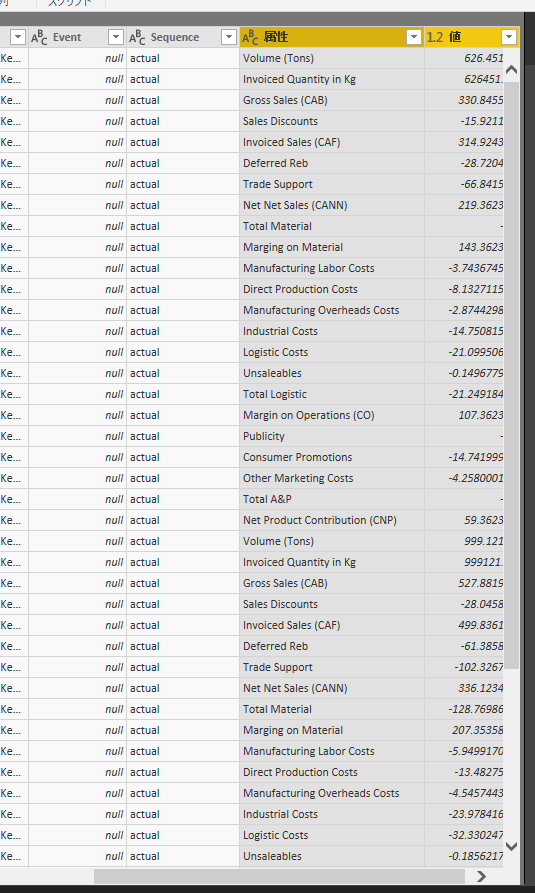
Perhaps, I need to unpivot the original dataset in query mode to have all values in one column like below screenshot.
If any of above is not clear, please let me know.
Your help is much appreicated.
Many thanks,
H
Hi @hidenseek9
Currently, i have unpivot the "volume and Net Sales" columns, the create a measure
Measure = CALCULATE(SUM(Sheet2[Value]),FILTER(Sheet2,[DATE].[MonthNo]>=1&&[DATE].[MonthNo]<=3))
I will update my reply nextday.
Best Regards
Maggie
Thank you Maggie.
I will wait for your response.
It will be great to do a variance analysis.
Thanks,
H
If you have recently started exploring Fabric, we'd love to hear how it's going. Your feedback can help with product improvements.
A new Power BI DataViz World Championship is coming this June! Don't miss out on submitting your entry.
Share feedback directly with Fabric product managers, participate in targeted research studies and influence the Fabric roadmap.
| User | Count |
|---|---|
| 50 | |
| 44 | |
| 41 | |
| 18 | |
| 18 |
| User | Count |
|---|---|
| 69 | |
| 68 | |
| 32 | |
| 32 | |
| 32 |