Get certified for free when you join Fabric Data Days 2026 and dive into Fabric, Power BI, SQL, AI, and other essential data skills.
Join nowData Days is here! Join us now for 60+ days of learning, challenges, and connection. Learn more
Hello Power BI Community,
I need a help with structuring a table and to do a variance analysis on product performance.
(PL tab specifically)
I would like the final table in PL tab to look like a table in below excel data.
I would like to be able to drill down in Power BI on column to get the detail of where the performance gap is coming from.
In the above dataset I have a lot of data, but I would like to focus on 2018 Jan - Mar on a brand called BIO.
I have several measures to calculate volume and Net Sales in CY (current year) and LY (Last year),
but beginning to think measures may not be the right way to approach this.
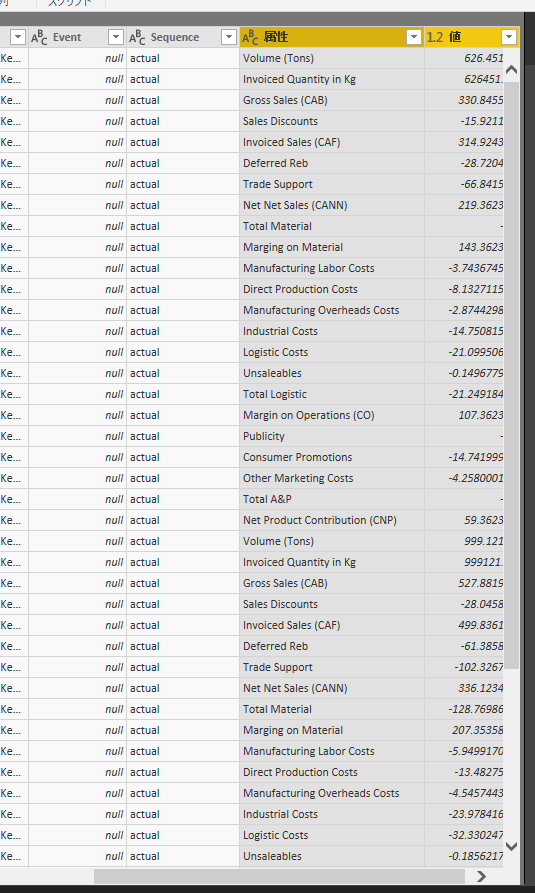
Perhaps, I need to unpivot the original dataset in query mode to have all values in one column like below screenshot.
If any of above is not clear, please let me know.
Your help is much appreicated.
Many thanks,
H
For the P&L drill-down layout with CY vs LY variance, the cleanest native approach is a Matrix with rows as your product hierarchy and columns as CY/LY measures. For the drill-through on variance column, you'd set up a separate detail page with cross-report drill-through.
One thing worth knowing: if brand managers need to explore different cuts of the data themselves (swap rows/columns, add DoD/MoM) without coming back to you, Flexa Tables (AppSource) handles this without rebuilding anything variance columns and period comparison are built-in, no DAX needed.
Hi @hidenseek9
Currently, i have unpivot the "volume and Net Sales" columns, the create a measure
Measure = CALCULATE(SUM(Sheet2[Value]),FILTER(Sheet2,[DATE].[MonthNo]>=1&&[DATE].[MonthNo]<=3))
I will update my reply nextday.
Best Regards
Maggie
Thank you Maggie.
I will wait for your response.
It will be great to do a variance analysis.
Thanks,
H
Don't miss out on Data Days, June 15 through August 7. Learn Fabric, Power BI, SQL, AI and more.
Check out the May 2026 Power BI update to learn about new features.
| User | Count |
|---|---|
| 23 | |
| 23 | |
| 21 | |
| 17 | |
| 14 |
| User | Count |
|---|---|
| 58 | |
| 50 | |
| 37 | |
| 29 | |
| 24 |