This time we’re going bigger than ever. Fabric, Power BI, SQL, AI and more. We're covering it all. You won't want to miss it.
Learn moreDid you hear? There's a new SQL AI Developer certification (DP-800). Start preparing now and be one of the first to get certified. Register now
Hi everyone,
It might be a bit stupid of a question, but is there a way to overwrite csv files in a lakehouse (using Pyspark notebook) without creation of additional folders/artifacts?
Right now when I use:
I can live with it, but it would be nice if it could just overwrite a file and leave it in the same destination.
Thank you in advance for any feedback.
Solved! Go to Solution.
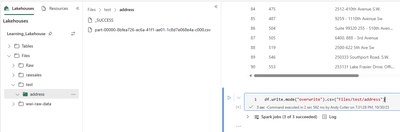
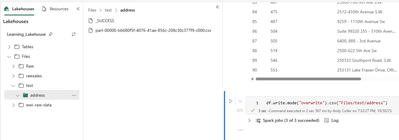
Hi @Ostrzak what is the value in "file_path"? If I specify a Files folder to save the CSV to, it replaces the current CSV with a new version - changing the CSV filename in the process. But the old one has been removed.
Hi @AndyDDC
Thank you for answering.
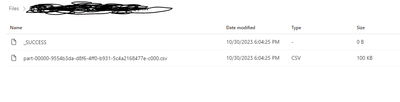
I had it saved directly to the lakehouse Files, without any subfolder. When I overwrite it, it lands in a subfolder that is named as the file before, while inside there are two entities:
- csv file with hashed name
- SUCCESS artifact
I see from your example that it works fine after it creates the aforementioned structure. That is useful knowledge. I guess I have to get accustomed to this structure, at the end of a day it is still human-readable.
Hi @Ostrzak ,
We haven’t heard from you on the last response and was just checking back to see if you have a resolution yet. Otherwise, will respond back with the more details and we will try to help .
Yes it's advisable to have sub-folders when writing, as there could be overwrite issues.
If my reply has been helpful please consider marking it as the solution.
Glad it's sorted now
Check out the April 2026 Fabric update to learn about new features.
Sign up to receive a private message when registration opens and key events begin.
| User | Count |
|---|---|
| 12 | |
| 11 | |
| 7 | |
| 5 | |
| 4 |
| User | Count |
|---|---|
| 24 | |
| 17 | |
| 10 | |
| 9 | |
| 6 |