Join us at FabCon Vienna from September 15-18, 2025
The ultimate Fabric, Power BI, SQL, and AI community-led learning event. Save €200 with code FABCOMM.
Get registered- Power BI forums
- Get Help with Power BI
- Desktop
- Service
- Report Server
- Power Query
- Mobile Apps
- Developer
- DAX Commands and Tips
- Custom Visuals Development Discussion
- Health and Life Sciences
- Power BI Spanish forums
- Translated Spanish Desktop
- Training and Consulting
- Instructor Led Training
- Dashboard in a Day for Women, by Women
- Galleries
- Data Stories Gallery
- Themes Gallery
- Contests Gallery
- Quick Measures Gallery
- Notebook Gallery
- Translytical Task Flow Gallery
- TMDL Gallery
- R Script Showcase
- Webinars and Video Gallery
- Ideas
- Custom Visuals Ideas (read-only)
- Issues
- Issues
- Events
- Upcoming Events
Compete to become Power BI Data Viz World Champion! First round ends August 18th. Get started.
- Power BI forums
- Forums
- Get Help with Power BI
- DAX Commands and Tips
- Re: showing zero instead of blank in pivot table o...
- Subscribe to RSS Feed
- Mark Topic as New
- Mark Topic as Read
- Float this Topic for Current User
- Bookmark
- Subscribe
- Printer Friendly Page


- Mark as New
- Bookmark
- Subscribe
- Mute
- Subscribe to RSS Feed
- Permalink
- Report Inappropriate Content
showing zero instead of blank in pivot table or bar chart
Hello All,
I have created the below pivot table :
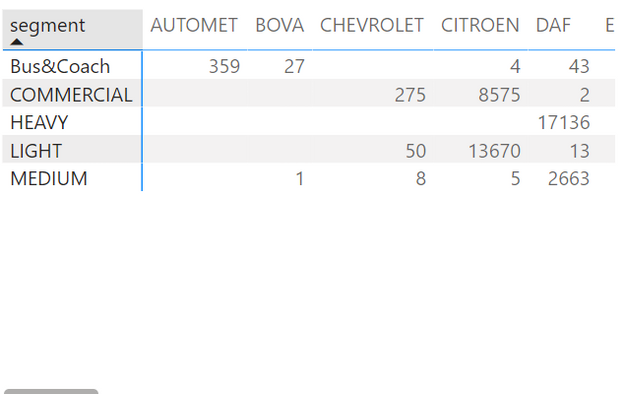
I need to replace the blank values by 0. The Segment column and the Brand column both come from the same Dim Table.
The mesure is a count of of a column in the fact table. Some of the brands don't have a relationship with all the segments.
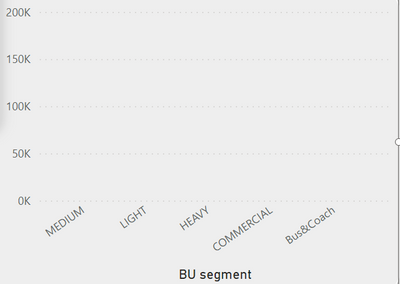
I need it to show as 0 because when I transform the pivot table in a bar chart, all the segment still need to show on the bar chart and not disapear when it is blank. For example, if I select Automet on a filter, then the bar chart will only show the bus&coach segment. Instead, I still need the bar chart to show me the other segment with no values like below:
I have tried IF(ISBLANK(count(column)), 0, count(column))
How could I fix it ?
Thanks
Solved! Go to Solution.


- Mark as New
- Bookmark
- Subscribe
- Mute
- Subscribe to RSS Feed
- Permalink
- Report Inappropriate Content
It works better when rows and columns are coming from separate dimension/table
Please provide sample data.


- Mark as New
- Bookmark
- Subscribe
- Mute
- Subscribe to RSS Feed
- Permalink
- Report Inappropriate Content
Previous posters already hinted at this, but if the "+ 0" doesn't work, then the issue is with your dimension table not containing the Segment/Brand combinations you want to show zeros for. This can't be solved with a dax measure.
So either make sure the dimension table contains these combinations or otherwise create an additional dimension table and link that to the fact.
- Mark as New
- Bookmark
- Subscribe
- Mute
- Subscribe to RSS Feed
- Permalink
- Report Inappropriate Content
@sjoerdvn thanks for the help. They do contain the combinations. I think I will just create a separte dimensions.
- Mark as New
- Bookmark
- Subscribe
- Mute
- Subscribe to RSS Feed
- Permalink
- Report Inappropriate Content
Did you try it inside your transformation table with the folowing DAX statement?
modified_column =
IF (
    LEN ( column[Name] ) = 0, 0,column[Name]
)
- Mark as New
- Bookmark
- Subscribe
- Mute
- Subscribe to RSS Feed
- Permalink
- Report Inappropriate Content
- Mark as New
- Bookmark
- Subscribe
- Mute
- Subscribe to RSS Feed
- Permalink
- Report Inappropriate Content
It works better when rows and columns are coming from separate dimension/table
Please provide sample data.
- Mark as New
- Bookmark
- Subscribe
- Mute
- Subscribe to RSS Feed
- Permalink
- Report Inappropriate Content
So fact table would be as below:
| Column(to count) | BrandID |
| aaa | 1 |
| bbbb | 2 |
| zzz | 3 |
| ee | 4 |
| rrz | 5 |
| ete | 6 |
| zr | 7 |
| er | 8 |
The dim table would be as below:
| segment | Brand | BrandID |
| Bus&Coach | VOLVO | 1 |
| COMMERCIAL | VOLVO | 2 |
| HEAVY | VOLVO | 3 |
| MEDIUM | VOLVO | 4 |
| Bus&Coach | VOLKSWAGEN | 5 |
| COMMERCIAL | VOLKSWAGEN | 6 |
| LIGHT | VOLKSWAGEN | 7 |
| Bus&Coach | VDL | 8 |
- Mark as New
- Bookmark
- Subscribe
- Mute
- Subscribe to RSS Feed
- Permalink
- Report Inappropriate Content
You can try this count(column)+0
- Mark as New
- Bookmark
- Subscribe
- Mute
- Subscribe to RSS Feed
- Permalink
- Report Inappropriate Content

Helpful resources

Power BI Monthly Update - July 2025
Check out the July 2025 Power BI update to learn about new features.

Fabric Community Update - August 2025
Find out what's new and trending in the Fabric community.

| User | Count |
|---|---|
| 25 | |
| 10 | |
| 8 | |
| 6 | |
| 6 |


| User | Count |
|---|---|
| 31 | |
| 12 | |
| 10 | |
| 10 | |
| 9 |


