cancel
Showing results for 
Search instead for 
Did you mean: 

The Power BI Data Visualization World Championships is back! Get ahead of the game and start preparing now! Learn more

Reply
Anonymous
Not applicable

formula to calculate % of column total for multiple hierarchies

Hello Everyone, 

I am trying to create a measure for market share (% of column total) to be used in a matrix. This is an example of my expected result - each hierarchy should be calculated against the column total in the specific region.
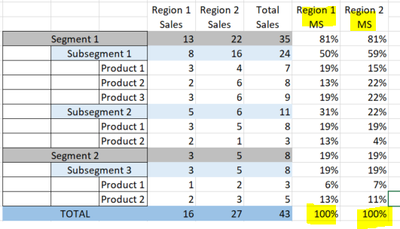
newbee08_0-1611260455197.png

All the formulas I have tried either calculate the % over grand total and not the region specific column total. My current formula only produces correct %s for the first 2 hierarcies (segment/subsegment). If anyone has worked with this before, I will appreciate any feedback. Thank you so much in advance. 

VAR currentsale = [Sales]
VAR productsales = CALCULATE([Sales], ALLSELECTED('Segment'))
VAR subsegmentsale = CALCULATE([Sales], ALLSELECTED('Segment'))
VAR segmentsale = CALCULATE([Sales], ALLSELECTED('Segment'[segment]))
VAR grandsale = CALCULATE([Sales])

VAR Result = IF(ISINSCOPE(Series[product]), DIVIDE(currentsale,modelsales),
IF(ISINSCOPE('Segment'[subsegment]), DIVIDE(currentsale,manufacturersale),
IF(ISINSCOPE('Segment'[Segment]),DIVIDE(currentsale,groupsale),
DIVIDE(currentsale, grandsale))))

RETURN
Result


1 ACCEPTED SOLUTION
amitchandak
Super User
Super User

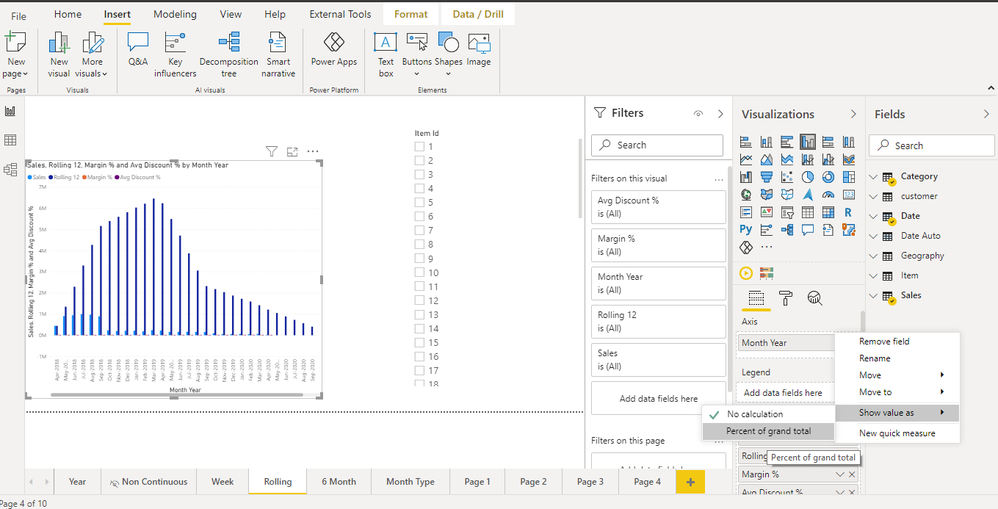
@Anonymous , You have the option of % of the total, So add the measure again and right on the measure on in visualization pane and use % of total

If region 1 is because of value (means row value in region) a measure like this

% of total = divide([measure] , calculate([measure],allexcept(Table, Table[region]))

if region 1 is  column

% of total region 1= divide([measure] , calculate([measure],allt(Table[region1]))

% of total region 2= divide([measure] , calculate([measure],allt(Table[region2]))

Also refer : https://www.youtube.com/watch?v=6jTildcV2ho


Percent of total.png

Share with Power BI Enthusiasts: Full Power BI Video (20 Hours) YouTube
Microsoft Fabric Series 60+ Videos YouTube
Microsoft Fabric Hindi End to End YouTube

View solution in original post

1 REPLY 1
amitchandak
Super User
Super User

@Anonymous , You have the option of % of the total, So add the measure again and right on the measure on in visualization pane and use % of total

If region 1 is because of value (means row value in region) a measure like this

% of total = divide([measure] , calculate([measure],allexcept(Table, Table[region]))

if region 1 is  column

% of total region 1= divide([measure] , calculate([measure],allt(Table[region1]))

% of total region 2= divide([measure] , calculate([measure],allt(Table[region2]))

Also refer : https://www.youtube.com/watch?v=6jTildcV2ho


Percent of total.png

Share with Power BI Enthusiasts: Full Power BI Video (20 Hours) YouTube
Microsoft Fabric Series 60+ Videos YouTube
Microsoft Fabric Hindi End to End YouTube

Helpful resources

Announcements
Power BI DataViz World Championships

Power BI Dataviz World Championships

The Power BI Data Visualization World Championships is back! Get ahead of the game and start preparing now!

December 2025 Power BI Update Carousel

Power BI Monthly Update - December 2025

Check out the December 2025 Power BI Holiday Recap!

FabCon Atlanta 2026 carousel

FabCon Atlanta 2026

Join us at FabCon Atlanta, March 16-20, for the ultimate Fabric, Power BI, AI and SQL community-led event. Save $200 with code FABCOMM.