cancel
Showing results for 
Search instead for 
Did you mean: 

The Power BI Data Visualization World Championships is back! Get ahead of the game and start preparing now! Learn more

Reply
Anonymous
Not applicable

formula to calculate % of column total for multiple hierarchies

Hello Everyone, 

I am trying to create a measure for market share (% of column total) to be used in a matrix. This is an example of my expected result - each hierarchy should be calculated against the column total in the specific region.
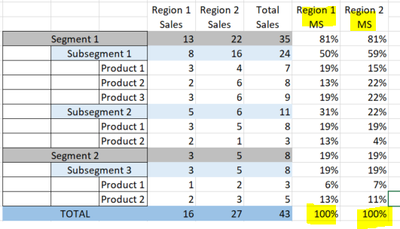
newbee08_0-1611260455197.png

All the formulas I have tried either calculate the % over grand total and not the region specific column total. My current formula only produces correct %s for the first 2 hierarcies (segment/subsegment). If anyone has worked with this before, I will appreciate any feedback. Thank you so much in advance. 

VAR currentsale = [Sales]
VAR productsales = CALCULATE([Sales], ALLSELECTED('Segment'))
VAR subsegmentsale = CALCULATE([Sales], ALLSELECTED('Segment'))
VAR segmentsale = CALCULATE([Sales], ALLSELECTED('Segment'[segment]))
VAR grandsale = CALCULATE([Sales])

VAR Result = IF(ISINSCOPE(Series[product]), DIVIDE(currentsale,modelsales),
IF(ISINSCOPE('Segment'[subsegment]), DIVIDE(currentsale,manufacturersale),
IF(ISINSCOPE('Segment'[Segment]),DIVIDE(currentsale,groupsale),
DIVIDE(currentsale, grandsale))))

RETURN
Result


1 ACCEPTED SOLUTION
amitchandak
Super User
Super User

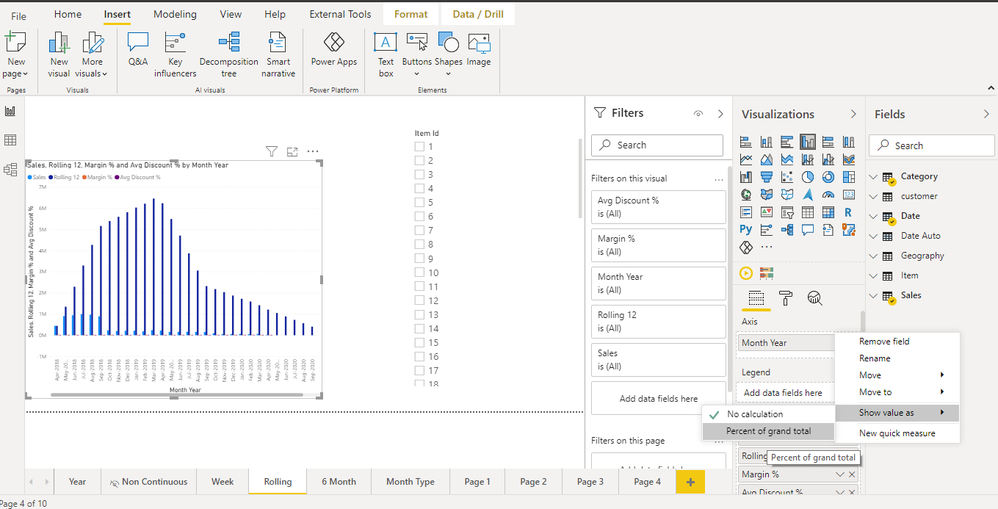
@Anonymous , You have the option of % of the total, So add the measure again and right on the measure on in visualization pane and use % of total

If region 1 is because of value (means row value in region) a measure like this

% of total = divide([measure] , calculate([measure],allexcept(Table, Table[region]))

if region 1 is  column

% of total region 1= divide([measure] , calculate([measure],allt(Table[region1]))

% of total region 2= divide([measure] , calculate([measure],allt(Table[region2]))

Also refer : https://www.youtube.com/watch?v=6jTildcV2ho


Percent of total.png

Share with Power BI Enthusiasts: Full Power BI Video (20 Hours) YouTube
Microsoft Fabric Series 60+ Videos YouTube
Microsoft Fabric Hindi End to End YouTube

View solution in original post

1 REPLY 1
amitchandak
Super User
Super User

@Anonymous , You have the option of % of the total, So add the measure again and right on the measure on in visualization pane and use % of total

If region 1 is because of value (means row value in region) a measure like this

% of total = divide([measure] , calculate([measure],allexcept(Table, Table[region]))

if region 1 is  column

% of total region 1= divide([measure] , calculate([measure],allt(Table[region1]))

% of total region 2= divide([measure] , calculate([measure],allt(Table[region2]))

Also refer : https://www.youtube.com/watch?v=6jTildcV2ho


Percent of total.png

Share with Power BI Enthusiasts: Full Power BI Video (20 Hours) YouTube
Microsoft Fabric Series 60+ Videos YouTube
Microsoft Fabric Hindi End to End YouTube

Helpful resources

Announcements
November Power BI Update Carousel

Power BI Monthly Update - November 2025

Check out the November 2025 Power BI update to learn about new features.

Fabric Data Days Carousel

Fabric Data Days

Advance your Data & AI career with 50 days of live learning, contests, hands-on challenges, study groups & certifications and more!

FabCon Atlanta 2026 carousel

FabCon Atlanta 2026

Join us at FabCon Atlanta, March 16-20, for the ultimate Fabric, Power BI, AI and SQL community-led event. Save $200 with code FABCOMM.