Join us at FabCon Atlanta from March 16 - 20, 2026, for the ultimate Fabric, Power BI, AI and SQL community-led event. Save $200 with code FABCOMM.
Register now!The Power BI Data Visualization World Championships is back! Get ahead of the game and start preparing now! Learn more
Hi
I want to calculate the number of HH:MM between 2 columns - both have the same reference however the inbound has 1 and outbound has 0 and same reg too.
e.g.
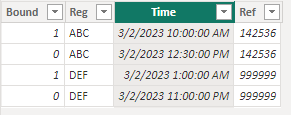
Bound Reg Time Ref
1 ABC 03/02/2023 10:00 142536
0 ABC 03/02/2023 12:30 142536
The difference for reg: ABC or Ref 142536 should be 02:30 (HH:MM)
Thanks.
Solved! Go to Solution.
hi @AI14
Not sure if i fully get you, supposing your data is like:
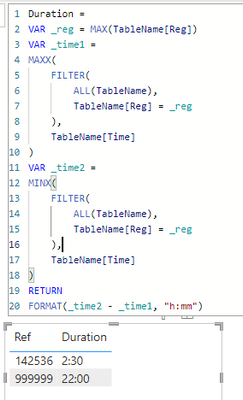
you can plot a table with the ref column and a measure like:
Duration =
VAR _reg = MAX(TableName[Reg])
VAR _time1 =
MAXX(
FILTER(
ALL(TableName),
TableName[Reg] = _reg
),
TableName[Time]
)
VAR _time2 =
MINX(
FILTER(
ALL(TableName),
TableName[Reg] = _reg
),
TableName[Time]
)
RETURN
FORMAT(_time2 - _time1, "h:mm")
it worked like:
hi @AI14
Not sure if i fully get you, supposing your data is like:
you can plot a table with the ref column and a measure like:
Duration =
VAR _reg = MAX(TableName[Reg])
VAR _time1 =
MAXX(
FILTER(
ALL(TableName),
TableName[Reg] = _reg
),
TableName[Time]
)
VAR _time2 =
MINX(
FILTER(
ALL(TableName),
TableName[Reg] = _reg
),
TableName[Time]
)
RETURN
FORMAT(_time2 - _time1, "h:mm")
it worked like:
Thank you it worked!
Hi @AI14
Where are you planning to show the result? Are you looking for a measure?
|
|
Please accept the solution when done and consider giving a thumbs up if posts are helpful. Contact me privately for support with any larger-scale BI needs, tutoring, etc. |
to show on a table and a chart
The Power BI Data Visualization World Championships is back! Get ahead of the game and start preparing now!
Check out the November 2025 Power BI update to learn about new features.
| User | Count |
|---|---|
| 20 | |
| 10 | |
| 9 | |
| 4 | |
| 4 |
| User | Count |
|---|---|
| 34 | |
| 31 | |
| 20 | |
| 12 | |
| 11 |