This is best Fabric, Power BI, SQL and AI community event. How do we know? The last event sold out! Save €200 with code FABCMTY200.
Register nowA new Data Days event is coming soon! This time we’re going bigger than ever. Fabric, Power BI, SQL, AI and more. Don't miss out.
Hi,
I tried the following dax which works using calculate, hwow to simply by using only If statement using IN operator
aps=CALCULATE(If(countrows(Pop)>0,"Yes","No"),Pop[city] IN {"Arizona","Arkansas","California","Colorado"})
I need something like below:
If(Pop[city] IN {"Arizona","Arkansas","California","Colorado"},"Yes","No")
I tried this way but column(Pop[city]) is not showing in DAX editor.
Solved! Go to Solution.
Hi @Anonymous ,
Create a Measure.
Measure = IF ( MAX(Pop[city])) IN { "Arizona","Arkansas","California","Colorado"},"Yes","No")
Incase you want to create a Calculated Column
Column = IF (Pop[city] IN { "Arizona","Arkansas","California","Colorado"},"Yes","No")
Regards,
Harsh Nathani
Did I answer your question? Mark my post as a solution! Appreciate with a Kudos!! (Click the Thumbs Up Button)
Hi @Anonymous ,
Create a Measure.
Measure = IF ( MAX(Pop[city])) IN { "Arizona","Arkansas","California","Colorado"},"Yes","No")
Incase you want to create a Calculated Column
Column = IF (Pop[city] IN { "Arizona","Arkansas","California","Colorado"},"Yes","No")
Regards,
Harsh Nathani
Did I answer your question? Mark my post as a solution! Appreciate with a Kudos!! (Click the Thumbs Up Button)
Thanks for the fast response.
Measure = IF ( MAX(Pop[city]) IN { "Arizona","Arkansas","California","Colorado"},"Yes","No")
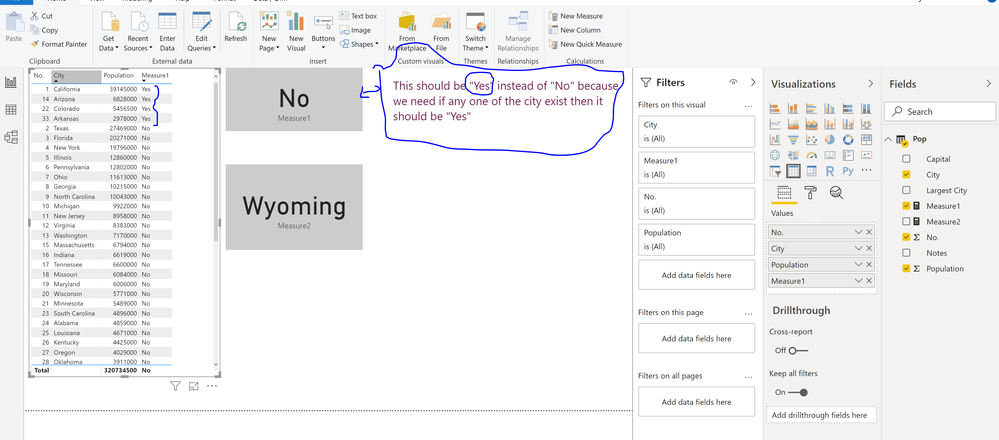
This measure works fine as long as in in table which i need to display on table.
I just test this one on "Card" visualization which gives "No". Out of 50 cities, i am checking only 4 cities. The last city in the column is "Wyoming".
When is used to test : Measure2 = max(Pop[city]) Then "card" Visualization is display Last city "Wyoming".
My concern is as long as there is city value exist then display "Yes" either on the table or on the card.
Thanks.
Hi @Anonymous ,
Can you share sample data, your data model and your expected output to help you on this.
Regards,
Harsh Nathani
Did I answer your question? Mark my post as a solution! Appreciate with a Kudos!! (Click the Thumbs Up Button)
Hi Harshnathani,
Measure1 = IF ( MAX(Pop[city]) IN { "Arizona","Arkansas","California","Colorado"},"Yes","No")
| No. | City | Population | Measure1 |
| 24 | Alabama | 4859000 | No |
| 48 | Alaska | 738400 | No |
| 14 | Arizona | 6828000 | Yes |
| 33 | Arkansas | 2978000 | Yes |
| 1 | California | 39145000 | Yes |
| 22 | Colorado | 5456500 | Yes |
| 29 | Connecticut | 3590000 | No |
| 45 | Delaware | 946000 | No |
| 3 | Florida | 20271000 | No |
| 8 | Georgia | 10215000 | No |
| 40 | Hawaii | 1431000 | No |
| 39 | Idaho | 1655000 | No |
| 5 | Illinois | 12860000 | No |
| 16 | Indiana | 6619000 | No |
| 30 | Iowa | 3124000 | No |
| 34 | Kansas | 2911000 | No |
| 26 | Kentucky | 4425000 | No |
| 25 | Louisiana | 4671000 | No |
| 42 | Maine | 1329000 | No |
| 19 | Maryland | 6006000 | No |
| 15 | Massachusetts | 6794000 | No |
| 10 | Michigan | 9922000 | No |
| 21 | Minnesota | 5489000 | No |
| 32 | Mississippi | 2992000 | No |
| 18 | Missouri | 6084000 | No |
| 44 | Montana | 1031000 | No |
| 37 | Nebraska | 1896000 | No |
| 35 | Nevada | 2891000 | No |
| 41 | New Hampshire | 1330000 | No |
| 11 | New Jersey | 8958000 | No |
| 36 | New Mexico | 2085000 | No |
| 4 | New York | 19796000 | No |
| 9 | North Carolina | 10043000 | No |
| 47 | North Dakota | 757000 | No |
| 7 | Ohio | 11613000 | No |
| 28 | Oklahoma | 3911000 | No |
| 27 | Oregon | 4029000 | No |
| 6 | Pennsylvania | 12802000 | No |
| 43 | Rhode Island | 1056000 | No |
| 23 | South Carolina | 4896000 | No |
| 46 | South Dakota | 858500 | No |
| 17 | Tennessee | 6600000 | No |
| 2 | Texas | 27469000 | No |
| 31 | Utah | 2996000 | No |
| 49 | Vermont | 624600 | No |
| 12 | Virginia | 8383000 | No |
| 13 | Washington | 7170000 | No |
| 38 | West Virginia | 1844000 | No |
| 20 | Wisconsin | 5771000 | No |
| 50 | Wyoming | 585500 | No |
Check out the May 2026 Power BI update to learn about new features.
Sign up to receive a private message when registration opens and key events begin.
If you have recently started exploring Fabric, we'd love to hear how it's going. Your feedback can help with product improvements.
| User | Count |
|---|---|
| 5 | |
| 4 | |
| 3 | |
| 3 | |
| 2 |
| User | Count |
|---|---|
| 9 | |
| 7 | |
| 6 | |
| 6 | |
| 5 |