Don't miss your chance to take the Fabric Data Engineer (DP-600) exam for FREE! Find out how by attending the DP-600 session on April 23rd (pacific time), live or on-demand.
Learn moreNext up in the FabCon + SQLCon recap series: The roadmap for Microsoft SQL and Maximizing Developer experiences in Fabric. All sessions are available on-demand after the live show. Register now
Hi,
I tried the following dax which works using calculate, hwow to simply by using only If statement using IN operator
aps=CALCULATE(If(countrows(Pop)>0,"Yes","No"),Pop[city] IN {"Arizona","Arkansas","California","Colorado"})
I need something like below:
If(Pop[city] IN {"Arizona","Arkansas","California","Colorado"},"Yes","No")
I tried this way but column(Pop[city]) is not showing in DAX editor.
Solved! Go to Solution.
Hi @Anonymous ,
Create a Measure.
Measure = IF ( MAX(Pop[city])) IN { "Arizona","Arkansas","California","Colorado"},"Yes","No")
Incase you want to create a Calculated Column
Column = IF (Pop[city] IN { "Arizona","Arkansas","California","Colorado"},"Yes","No")
Regards,
Harsh Nathani
Did I answer your question? Mark my post as a solution! Appreciate with a Kudos!! (Click the Thumbs Up Button)
Hi @Anonymous ,
Create a Measure.
Measure = IF ( MAX(Pop[city])) IN { "Arizona","Arkansas","California","Colorado"},"Yes","No")
Incase you want to create a Calculated Column
Column = IF (Pop[city] IN { "Arizona","Arkansas","California","Colorado"},"Yes","No")
Regards,
Harsh Nathani
Did I answer your question? Mark my post as a solution! Appreciate with a Kudos!! (Click the Thumbs Up Button)
Thanks for the fast response.
Measure = IF ( MAX(Pop[city]) IN { "Arizona","Arkansas","California","Colorado"},"Yes","No")
This measure works fine as long as in in table which i need to display on table.
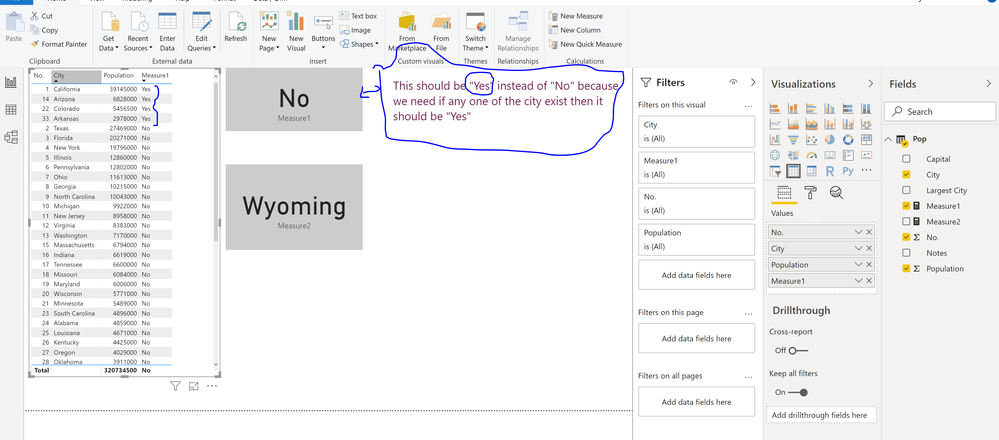
I just test this one on "Card" visualization which gives "No". Out of 50 cities, i am checking only 4 cities. The last city in the column is "Wyoming".
When is used to test : Measure2 = max(Pop[city]) Then "card" Visualization is display Last city "Wyoming".
My concern is as long as there is city value exist then display "Yes" either on the table or on the card.
Thanks.
Hi @Anonymous ,
Can you share sample data, your data model and your expected output to help you on this.
Regards,
Harsh Nathani
Did I answer your question? Mark my post as a solution! Appreciate with a Kudos!! (Click the Thumbs Up Button)
Hi Harshnathani,
Measure1 = IF ( MAX(Pop[city]) IN { "Arizona","Arkansas","California","Colorado"},"Yes","No")
| No. | City | Population | Measure1 |
| 24 | Alabama | 4859000 | No |
| 48 | Alaska | 738400 | No |
| 14 | Arizona | 6828000 | Yes |
| 33 | Arkansas | 2978000 | Yes |
| 1 | California | 39145000 | Yes |
| 22 | Colorado | 5456500 | Yes |
| 29 | Connecticut | 3590000 | No |
| 45 | Delaware | 946000 | No |
| 3 | Florida | 20271000 | No |
| 8 | Georgia | 10215000 | No |
| 40 | Hawaii | 1431000 | No |
| 39 | Idaho | 1655000 | No |
| 5 | Illinois | 12860000 | No |
| 16 | Indiana | 6619000 | No |
| 30 | Iowa | 3124000 | No |
| 34 | Kansas | 2911000 | No |
| 26 | Kentucky | 4425000 | No |
| 25 | Louisiana | 4671000 | No |
| 42 | Maine | 1329000 | No |
| 19 | Maryland | 6006000 | No |
| 15 | Massachusetts | 6794000 | No |
| 10 | Michigan | 9922000 | No |
| 21 | Minnesota | 5489000 | No |
| 32 | Mississippi | 2992000 | No |
| 18 | Missouri | 6084000 | No |
| 44 | Montana | 1031000 | No |
| 37 | Nebraska | 1896000 | No |
| 35 | Nevada | 2891000 | No |
| 41 | New Hampshire | 1330000 | No |
| 11 | New Jersey | 8958000 | No |
| 36 | New Mexico | 2085000 | No |
| 4 | New York | 19796000 | No |
| 9 | North Carolina | 10043000 | No |
| 47 | North Dakota | 757000 | No |
| 7 | Ohio | 11613000 | No |
| 28 | Oklahoma | 3911000 | No |
| 27 | Oregon | 4029000 | No |
| 6 | Pennsylvania | 12802000 | No |
| 43 | Rhode Island | 1056000 | No |
| 23 | South Carolina | 4896000 | No |
| 46 | South Dakota | 858500 | No |
| 17 | Tennessee | 6600000 | No |
| 2 | Texas | 27469000 | No |
| 31 | Utah | 2996000 | No |
| 49 | Vermont | 624600 | No |
| 12 | Virginia | 8383000 | No |
| 13 | Washington | 7170000 | No |
| 38 | West Virginia | 1844000 | No |
| 20 | Wisconsin | 5771000 | No |
| 50 | Wyoming | 585500 | No |
If you have recently started exploring Fabric, we'd love to hear how it's going. Your feedback can help with product improvements.
A new Power BI DataViz World Championship is coming this June! Don't miss out on submitting your entry.
Experience the highlights from FabCon & SQLCon, available live and on-demand starting April 14th.
| User | Count |
|---|---|
| 6 | |
| 6 | |
| 3 | |
| 2 | |
| 2 |
| User | Count |
|---|---|
| 22 | |
| 10 | |
| 10 | |
| 6 | |
| 5 |