This time we’re going bigger than ever. Fabric, Power BI, SQL, AI and more. We're covering it all. You won't want to miss it.
Learn moreLevel up your Power BI skills this month - build one visual each week and tell better stories with data! Get started
I am having a hard time to get a expected output on a calculated column, i know how to get it through sql though using window function(lag). Here is the sql command:
select
(select lag(input_priority) over (partition by task_id order by task_id, request_datetime) as prv_input_priority
, input_priority
, convert(date, request_datetime) as dateField
from task_log
This will sort the data first on 'Task id' and then on 'request_datetime', after which will print the previous value of 'input_priority'.
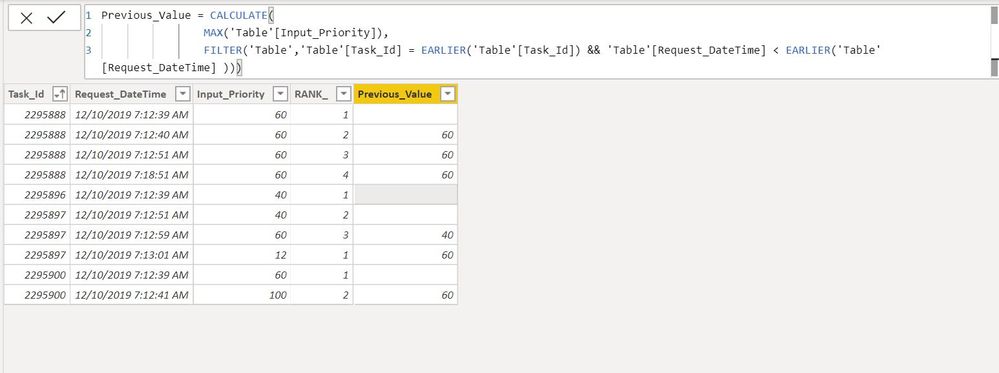
On DAX i'm trying Earlier(), but having a very hard time to get the expected output.
Solved! Go to Solution.
HI @Anmol ,
Let me know if this works for you.
Create Calculated Columns
Regards,
Harsh Nathani
Did I answer your question? Mark my post as a solution! Appreciate with a Kudos!! (Click the Thumbs Up Button)
Hi @Anmol
Can you show a sample of the table you are using and explain with an example based on that data/table what you would need?
Please mark the question solved when done and consider giving kudos if posts are helpful.
Contact me privately for support with any larger-scale BI needs, tutoring, etc.
Cheers
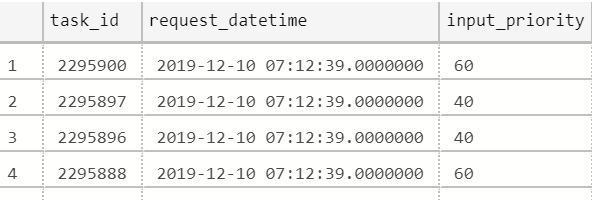
That's how the data looks like, im just looking for a calculated column that gives previous 'input_priority' only after sorting the data on 'task_id' and 'request_datetime'.
HI @Anmol ,
Let me know if this works for you.
Create Calculated Columns
Regards,
Harsh Nathani
Did I answer your question? Mark my post as a solution! Appreciate with a Kudos!! (Click the Thumbs Up Button)
Check out the April 2026 Power BI update to learn about new features.
Sign up to receive a private message when registration opens and key events begin.
If you have recently started exploring Fabric, we'd love to hear how it's going. Your feedback can help with product improvements.
| User | Count |
|---|---|
| 4 | |
| 3 | |
| 3 | |
| 2 | |
| 2 |
| User | Count |
|---|---|
| 7 | |
| 6 | |
| 6 | |
| 5 | |
| 4 |