cancel
Showing results for 
Search instead for 
Did you mean: 

The Power BI Data Visualization World Championships is back! Get ahead of the game and start preparing now! Learn more

Reply
Anmol
Frequent Visitor

Using Earlier() command for lag

I am having a hard time to get a expected output on a calculated column, i know how to get it through sql though using window function(lag). Here is the sql command:


select 

 (select lag(input_priority) over (partition by task_id order by task_id, request_datetime) as prv_input_priority

, input_priority

, convert(date, request_datetime) as dateField 

from task_log 


This will sort the data first on 'Task id' and then on 'request_datetime', after which will print the previous value of 'input_priority'.


On DAX i'm trying Earlier(), but having a very hard time to get the expected output.


1 ACCEPTED SOLUTION

HI @Anmol ,


Let me know  if this works for you.


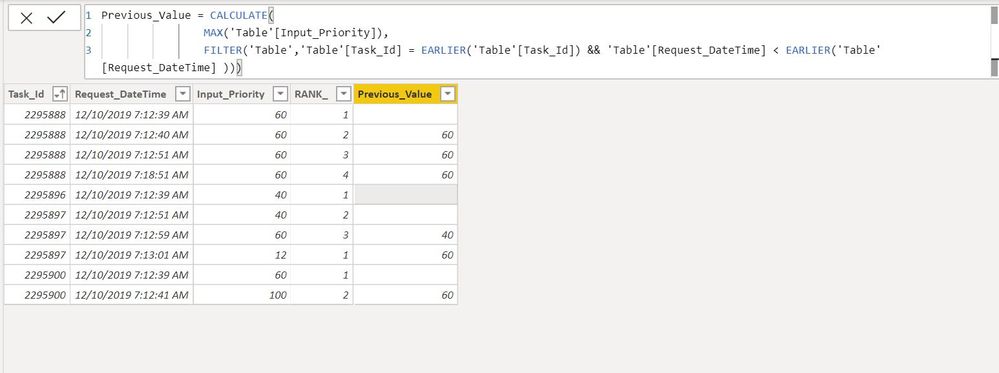
1.jpg


Create Calculated Columns


Previous_Value = CALCULATE(
MAX('Table'[Input_Priority]),
FILTER('Table','Table'[Task_Id] = EARLIER('Table'[Task_Id]) && 'Table'[Request_DateTime] < EARLIER('Table'[Request_DateTime] )))
 
 
RANK_ = RANKX(
FILTER('Table',
'Table'[Task_Id] = EARLIER('Table'[Task_Id])
),
'Table'[Request_DateTime] 
,,ASC,Dense)
 

Regards,
Harsh Nathani

Did I answer your question? Mark my post as a solution! Appreciate with a Kudos!! (Click the Thumbs Up Button)


View solution in original post

3 REPLIES 3
AlB
Community Champion
Community Champion

Hi @Anmol 

Can you show a sample of the table you are using and explain with an example based on that data/table what you would need?

Please mark the question solved when done and consider giving kudos if posts are helpful.

Contact me privately for support with any larger-scale BI needs, tutoring, etc.

Cheers 

SU18_powerbi_badge

Anmol
Frequent Visitor

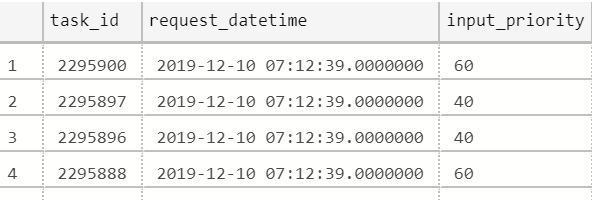
log.PNG

That's how the data looks like, im just looking for a calculated column that gives previous 'input_priority' only after sorting the data on 'task_id' and 'request_datetime'.

HI @Anmol ,


Let me know  if this works for you.


1.jpg


Create Calculated Columns


Previous_Value = CALCULATE(
MAX('Table'[Input_Priority]),
FILTER('Table','Table'[Task_Id] = EARLIER('Table'[Task_Id]) && 'Table'[Request_DateTime] < EARLIER('Table'[Request_DateTime] )))
 
 
RANK_ = RANKX(
FILTER('Table',
'Table'[Task_Id] = EARLIER('Table'[Task_Id])
),
'Table'[Request_DateTime] 
,,ASC,Dense)
 

Regards,
Harsh Nathani

Did I answer your question? Mark my post as a solution! Appreciate with a Kudos!! (Click the Thumbs Up Button)


Helpful resources

Announcements
Power BI DataViz World Championships

Power BI Dataviz World Championships

The Power BI Data Visualization World Championships is back! Get ahead of the game and start preparing now!

December 2025 Power BI Update Carousel

Power BI Monthly Update - December 2025

Check out the December 2025 Power BI Holiday Recap!

FabCon Atlanta 2026 carousel

FabCon Atlanta 2026

Join us at FabCon Atlanta, March 16-20, for the ultimate Fabric, Power BI, AI and SQL community-led event. Save $200 with code FABCOMM.