Advance your Data & AI career with 50 days of live learning, dataviz contests, hands-on challenges, study groups & certifications and more!
Get registeredGet Fabric Certified for FREE during Fabric Data Days. Don't miss your chance! Request now
| Material | RM Category | Cost | % of Cost |
| SKU1 | Fuel | 1000 | 38% |
| Gas | 250 | 9% | |
| Transport | 500 | 19% | |
| Direct | 700 | 26% | |
| Indirect | 200 | 8% | |
| Total Cost | 2650 | 100% | |
| SKU2 | Fuel | 750 | 25% |
| Gas | 850 | 28% | |
| Transport | 900 | 30% | |
| Direct | 200 | 7% | |
| Indirect | 300 | 10% | |
| Total Cost | 3000 | 100% |
Hello Guys : Can you pls provide some guidance to do this % of Cost Column (4) which is the total within product and category of that product ?
Solved! Go to Solution.
@Aravind_Kumar , Try a measure like
divide(Sum(Table[Cost]),calculate(Sum(Table[Cost]), allexcept(Table, Table[SKU])))
or
divide(Sum(Table[Cost]),calculate(Sum(Table[Cost]), filter(allselected(Table), Table[SKU] = max(Table[SKU]))))
Hi @Aravind_Kumar ,
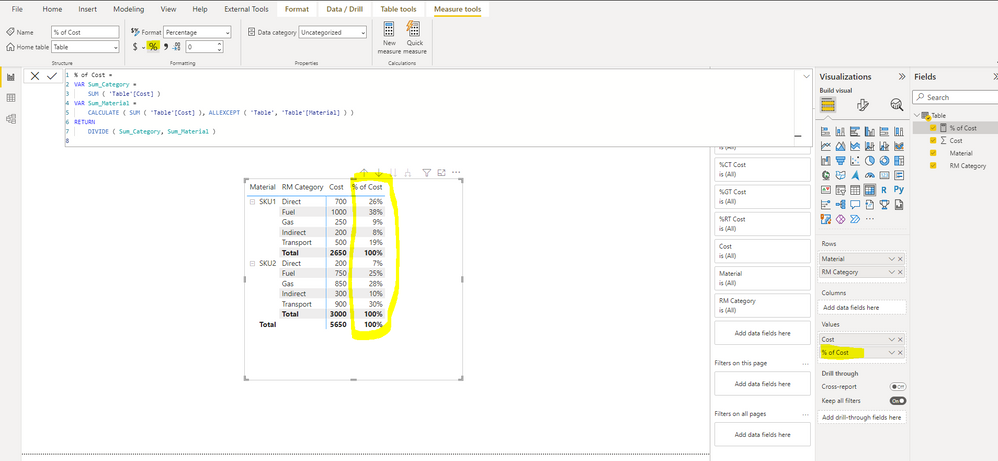
You can try what @amitchandak mentioned, it will give you the expected result. And here is the test result:
Best Regards,
Icey
If this post helps, then please consider Accept it as the solution to help the other members find it more quickly.
@Aravind_Kumar , Try a measure like
divide(Sum(Table[Cost]),calculate(Sum(Table[Cost]), allexcept(Table, Table[SKU])))
or
divide(Sum(Table[Cost]),calculate(Sum(Table[Cost]), filter(allselected(Table), Table[SKU] = max(Table[SKU]))))
| User | Count |
|---|---|
| 6 | |
| 6 | |
| 4 | |
| 4 | |
| 4 |
| User | Count |
|---|---|
| 24 | |
| 17 | |
| 10 | |
| 7 | |
| 6 |