FabCon is coming to Atlanta
Join us at FabCon Atlanta from March 16 - 20, 2026, for the ultimate Fabric, Power BI, AI and SQL community-led event. Save $200 with code FABCOMM.
Register now!- Power BI forums
- Get Help with Power BI
- Desktop
- Service
- Report Server
- Power Query
- Mobile Apps
- Developer
- DAX Commands and Tips
- Custom Visuals Development Discussion
- Health and Life Sciences
- Power BI Spanish forums
- Translated Spanish Desktop
- Training and Consulting
- Instructor Led Training
- Dashboard in a Day for Women, by Women
- Galleries
- Data Stories Gallery
- Themes Gallery
- Contests Gallery
- QuickViz Gallery
- Quick Measures Gallery
- Visual Calculations Gallery
- Notebook Gallery
- Translytical Task Flow Gallery
- TMDL Gallery
- R Script Showcase
- Webinars and Video Gallery
- Ideas
- Custom Visuals Ideas (read-only)
- Issues
- Issues
- Events
- Upcoming Events
The Power BI Data Visualization World Championships is back! Get ahead of the game and start preparing now! Learn more
- Power BI forums
- Forums
- Get Help with Power BI
- DAX Commands and Tips
- Re: The expression specified in the query is not a...
- Subscribe to RSS Feed
- Mark Topic as New
- Mark Topic as Read
- Float this Topic for Current User
- Bookmark
- Subscribe
- Printer Friendly Page

- Mark as New
- Bookmark
- Subscribe
- Mute
- Subscribe to RSS Feed
- Permalink
- Report Inappropriate Content
The expression specified in the query is not a valid table expression
Hi, please I am using table variable and when i call the table name "evaluate tbl "with evaluate it works but when I use it in the context of countrows it returns the error above
*
DEFINE
VAR fsumX =
SUMMARIZE(CHA,[Employee],[YearNo],[Organisation],[MonthNamed],
"CallTimeDuration",SUM(CHA[CallTimeDuration])
)
VAR tbl =
FILTER(
fsumX,
[AvgDBanding] = "Less Than 60 Min(s)" && CHA,[Organisation] = "b" && CHA,[MonthNamed] ="November"
)
EVALUATE
COUNTROWS(tbl)
//tbl
*
I saw a similar solution that works with countrows (https://social.msdn.microsoft.com/Forums/sqlserver/en-US/42325576-064d-4fbf-bc1c-12fbd6c89728/dax-co...) but i could not get the quey for mine.
I will appreciate a guide on this
Thanks
Solved! Go to Solution.
- Mark as New
- Bookmark
- Subscribe
- Mute
- Subscribe to RSS Feed
- Permalink
- Report Inappropriate Content
Sorry, I thought your problem was in PBI.
In Dax Studio you need to use the following to check the result of a measure:
return
ROW("Result:", COUNTROWS(tbl))
- Mark as New
- Bookmark
- Subscribe
- Mute
- Subscribe to RSS Feed
- Permalink
- Report Inappropriate Content
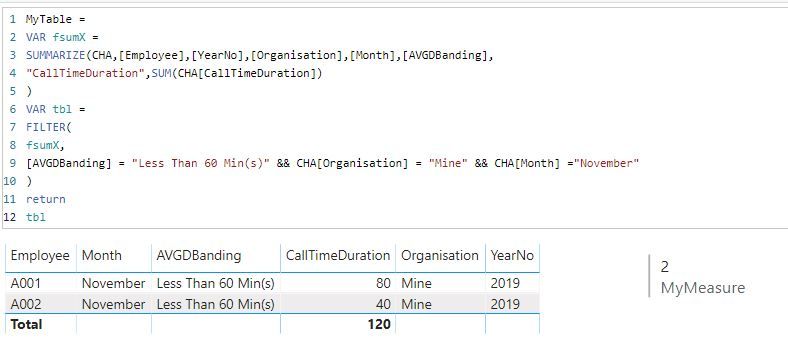
Hi,
When I try to run the code I get an error on [AvgDBanding] does not exist.
When you add [AvgDBanding] to the FsumX / Summarize function then it will probably work.
It does work for me either as a calculated table or as a measure (with countrows, of course), but I tested it with a very simple test set.
Regards,
- Mark as New
- Bookmark
- Subscribe
- Mute
- Subscribe to RSS Feed
- Permalink
- Report Inappropriate Content
Thanks for the response, the return works well for me as well, but the "countrows" function on the tbl does not work, I was using the code in dax studio and it was throwing the error, but when I executed the code (countrows)in on power bi it worked, so I am guessing am missing something
- Mark as New
- Bookmark
- Subscribe
- Mute
- Subscribe to RSS Feed
- Permalink
- Report Inappropriate Content
Sorry, I thought your problem was in PBI.
In Dax Studio you need to use the following to check the result of a measure:
return
ROW("Result:", COUNTROWS(tbl))


- Mark as New
- Bookmark
- Subscribe
- Mute
- Subscribe to RSS Feed
- Permalink
- Report Inappropriate Content
Thanks - this solution definitely worked!
- Mark as New
- Bookmark
- Subscribe
- Mute
- Subscribe to RSS Feed
- Permalink
- Report Inappropriate Content
@Anonymous Thanks for the solution, I had a look at the help of dax studio for "row" context but could not find it , can you send me on a link where i can see more on it.
- Mark as New
- Bookmark
- Subscribe
- Mute
- Subscribe to RSS Feed
- Permalink
- Report Inappropriate Content
@Anonymous
There is not too much explanation in the documentation, but it is a starting point: https://docs.microsoft.com/en-us/dax/row-function-dax
Hope this helps.
- Mark as New
- Bookmark
- Subscribe
- Mute
- Subscribe to RSS Feed
- Permalink
- Report Inappropriate Content
@Anonymous Thanks
Helpful resources

Power BI Dataviz World Championships
The Power BI Data Visualization World Championships is back! Get ahead of the game and start preparing now!

Power BI Monthly Update - November 2025
Check out the November 2025 Power BI update to learn about new features.

FabCon Atlanta 2026
Join us at FabCon Atlanta, March 16-20, for the ultimate Fabric, Power BI, AI and SQL community-led event. Save $200 with code FABCOMM.

| User | Count |
|---|---|
| 20 | |
| 11 | |
| 10 | |
| 4 | |
| 4 |


| User | Count |
|---|---|
| 33 | |
| 30 | |
| 19 | |
| 12 | |
| 11 |


