
cancel
Showing results for 
Search instead for 
Did you mean: 

July 7 - July 17 | Round 2 of the Power BI Dataviz World Championships. Don't miss your chance! Learn more

Reply
BA11501Banderso
Frequent Visitor

Table Filtering

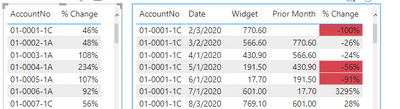
I have a table with a long list of accounts and changes in those accounts from the prior month.  I have a second table I'd like to have show the monthly totals for the past two years for the account clicked on in the first table.  The problem I am having is when I click on the account in the first table, I'm only able to see the one month referenced in the first table in the second.  The point of the first table is to highlight outliers.  The point of the second table is to see how big of an issue it is in relation to the previous months.

BA11501Banderso_1-1644524674447.png


BA11501Banderso_0-1644524637935.png


1 ACCEPTED SOLUTION
Whitewater100
Solution Sage
Solution Sage

Hi:

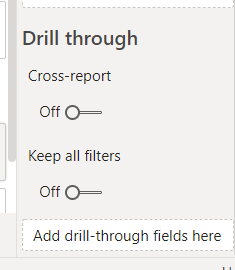
This would be a nice one to do dril-through on. If you build your second detailed table with all the coulmns you want on another page, you can drop the Acct No field into this new detailed second page where it says drill-thru fields. Then when a user R-clicks your first account list at a high level they can see all the details on your drill-thru page.  Just one idea. 

To answer your question it should work. You can go to Format-Edit Interactions and choose the filtering style (or not) but normally that column should filter other visuals. Hope this gives you an option to explore.

Whitewater100_0-1644530572509.png


View solution in original post

2 REPLIES 2
BA11501Banderso
Frequent Visitor

Thank you @Whitewater100.  It did work.  The issue that was keeping me from having the interactions work correctly is I had a date filtered.

Whitewater100
Solution Sage
Solution Sage

Hi:

This would be a nice one to do dril-through on. If you build your second detailed table with all the coulmns you want on another page, you can drop the Acct No field into this new detailed second page where it says drill-thru fields. Then when a user R-clicks your first account list at a high level they can see all the details on your drill-thru page.  Just one idea. 

To answer your question it should work. You can go to Format-Edit Interactions and choose the filtering style (or not) but normally that column should filter other visuals. Hope this gives you an option to explore.

Whitewater100_0-1644530572509.png


Helpful resources

Announcements
FabCon and SQLCon Barcelona 2026

FabCon & SQLCon – Barcelona 2026

Join us in Barcelona for FabCon and SQLCon, the Fabric, Power BI, SQL, and AI community event. Save €200 with code FABCMTY200.

60 days of Data Days Carousel

Data Days 2026

Join Fabric Data Days 2026: 60 days of free live/on-demand sessions, challenges, study groups, and certification opportunities.

Power BI DataViz World Championships carousel

Power BI DataViz World Championships - June 2026

A new Power BI DataViz World Championship is coming this June! Don't miss out on submitting your entry.