FabCon is coming to Atlanta
Join us at FabCon Atlanta from March 16 - 20, 2026, for the ultimate Fabric, Power BI, AI and SQL community-led event. Save $200 with code FABCOMM.
Register now!- Power BI forums
- Get Help with Power BI
- Desktop
- Service
- Report Server
- Power Query
- Mobile Apps
- Developer
- DAX Commands and Tips
- Custom Visuals Development Discussion
- Health and Life Sciences
- Power BI Spanish forums
- Translated Spanish Desktop
- Training and Consulting
- Instructor Led Training
- Dashboard in a Day for Women, by Women
- Galleries
- Data Stories Gallery
- Themes Gallery
- Contests Gallery
- QuickViz Gallery
- Quick Measures Gallery
- Visual Calculations Gallery
- Notebook Gallery
- Translytical Task Flow Gallery
- TMDL Gallery
- R Script Showcase
- Webinars and Video Gallery
- Ideas
- Custom Visuals Ideas (read-only)
- Issues
- Issues
- Events
- Upcoming Events
The Power BI Data Visualization World Championships is back! Get ahead of the game and start preparing now! Learn more
- Power BI forums
- Forums
- Get Help with Power BI
- DAX Commands and Tips
- Re: Sum of time rounded per 15 min per month
- Subscribe to RSS Feed
- Mark Topic as New
- Mark Topic as Read
- Float this Topic for Current User
- Bookmark
- Subscribe
- Printer Friendly Page

- Mark as New
- Bookmark
- Subscribe
- Mute
- Subscribe to RSS Feed
- Permalink
- Report Inappropriate Content
Sum of time rounded per 15 min per month
Hi,
I need to measure the total time per ID per month rounded by 15 minutes (0,25 hour).
For request 53267 it should be:
- February: 0,25 + 0.75 + 0,08 = 1,08 = 1,25 (roundup by 0,25)
- March: 0,08 = 0,25 (roundup by 0,25)
Total time request 53267 = 1,25 + 0,25 = 1,5 hour
For request 53268 it should be:
- February: 0,08 + 0,16 = 0,24 = 0,25 (roundup by 0,25)
- March: 0,08 = 0,25 (roundup by 0,25)
Total time request 53268 = 0,25 + 0,25 = 0,5 hour
Total time of the 2 requests = 2,0 hours
ID | Note Date | Detail Hour | Detail Minutes | Total Time |
53267 | 02-13-2019 11:01:00 | 0,25 | 15,00 |
|
53267 | 02-15-2019 13:21:00 | 0,75 | 45,00 |
|
53267 | 02-15-2019 15:32:00 | 0,08 | 5,00 |
|
53267 | 03-04-2019 10:06:00 | 0,08 | 5,00 | 1,5 |
53268 | 02-25-2019 09:45:00 | 0,08 | 5,00 |
|
53268 | 02-25-2019 09:45:00 | 0,16 | 10,00 |
|
53268 | 03-02-2019 14:22:00 | 0,08 | 5,00 | 0,5 |
|
|
|
| 2,0 |
Help is appreciated!
Solved! Go to Solution.
- Mark as New
- Bookmark
- Subscribe
- Mute
- Subscribe to RSS Feed
- Permalink
- Report Inappropriate Content
I attached the pbix below, but here's the idea.
- Created a Date calendar and related that to your main (fact) table
DimCalendar =
ADDCOLUMNS(
    CALENDAR(
        DATE( YEAR(MIN( Table2[Note Date ])),1,1),
        DATE( YEAR( MAX ( Table2[Note Date ])),12,31)),
        "Year", YEAR([Date]),
        "Month", MONTH( [Date] ),
        "MonthName", FORMAT( [Date], "mmmm")
)- Created a DimID table as well and related that to your main table
DimID = DISTINCT( Table2[ID] )
- Then the measure itself
Rounded Total Time =
sumx(
    Var __Round= .25
RETURN

ADDCOLUMNS(
    GROUPBY( Table2, Table2[ID], DimCalendar[Month]),
    "Round",
    (
        INT(
            CALCULATE(
                SUM ( Table2[Detail Hour ] )
                )
            /__Round)+1)*__Round),
            [Round]
)
then with Month from the Date table and ID from the DimID table on rows you get this:
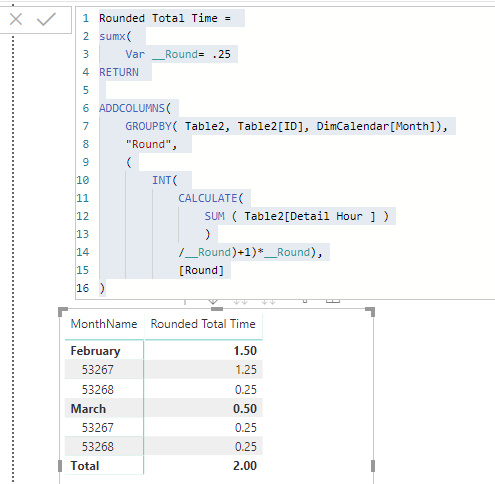
Here's the pbix file:
https://1drv.ms/u/s!Amqd8ArUSwDS1T5qC3ekPiuLAoG4?e=VHigXL
- Mark as New
- Bookmark
- Subscribe
- Mute
- Subscribe to RSS Feed
- Permalink
- Report Inappropriate Content
this should work
Rounded Total Time =
sumx(
   var __Round= .25
return

ADDCOLUMNS(
    GROUPBY( Table2, Table2[ID], DimCalendar[Month]),
    "Round",
    IF (
        MOD(
            CALCULATE( SUM( Table2[Detail Hour ])), __Round) =0,
            CALCULATE( SUM( Table2[Detail Hour ]) ),
    (
        INT(
            CALCULATE(
                SUM ( Table2[Detail Hour ] )
                )
            /__Round)+1)*__Round)
            ),
            [Round]
)
- Mark as New
- Bookmark
- Subscribe
- Mute
- Subscribe to RSS Feed
- Permalink
- Report Inappropriate Content
Anyone?
- Mark as New
- Bookmark
- Subscribe
- Mute
- Subscribe to RSS Feed
- Permalink
- Report Inappropriate Content
I attached the pbix below, but here's the idea.
- Created a Date calendar and related that to your main (fact) table
DimCalendar =
ADDCOLUMNS(
    CALENDAR(
        DATE( YEAR(MIN( Table2[Note Date ])),1,1),
        DATE( YEAR( MAX ( Table2[Note Date ])),12,31)),
        "Year", YEAR([Date]),
        "Month", MONTH( [Date] ),
        "MonthName", FORMAT( [Date], "mmmm")
)- Created a DimID table as well and related that to your main table
DimID = DISTINCT( Table2[ID] )
- Then the measure itself
Rounded Total Time =
sumx(
    Var __Round= .25
RETURN

ADDCOLUMNS(
    GROUPBY( Table2, Table2[ID], DimCalendar[Month]),
    "Round",
    (
        INT(
            CALCULATE(
                SUM ( Table2[Detail Hour ] )
                )
            /__Round)+1)*__Round),
            [Round]
)
then with Month from the Date table and ID from the DimID table on rows you get this:
Here's the pbix file:
https://1drv.ms/u/s!Amqd8ArUSwDS1T5qC3ekPiuLAoG4?e=VHigXL
- Mark as New
- Bookmark
- Subscribe
- Mute
- Subscribe to RSS Feed
- Permalink
- Report Inappropriate Content
@Anonymous
I found one issue (could be due to my poor explanation🙂
If there is 0,25 hour (15 min) logged (real time) on an id it should not be rounded because ist is already rounded to 15 min.
So if i have the following time in jan, it should be:
0,25 real hours should be 0,25 hours rounded
0,08 real hours should be 0,25 hours rounded
0,5 real hours shouls be 0,5 hours rounded
So i should round up to the nearest 0,25 hour (15 min).
Regards!
- Mark as New
- Bookmark
- Subscribe
- Mute
- Subscribe to RSS Feed
- Permalink
- Report Inappropriate Content
Any chance you can load some data that is showing this? I dont quite follow.
- Mark as New
- Bookmark
- Subscribe
- Mute
- Subscribe to RSS Feed
- Permalink
- Report Inappropriate Content
Hi @Anonymous
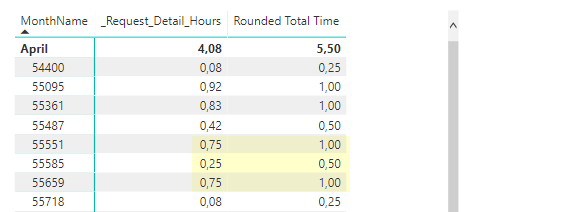
ID 55551 and 55659 should stay the same, 0.75 rounded total time.
ID 55585 should also stay the same, 0.25 rounded total time.
Only the hours that are not a multiple of 0.25 hours should be rounded up to the nearest multiple of 0.25
- Mark as New
- Bookmark
- Subscribe
- Mute
- Subscribe to RSS Feed
- Permalink
- Report Inappropriate Content
this should work
Rounded Total Time =
sumx(
   var __Round= .25
return

ADDCOLUMNS(
    GROUPBY( Table2, Table2[ID], DimCalendar[Month]),
    "Round",
    IF (
        MOD(
            CALCULATE( SUM( Table2[Detail Hour ])), __Round) =0,
            CALCULATE( SUM( Table2[Detail Hour ]) ),
    (
        INT(
            CALCULATE(
                SUM ( Table2[Detail Hour ] )
                )
            /__Round)+1)*__Round)
            ),
            [Round]
)- Mark as New
- Bookmark
- Subscribe
- Mute
- Subscribe to RSS Feed
- Permalink
- Report Inappropriate Content
Thanx!! Works!
- Mark as New
- Bookmark
- Subscribe
- Mute
- Subscribe to RSS Feed
- Permalink
- Report Inappropriate Content
Thank you, this seems to be working like a charm!

Helpful resources

Power BI Dataviz World Championships
The Power BI Data Visualization World Championships is back! Get ahead of the game and start preparing now!

Power BI Monthly Update - November 2025
Check out the November 2025 Power BI update to learn about new features.

FabCon Atlanta 2026
Join us at FabCon Atlanta, March 16-20, for the ultimate Fabric, Power BI, AI and SQL community-led event. Save $200 with code FABCOMM.

| User | Count |
|---|---|
| 20 | |
| 10 | |
| 9 | |
| 4 | |
| 4 |


| User | Count |
|---|---|
| 34 | |
| 31 | |
| 20 | |
| 12 | |
| 11 |


