Don't miss your chance to take the Fabric Data Engineer (DP-600) exam for FREE! Find out how by attending the DP-600 session on April 23rd (pacific time), live or on-demand.
Learn moreNext up in the FabCon + SQLCon recap series: The roadmap for Microsoft SQL and Maximizing Developer experiences in Fabric. All sessions are available on-demand after the live show. Register now
Hi.
I have survey input where customers submit the most recent count of a required value. I'm able to filter to the most recent submissions using MAX to get proper numbers, which is good.
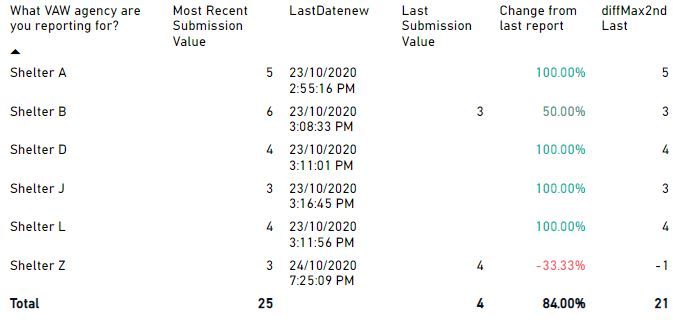
What I would like to show (in a report table) is the increase or decrease from the previous row date/value (or second last), if the value exisits (which it doesn't for some). If no submission exisits I would like to show just the increase/decrease, and nothing for values that don't have a previous submission. I've tried a bunch of measures but i'm not getting it.
To get the previous date value, I tried this combo of measures (which worked, but not sure if it's best):
This is basically the format of the incoming background form data table.
| Location | SubmissionDate | Value |
| Shelter A | October 23, 2020 | 5 |
| Shelter B | October 23, 2020 | 6 |
| Shelter Z | October 24, 2020 | 3 |
| Shelter Z | October 22, 2020 | 4 |
Any help would be great, but i'm ok if this is just not practical.
Solved! Go to Solution.
Hi, @mcinnisbr ,
I think I understand what you mean.
The key to this is to position the second largest date for each location in the dataset.
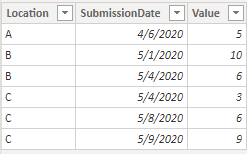
Suppose we have the following data:
Then you need to create a calculated column (for example: [ID]) to mark the second largest date:
ID =
VAR _D =
CALCULATE (
MAX ( 'Sheet1'[SubmissionDate] ),
ALLEXCEPT ( 'Sheet1', 'Sheet1'[Location] )
)
VAR _LD =
CALCULATE (
MAX ( Sheet1[SubmissionDate] ),
FILTER ( ALL ( Sheet1 ), 'Sheet1'[SubmissionDate] < _D )
)
RETURN
SWITCH ( 'Sheet1'[SubmissionDate], _D, 1, _LD, 2, BLANK () )
Then you can create measures for both [MOST RECENT SUBMISSION] and [LAST SUBMISSSION], so that you can get the change for that:
CHANGE =
VAR _THIS = [MOST RECENT]
VAR _LAST = [LAST]
RETURN
DIVIDE ( _THIS - _LAST, _LAST, BLANK () )
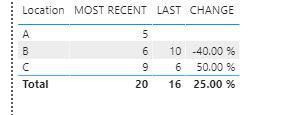
The results are shown in the below figure, it works perfectly:
Mark this post as solution if this helps,thanks!
( See Davis.Z's blog at LinkedIn)
Hi, @mcinnisbr ,
I think I understand what you mean.
The key to this is to position the second largest date for each location in the dataset.
Suppose we have the following data:
Then you need to create a calculated column (for example: [ID]) to mark the second largest date:
ID =
VAR _D =
CALCULATE (
MAX ( 'Sheet1'[SubmissionDate] ),
ALLEXCEPT ( 'Sheet1', 'Sheet1'[Location] )
)
VAR _LD =
CALCULATE (
MAX ( Sheet1[SubmissionDate] ),
FILTER ( ALL ( Sheet1 ), 'Sheet1'[SubmissionDate] < _D )
)
RETURN
SWITCH ( 'Sheet1'[SubmissionDate], _D, 1, _LD, 2, BLANK () )
Then you can create measures for both [MOST RECENT SUBMISSION] and [LAST SUBMISSSION], so that you can get the change for that:
CHANGE =
VAR _THIS = [MOST RECENT]
VAR _LAST = [LAST]
RETURN
DIVIDE ( _THIS - _LAST, _LAST, BLANK () )
The results are shown in the below figure, it works perfectly:
Mark this post as solution if this helps,thanks!
( See Davis.Z's blog at LinkedIn)
DavisBI,
Many apologies, but i'm just getting to this. This works very well and way more elegantly than my previous version for percentage. Is it possible to show the raw change value as 'blank' if there are no previous dates to subtract from? My version works, but subtracting the the recent from the previous gives me the only value regardless. if not possible, that's ok.
Thanks.
@mcinnisbr Hi mcinnisbr, I might have misunderstood your question, if what you want is not to show any value for [Change from last report] and [diffMax2ndLast] in case there is no Last submission, I guess we can solve the problem by adding a condition such as LastSubmissionValue >0 when we calculate these meaures.
e.g.) [diffMax2ndLast] = calculate( MostrecentSubmissionValue - LastSubmissionValue, LastSubmissionValue <> blank() )
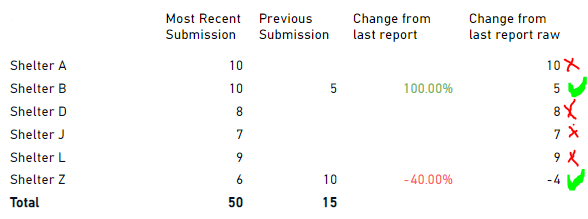
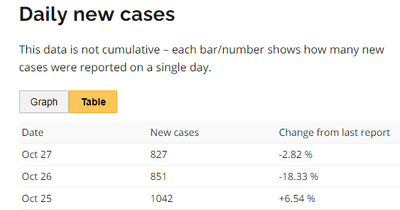
Thanks for the reply. That didnt quite work. I'm probably not explaining things well either. I guess what i'm trying to do is almost like a 'change from last report' like you see for COVID-19 case tables, but by customer instead of by date like you see in the covid screen below.
My raw table (forms submissions) looks like this. I want to be able to subtract the last date from the previous and display the change in a report similar to my first post. And, display + or - value by client, not by date.
Location SubmissionDate Value
Shelter A October 23, 2020 5
Shelter B October 23, 2020 6
Shelter Z October 24, 2020 3
Shelter Z October 22, 2020 4
If this is too confusing i'll have to try again another time. Thanks.
If you have recently started exploring Fabric, we'd love to hear how it's going. Your feedback can help with product improvements.
A new Power BI DataViz World Championship is coming this June! Don't miss out on submitting your entry.
Experience the highlights from FabCon & SQLCon, available live and on-demand starting April 14th.
| User | Count |
|---|---|
| 6 | |
| 6 | |
| 3 | |
| 2 | |
| 2 |
| User | Count |
|---|---|
| 22 | |
| 10 | |
| 10 | |
| 7 | |
| 5 |