cancel
Showing results for 
Search instead for 
Did you mean: 

We've captured the moments from FabCon & SQLCon that everyone is talking about, and we are bringing them to the community, live and on-demand. Starts on April 14th. Register now

Reply
Anonymous
Not applicable

SELECTEDVALUE alternate result is calculating correctly but not working with filter

I have what i thought was a fairly simple measure to allow a visual to be filtered by selection and default to the current month if nothing is selected: 


the measure works as expected if a month is selected, it even returns the correct value if nothing is selected (checked by putting it in a card) but the visual is not filtering to the defult (current) month if nothing is selected.  i made the default month a variable to see if that would fix and it is still not working -  I'm stuck as to what to try next?


The Measure: 

Selected Month =
VAR defaultmonth =
CALCULATE (
DISTINCT ( DIM_Calendar[MonthYear] ),
DIM_Calendar[CurMonthOffset] = 0
)
RETURN
SELECTEDVALUE ( DIM_Calendar[MonthYear], defaultmonth )


4 REPLIES 4
vapid128
Solution Specialist
Solution Specialist

IF(

DISTINCTCOUNT( DIM_Calendar[MonthYear] )=1,

the correct value,

the defult (current)value

)

Anonymous
Not applicable

i tried this and it didnt work, the card now shows blank if nothing is selected: 


Selected Month =
IF (
    DISTINCTCOUNT ( DIM_Calendar[MonthYear] ) = 1,
    SELECTEDVALUE (
        DIM_Calendar[MonthYear],
        CALCULATE (
            DISTINCT ( DIM_Calendar[MonthYear] ),
            DIM_Calendar[CurMonthOffset] = 0
        )
    )
)

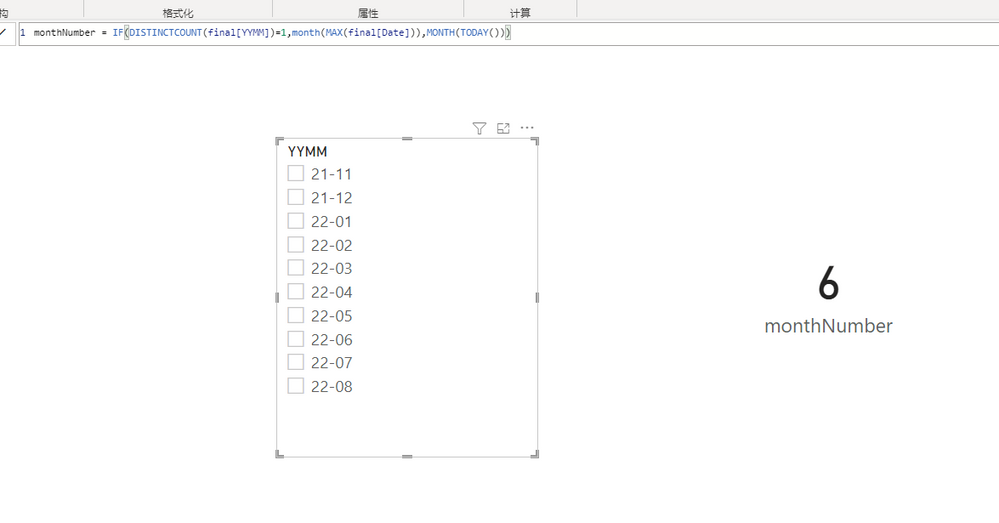
IS this what you want?

屏幕截图 2022-06-07 174605.png屏幕截图 2022-06-07 174605.png


Anonymous
Not applicable

my measure does that the problem is when the alternate result is returned for selected value it doesnt pass to a filter.   note it is returning the correct value just not filtering.   


i tried to simplify the dax to make it easier to trouble shoot - the full measure is here: 


SelectedMTD cumulative =
VAR selectedmonth =
SELECTEDVALUE ( DIM_Calendar[MonthYear], CALCULATE (
DISTINCT ( DIM_Calendar[MonthYear] ),
DIM_Calendar[CurMonthOffset] = 0
) )
var SignUpsMTD =
CALCULATE (
DISTINCTCOUNT ( training_contracts[SUT ID ] ),
DATESMTD ( DIM_Calendar[Date] ),
DIM_Calendar[MonthYear] = selectedmonth
)
RETURN
IF (
MAX ( DIM_Calendar[Date] ) <= LASTDATE ( training_contracts[tyims_created_on] ),
signupsmtd,
BLANK ()
)


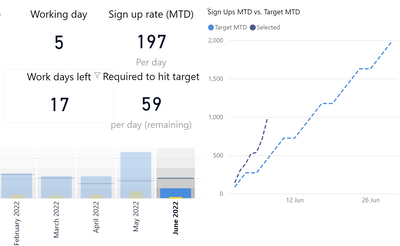
If i select a month it filters correctly: 

thisguy_0-1654822821097.png

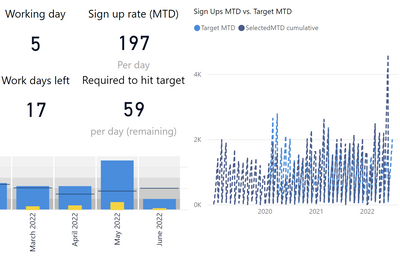
if no date is selected it shows all the data: 

thisguy_1-1654822880726.png


Helpful resources

Announcements
New to Fabric survey Carousel

New to Fabric Survey

If you have recently started exploring Fabric, we'd love to hear how it's going. Your feedback can help with product improvements.

Power BI DataViz World Championships carousel

Power BI DataViz World Championships - June 2026

A new Power BI DataViz World Championship is coming this June! Don't miss out on submitting your entry.

Join our Fabric User Panel

Join our Fabric User Panel

Share feedback directly with Fabric product managers, participate in targeted research studies and influence the Fabric roadmap.

March Power BI Update Carousel

Power BI Community Update - March 2026

Check out the March 2026 Power BI update to learn about new features.