Don't miss your chance to take the Fabric Data Engineer (DP-700) exam on us!
Learn moreWe've captured the moments from FabCon & SQLCon that everyone is talking about, and we are bringing them to the community, live and on-demand. Starts on April 14th. Register now
Hello,
I'm not sure why I am not getting this so I could please use some help. I have the following dataset:
| Task Name | Planned Count | Planned Finish | Commit Count | Commit Finish | Actual Count | Actual Finish |
| task 1 | 1 | 1/29/2021 | 0 | 1 | 1/29/2021 | |
| task2 | 1 | 8/28/2020 | 0 | 1 | 8/28/2020 | |
| task3 | 1 | 2/16/2021 | 0 | 1 | 2/16/2021 | |
| task4 | 1 | 9/11/2020 | 0 | 1 | 9/11/2020 | |
| task5 | 1 | 8/27/2021 | 1 | 10/1/2021 | 0 | |
| task6 | 1 | 4/30/2021 | 0 | 1 | 4/30/2021 | |
| task7 | 1 | 1/29/2021 | 0 | 1 | 1/29/2021 | |
| task8 | 1 | 7/30/2021 | 1 | 8/20/2021 | 0 | |
| task9 | 1 | 6/7/2021 | 0 | 1 | 6/7/2021 | |
| task10 | 1 | 7/19/2021 | 1 | 7/19/2021 | 0 | |
| task11 | 1 | 7/16/2021 | 1 | 8/6/2021 | 0 | |
| task12 | 1 | 7/23/2021 | 1 | 8/5/2021 | 0 | |
| task13 | 1 | 9/11/2020 | 0 | 1 | 9/11/2020 |
I need to be able to graph the following measures:
Any assistance would be appreciated!
Thank you!!
@amitchandak While I admire your correct syntax your spelling of count might have missed something. ;-O
Unfortunately this produces lines that start with the first date in the date table instead of the first date where there is data and it also produces flat lines for actual.
After thinking about this a little more I realize my requirements change a little.
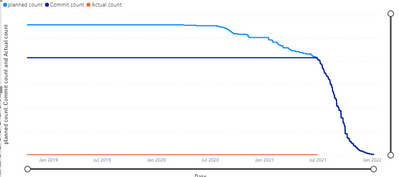
The lines should be based on the original data:
Planned: starts at 8/28/2020 and steps down from 13 to 0
Actual: starts at 8/28/20 and starts at 13 and counts down 8
Commit: starts at 7/19/21 and starts at 5 and counts down to zero.
Actual + Commit = Planned
Start dates are always the first date where there is a count.
Existing graph:
@jschaefer , I think you need
Reverse cumulative
Join all three dates with date table
then create measures like
planned = sum(Table[Planned Count])
Commit = calculate(sum(Table[Commit Count]), userelationship('Date'[date], Table[Commit Finish]), not(isblank(Table[Commit Finish])))
Actual = calculate(sum(Table[Commit Count]), userelationship('Date'[date], Table[Actual Finish]), not(isblank(Table[Actual Finish])))
planned **bleep** = calculate([planned], filter(allselected('Date'),'Date'[date] >=max('Date'[date])))
Commit **bleep** = calculate([Commit], filter(allselected('Date'),'Date'[date] >=max('Date'[date])))
Actual **bleep** = calculate([Actual], filter(allselected('Date'),'Date'[date] >=max('Date'[date])))
To get the best of the time intelligence function. Make sure you have a date calendar and it has been marked as the date in model view. Also, join it with the date column of your fact/s. Refer :radacad sqlbi My Video Series Appreciate your Kudos.
refer to my blog on similar topic if needed
If you have recently started exploring Fabric, we'd love to hear how it's going. Your feedback can help with product improvements.
A new Power BI DataViz World Championship is coming this June! Don't miss out on submitting your entry.
Share feedback directly with Fabric product managers, participate in targeted research studies and influence the Fabric roadmap.
| User | Count |
|---|---|
| 8 | |
| 8 | |
| 3 | |
| 2 | |
| 2 |
| User | Count |
|---|---|
| 23 | |
| 13 | |
| 10 | |
| 6 | |
| 5 |