


Join us at FabCon Atlanta from March 16 - 20, 2026, for the ultimate Fabric, Power BI, AI and SQL community-led event. Save $200 with code FABCOMM.
Register now!The Power BI Data Visualization World Championships is back! Get ahead of the game and start preparing now! Learn more
Good Morning!
Looking for help in an issue with two tables I have. This is an example of what my data looks like in each table.
Table1
| Truck# | Reporting Party |
1 | A |
| 1 | B |
| 2 | A |
| 2 | A |
| 2 | A |
| 3 | A |
| 3 | A |
| 3 | B |
| 4 | B |
Table2
| Truck # | # by reporting party "A" | # by reporting party "B" |
| 1 | 1 | 1 |
| 2 | 2 | 0 |
| 3 | 3 | 1 |
| 4 | 0 | 1 |
What i need is to be able to get the data of # by reporting party "A" and # by reporting party "B" from table 1 to exist in table 2 in order to be able to average later on in a bar chart. Any advice would be a huge help. Thank you!
Solved! Go to Solution.
Hi,
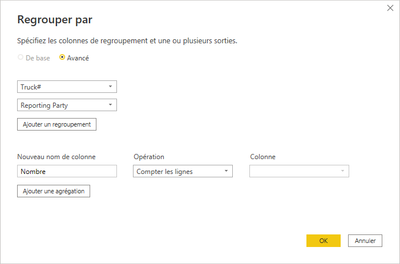
You can do it easily with power Query, just using the Group By button and then group by Truck# and Reporting Party :
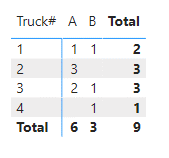
The show the results in a matrix (not table), using Reporting party as column, truck as line and count as value.
And you'll get that :
Hope it helps
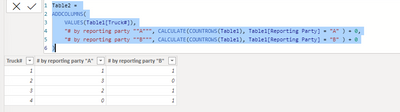
@ANTBressi this is the DAX code for the new calculated table:
Table2 =
ADDCOLUMNS(
VALUES(Table1[Truck#]),
"# by reporting party ""A""", CALCULATE(COUNTROWS(Table1), Table1[Reporting Party] = "A" ) + 0,
"# by reporting party ""B""", CALCULATE(COUNTROWS(Table1), Table1[Reporting Party] = "B" ) + 0
)
Huge help! Worked like a charm!
Hi,
You can do it easily with power Query, just using the Group By button and then group by Truck# and Reporting Party :
The show the results in a matrix (not table), using Reporting party as column, truck as line and count as value.
And you'll get that :
Hope it helps
Excellent, thank you!
The Power BI Data Visualization World Championships is back! Get ahead of the game and start preparing now!
Check out the November 2025 Power BI update to learn about new features.
| User | Count |
|---|---|
| 19 | |
| 11 | |
| 9 | |
| 4 | |
| 4 |
| User | Count |
|---|---|
| 35 | |
| 32 | |
| 20 | |
| 12 | |
| 10 |