Join us at FabCon Atlanta from March 16 - 20, 2026, for the ultimate Fabric, Power BI, AI and SQL community-led event. Save $200 with code FABCOMM.
Register now!The Power BI Data Visualization World Championships is back! Get ahead of the game and start preparing now! Learn more
Hello all,
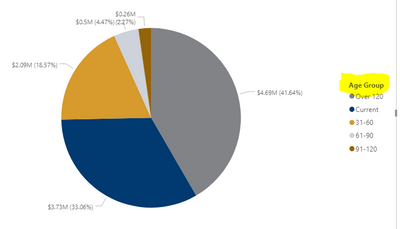
I have a pie chart showing invoice amounts by by age group Current, 31-60, 61-90, 91-20 and over 120. Unfortunately, on my visualization, those buckets are out of order. Is there a way I can fix this to show in order?
Thank you!
Solved! Go to Solution.
The easiest way would be to add a "1", "2", etc, to the labels.
But a neater way would would be to add a sort column. Here, you would add a new column next to each of the labels, such as Current being 1, and 31-60 being 2, etc. You can do that using SWITCH.
So the calculated column would be:
Sort column = SWITCH 'table name' [Age group], "Current","1",31-60","2", etc.
Then click on "Age group" field, and then click on sort by column, and then click on your new sort column. That should do it.
This seemed to do the trick. Thank you!
The easiest way would be to add a "1", "2", etc, to the labels.
But a neater way would would be to add a sort column. Here, you would add a new column next to each of the labels, such as Current being 1, and 31-60 being 2, etc. You can do that using SWITCH.
So the calculated column would be:
Sort column = SWITCH 'table name' [Age group], "Current","1",31-60","2", etc.
Then click on "Age group" field, and then click on sort by column, and then click on your new sort column. That should do it.
The Power BI Data Visualization World Championships is back! Get ahead of the game and start preparing now!
| User | Count |
|---|---|
| 9 | |
| 5 | |
| 5 | |
| 3 | |
| 3 |
| User | Count |
|---|---|
| 24 | |
| 11 | |
| 9 | |
| 6 | |
| 6 |