Join us at FabCon Atlanta from March 16 - 20, 2026, for the ultimate Fabric, Power BI, AI and SQL community-led event. Save $200 with code FABCOMM.
Register now!The Power BI Data Visualization World Championships is back! Get ahead of the game and start preparing now! Learn more
Hi,
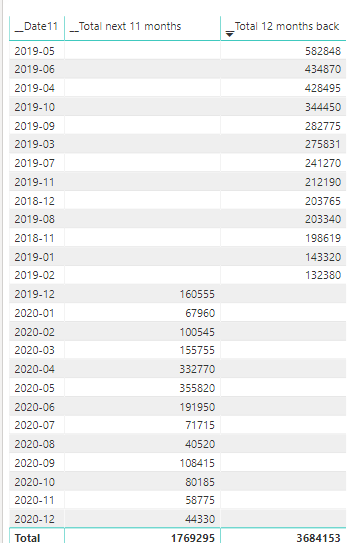
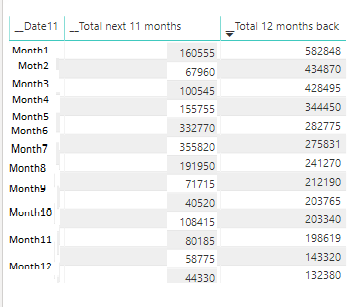
I need to replace the Year-Month with a value like Month1, Month2 etc...
I need to put __Total next 11 months and __Total 12 months back togeter
I need the data in the following format:
Can someone help me understad how I make this change to the date column
I am using:
Solved! Go to Solution.
@TiaCamilian
I guess the numbers are getting summarized. Just select the visual and right click on the __MonthNo1 field and select Don't summarize
@TiaCamilian
I guess the numbers are getting summarized. Just select the visual and right click on the __MonthNo1 field and select Don't summarize
Yes it was counting. Now is working.
Thank you
Assuming that your field _Date11 is formatted as date, and that you are happy that Jan = 1 and Feb = 2
MonthNo = MONTH(LASTDATE(table[_Date11]))
Check out the November 2025 Power BI update to learn about new features.
Advance your Data & AI career with 50 days of live learning, contests, hands-on challenges, study groups & certifications and more!
| User | Count |
|---|---|
| 21 | |
| 10 | |
| 9 | |
| 4 | |
| 4 |
| User | Count |
|---|---|
| 34 | |
| 31 | |
| 20 | |
| 13 | |
| 12 |