Hi,
I have the below table
| Company Group | Premium |
| Company 1 | 4,102,813 |
| Company 2 | 132,970,639 |
| Company 3 | 46,137,791 |
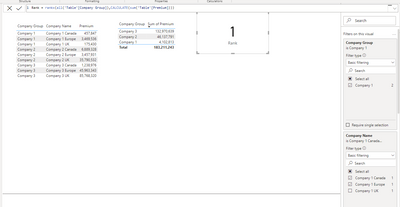
I have a rank formula on a card visual displaying the rank for Company 1.
rankx(all('Table'[Company Group]),CALCULATE(sum('Table'[Premium])))
Each company is split out by subsidiaries as below,
I filter for Company 1 and only for Company 1 uk and Company 1 europe the rank just gives me 1.
How do I update the formula so I can filter for the Company Names but still get the rank for Company group?
| Company Group | Company Name | Premium |
| Company 1 | Company 1 UK | 175,430 |
| Company 1 | Company 1 Europe | 3,469,536 |
| Company 1 | Company 1 Canada | 457,847 |
| Company 2 | Company 2 UK | 35,790,532 |
| Company 2 | Company 2 Europe | 3,457,931 |
| Company 2 | Company 2 Canada | 6,889,328 |
| Company 3 | Company 3 UK | 85,768,320 |
| Company 3 | Company 3 Europe | 45,963,343 |
| Company 3 | Company 3 Canada | 1,238,976 |
Thanks,