Join us at FabCon Atlanta from March 16 - 20, 2026, for the ultimate Fabric, Power BI, AI and SQL community-led event. Save $200 with code FABCOMM.
Register now!Get Fabric Certified for FREE during Fabric Data Days. Don't miss your chance! Request now
Hi all,
Struggling with some date work based on years against TODAY and a static date. I have never used calendars and Im wondering if this is what I need.
I have a table of components which have a column called PRIORTY DATE, this column has both past and future dates, I want to concentrate on the past dates. The components are considered as overdue if the PRIOROTY DATE is before TODAY, however I need to be able to determine HOW overdue they are and split them into one of 3 categories.
Overdue within 5 years (from TODAY)
Overdue between 5 years & 10 years (from TODAY)
Overdue over 10 years (from TODAY).
Example data
One is under 5 years overdue
One is between 5 & 6 years overdue
One is over 10 years overdue
| component_ref | priority_date | Overdue_Current |
| 573384 | 12/10/1996 | Overdue |
| 260108 | 19/02/2016 | Overdue |
| 260326 | 19/02/2018 | Overdue |
Any suggestions on either a column or a measure most welcome 😁
Thanks!
Solved! Go to Solution.
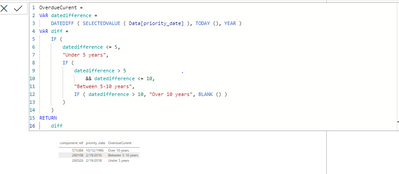
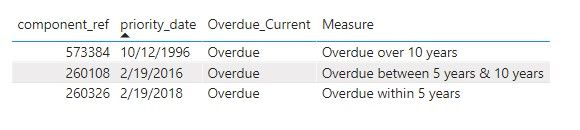
Please find the solution below using measure:
Dax Measure:
Hi @Googlecanthelp ,
Please check the measure.
Measure =
var _5year = EDATE(TODAY(),-60)
var _10year = EDATE(TODAY(),-120)
var _prio = SELECTEDVALUE('Table'[priority_date])
return
SWITCH(TRUE(),
_prio<TODAY()&&_prio>=_5year,"Overdue within 5 years",
_prio<_5year&&_prio>=_10year,"Overdue between 5 years & 10 years",
_prio<_10year,"Overdue over 10 years")
Best Regards,
Jay
Hi @Googlecanthelp ,
Please check the measure.
Measure =
var _5year = EDATE(TODAY(),-60)
var _10year = EDATE(TODAY(),-120)
var _prio = SELECTEDVALUE('Table'[priority_date])
return
SWITCH(TRUE(),
_prio<TODAY()&&_prio>=_5year,"Overdue within 5 years",
_prio<_5year&&_prio>=_10year,"Overdue between 5 years & 10 years",
_prio<_10year,"Overdue over 10 years")
Best Regards,
Jay
Please find the solution below using measure:
Dax Measure:
Thank you @Anonymous this worked a treat 🙂
Hi,
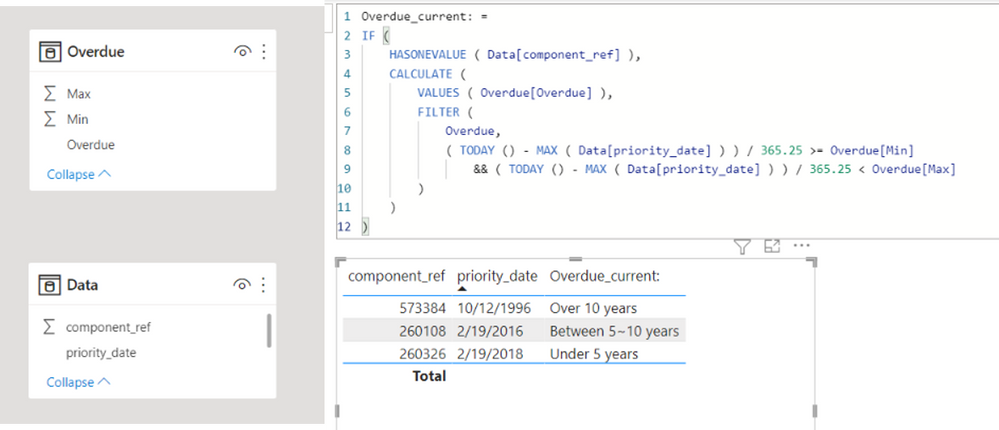
Please check the below picture and the attached pbix file.
One of ways to solve this is to create a helper table, like Overdue Table in a model, and create a measure.
Overdue_current: =
IF (
HASONEVALUE ( Data[component_ref] ),
CALCULATE (
VALUES ( Overdue[Overdue] ),
FILTER (
Overdue,
( TODAY () - MAX ( Data[priority_date] ) ) / 365.25 >= Overdue[Min]
&& ( TODAY () - MAX ( Data[priority_date] ) ) / 365.25 < Overdue[Max]
)
)
)
Check out the November 2025 Power BI update to learn about new features.
Advance your Data & AI career with 50 days of live learning, contests, hands-on challenges, study groups & certifications and more!
| User | Count |
|---|---|
| 11 | |
| 9 | |
| 9 | |
| 6 | |
| 5 |
| User | Count |
|---|---|
| 27 | |
| 22 | |
| 19 | |
| 17 | |
| 11 |