This time we’re going bigger than ever. Fabric, Power BI, SQL, AI and more. We're covering it all. You won't want to miss it.
Learn moreLevel up your Power BI skills this month - build one visual each week and tell better stories with data! Get started
Hi all,
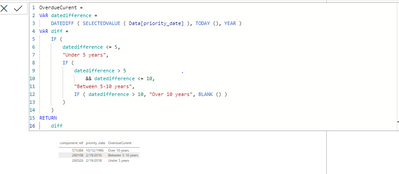
Struggling with some date work based on years against TODAY and a static date. I have never used calendars and Im wondering if this is what I need.
I have a table of components which have a column called PRIORTY DATE, this column has both past and future dates, I want to concentrate on the past dates. The components are considered as overdue if the PRIOROTY DATE is before TODAY, however I need to be able to determine HOW overdue they are and split them into one of 3 categories.
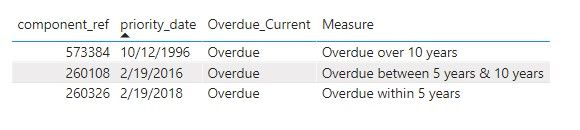
Overdue within 5 years (from TODAY)
Overdue between 5 years & 10 years (from TODAY)
Overdue over 10 years (from TODAY).
Example data
One is under 5 years overdue
One is between 5 & 6 years overdue
One is over 10 years overdue
| component_ref | priority_date | Overdue_Current |
| 573384 | 12/10/1996 | Overdue |
| 260108 | 19/02/2016 | Overdue |
| 260326 | 19/02/2018 | Overdue |
Any suggestions on either a column or a measure most welcome 😁
Thanks!
Solved! Go to Solution.
@Anonymous
Please find the solution below using measure:
Dax Measure:
Hi @Anonymous ,
Please check the measure.
Measure =
var _5year = EDATE(TODAY(),-60)
var _10year = EDATE(TODAY(),-120)
var _prio = SELECTEDVALUE('Table'[priority_date])
return
SWITCH(TRUE(),
_prio<TODAY()&&_prio>=_5year,"Overdue within 5 years",
_prio<_5year&&_prio>=_10year,"Overdue between 5 years & 10 years",
_prio<_10year,"Overdue over 10 years")
Best Regards,
Jay
Hi @Anonymous ,
Please check the measure.
Measure =
var _5year = EDATE(TODAY(),-60)
var _10year = EDATE(TODAY(),-120)
var _prio = SELECTEDVALUE('Table'[priority_date])
return
SWITCH(TRUE(),
_prio<TODAY()&&_prio>=_5year,"Overdue within 5 years",
_prio<_5year&&_prio>=_10year,"Overdue between 5 years & 10 years",
_prio<_10year,"Overdue over 10 years")
Best Regards,
Jay
@Anonymous
Please find the solution below using measure:
Dax Measure:
Thank you @Anonymous this worked a treat 🙂
Hi,
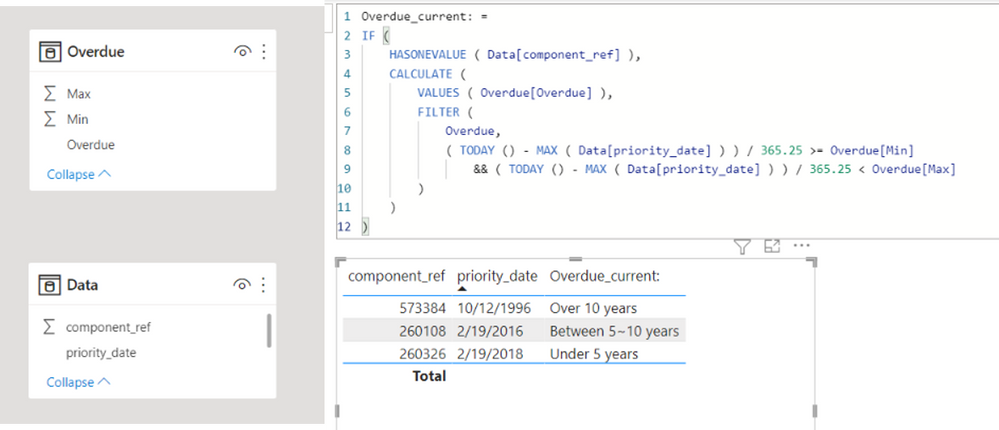
Please check the below picture and the attached pbix file.
One of ways to solve this is to create a helper table, like Overdue Table in a model, and create a measure.
Overdue_current: =
IF (
HASONEVALUE ( Data[component_ref] ),
CALCULATE (
VALUES ( Overdue[Overdue] ),
FILTER (
Overdue,
( TODAY () - MAX ( Data[priority_date] ) ) / 365.25 >= Overdue[Min]
&& ( TODAY () - MAX ( Data[priority_date] ) ) / 365.25 < Overdue[Max]
)
)
)
Check out the April 2026 Power BI update to learn about new features.
Sign up to receive a private message when registration opens and key events begin.
If you have recently started exploring Fabric, we'd love to hear how it's going. Your feedback can help with product improvements.
| User | Count |
|---|---|
| 4 | |
| 3 | |
| 3 | |
| 2 | |
| 2 |
| User | Count |
|---|---|
| 6 | |
| 6 | |
| 6 | |
| 5 | |
| 4 |