cancel
Showing results for 
Search instead for 
Did you mean: 

The Power BI Data Visualization World Championships is back! Get ahead of the game and start preparing now! Learn more

Reply
IgorGoncalves21
Regular Visitor

How to count in a measure

Hello,
I'm looking for solve this problem :

Count each result in this measure : 

  1. If(calculate(Count(FAT_MUDANCA_FASE_PRODUCAO_CONIPA[producao_numero]), DIM_GRUPO_FASE_PRODUCAO_CONIPA_DESTINO[grupo_fase_producao_nome] IN {"MODELAGEM", "CQ BORRACH"}) > 0, "3", If(SUM(FAT_MOVIMENTACAO_MOLDE_CONIPA[m_quantidade_movimento_ajustado]) = 0 || SUM(FAT_MOVIMENTACAO_MOLDE_CONIPA[m_quantidade_movimento_ajustado]) , "1", If(SUM(FAT_MUDANCA_FASE_PRODUCAO_CONIPA[m_quantidade]) / SUM('FAT_MOVIMENTACAO_MOLDE_CONIPA'[m_quantidade_movimento_ajustado]) > 300 , "2", "4" )))


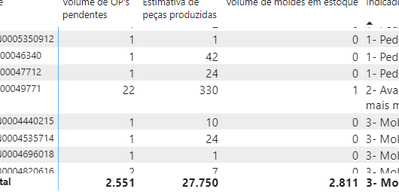
Last Collum :

IgorGoncalves21_1-1673382550278.png
So , reach how many are in numer 1 for exemple


1 REPLY 1
tamerj1
Super User
Super User

Hi @IgorGoncalves21 

Manually insert a single column table that contains the values of the 4 possible results of the measure. Let's call it FilterTable. 
Place FilterTable[Result] in a table visual along with following measure 

CountMeasure =
SUMX (

VALUES ( FAT_MUDANCA_FASE_PRODUCAO_CONIPA[producao_numero] ),

IF (

[Measure] = SELECTEDVALUE ( FilterTable[Result] ),

1

)

Helpful resources

Announcements
Power BI DataViz World Championships

Power BI Dataviz World Championships

The Power BI Data Visualization World Championships is back! Get ahead of the game and start preparing now!

November Power BI Update Carousel

Power BI Monthly Update - November 2025

Check out the November 2025 Power BI update to learn about new features.

FabCon Atlanta 2026 carousel

FabCon Atlanta 2026

Join us at FabCon Atlanta, March 16-20, for the ultimate Fabric, Power BI, AI and SQL community-led event. Save $200 with code FABCOMM.