cancel
Showing results for 
Search instead for 
Did you mean: 

Next up in the FabCon + SQLCon recap series: The roadmap for Microsoft SQL and Maximizing Developer experiences in Fabric. All sessions are available on-demand after the live show. Register now

Reply
IgorGoncalves21
Regular Visitor

How to count in a measure

Hello,
I'm looking for solve this problem :

Count each result in this measure : 

  1. If(calculate(Count(FAT_MUDANCA_FASE_PRODUCAO_CONIPA[producao_numero]), DIM_GRUPO_FASE_PRODUCAO_CONIPA_DESTINO[grupo_fase_producao_nome] IN {"MODELAGEM", "CQ BORRACH"}) > 0, "3", If(SUM(FAT_MOVIMENTACAO_MOLDE_CONIPA[m_quantidade_movimento_ajustado]) = 0 || SUM(FAT_MOVIMENTACAO_MOLDE_CONIPA[m_quantidade_movimento_ajustado]) , "1", If(SUM(FAT_MUDANCA_FASE_PRODUCAO_CONIPA[m_quantidade]) / SUM('FAT_MOVIMENTACAO_MOLDE_CONIPA'[m_quantidade_movimento_ajustado]) > 300 , "2", "4" )))


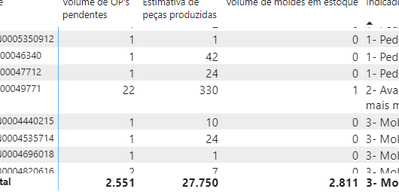
Last Collum :

IgorGoncalves21_1-1673382550278.png
So , reach how many are in numer 1 for exemple


1 REPLY 1
tamerj1
Community Champion
Community Champion

Hi @IgorGoncalves21 

Manually insert a single column table that contains the values of the 4 possible results of the measure. Let's call it FilterTable. 
Place FilterTable[Result] in a table visual along with following measure 

CountMeasure =
SUMX (

VALUES ( FAT_MUDANCA_FASE_PRODUCAO_CONIPA[producao_numero] ),

IF (

[Measure] = SELECTEDVALUE ( FilterTable[Result] ),

1

)

Helpful resources

Announcements
New to Fabric survey Carousel

New to Fabric Survey

If you have recently started exploring Fabric, we'd love to hear how it's going. Your feedback can help with product improvements.

Power BI DataViz World Championships carousel

Power BI DataViz World Championships - June 2026

A new Power BI DataViz World Championship is coming this June! Don't miss out on submitting your entry.

FabCon and SQLCon Highlights Carousel

FabCon &SQLCon Highlights

Experience the highlights from FabCon & SQLCon, available live and on-demand starting April 14th.

March Power BI Update Carousel

Power BI Community Update - March 2026

Check out the March 2026 Power BI update to learn about new features.