Share feedback directly with Fabric product managers, participate in targeted research studies and influence the Fabric roadmap.
Sign up nowGet Fabric certified for FREE! Don't miss your chance! Learn more
Hi before i used below DAX to calculate running totals and it works fine.
Board02P&LRunningTotal = if(
HASONEFILTER(TabPLGLItem[GLItem])
,
CALCULATE(
[Board01P&LAllTransactionAmountwithSign]
,
ALL(TabPLGLItem[GLItem])
,
TabPLGLItem[Index] <= VALUES(TabPLGLItem[Index])
)
,
blank()
)
Now I am trying my hand at the new Window function and wrote following DAX:
Board02aP&LRunningTotal =
CALCULATE(
[Board01P&LAllTransactionAmountwithSign],
WINDOW(
0,ABS,
0,REL,
SUMMARIZE(ALLSELECTED(TabPLGLItem),TabPLGLItem[GLItem]),
ORDERBY(TabPLGLItem[GLItem])
)
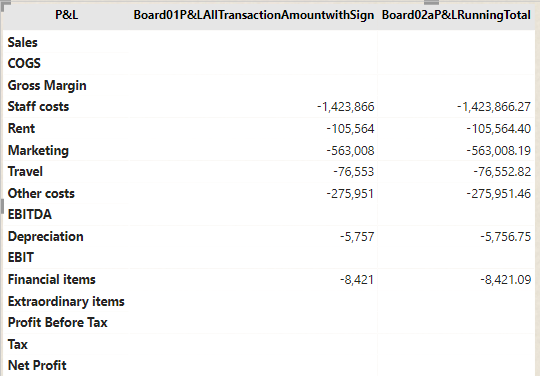
)Unfortunately, it is not giving me the same result. See below screenshot:
It is returning the same previous measure, which was calculating amount per row item:
Any idea what might went wrong with the window function?
Thanks
Solved! Go to Solution.
To replicate the behaviour of your original measure using the WINDOW function, a measure like this should work:
Board02aP&LRunningTotal =
CALCULATE (
[Board01P&LAllTransactionAmountwithSign],
WINDOW (
0, ABS,
0, REL,
ALL ( TabPLGLItem[GLItem], TabPLGLItem[Index] ),
ORDERBY ( TabPLGLItem[Index] )
)
)
Does this work as intended?
Explanation:
Regards,
Owen
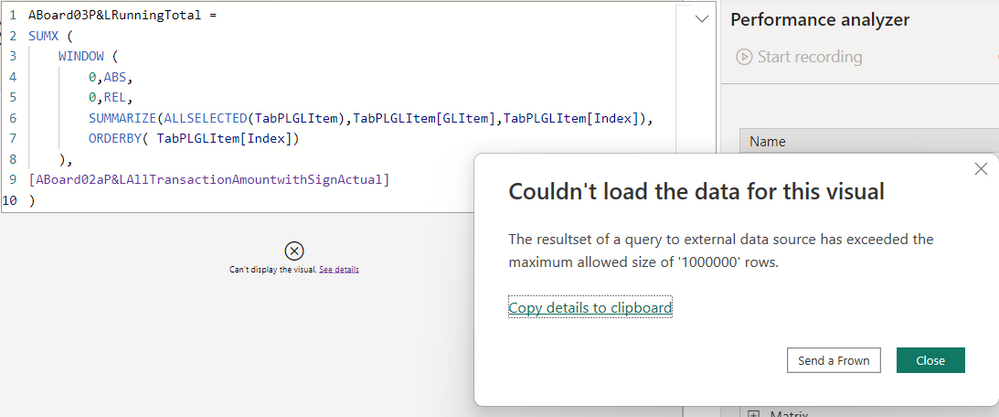
Both your solutions worked except that there is one limitation with the window function. Doing a running total with data from Direct Query using a window function is limited to 1million rows
I did the same running total using the previous way and it worked.
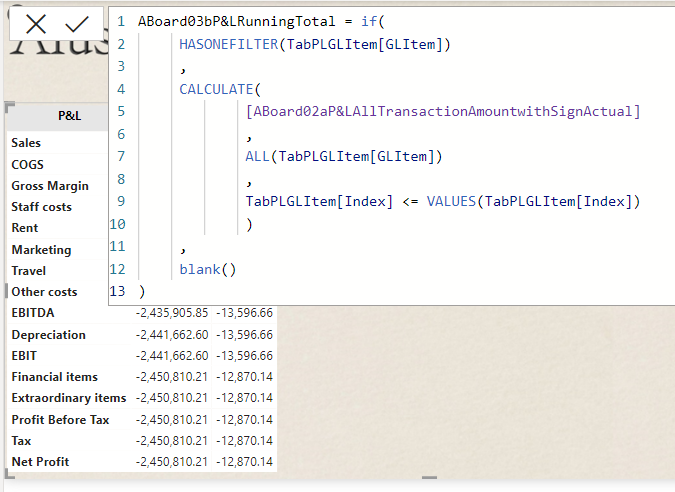
This seems weird though 🤔 as I kept everything the same and only changed the running total dax code. I guess the workings of the window function is pretty different at the back. Let me know if you have any workaround for this.
Thanks
You nned to have an item index column. please try
Board02aP&LRunningTotal =
SUMX (
WINDOW (
0,
ABS,
0,
REL,
SUMMARIZE (
ALLSELECTED ( TabPLGLItem ),
TabPLGLItem[GLItem],
TabPLGLItem[ItemIndex]
),
ORDERBY ( TabPLGLItem[ItemIndex] )
),
[Board01P&LAllTransactionAmountwithSign]
)
To replicate the behaviour of your original measure using the WINDOW function, a measure like this should work:
Board02aP&LRunningTotal =
CALCULATE (
[Board01P&LAllTransactionAmountwithSign],
WINDOW (
0, ABS,
0, REL,
ALL ( TabPLGLItem[GLItem], TabPLGLItem[Index] ),
ORDERBY ( TabPLGLItem[Index] )
)
)
Does this work as intended?
Explanation:
Regards,
Owen
Superb! It worked. Thanks.
Does the window function work with text or we should still keep an index column?
Share feedback directly with Fabric product managers, participate in targeted research studies and influence the Fabric roadmap.
If you love stickers, then you will definitely want to check out our Community Sticker Challenge!
Check out the January 2026 Power BI update to learn about new features.
| User | Count |
|---|---|
| 5 | |
| 4 | |
| 4 | |
| 3 | |
| 2 |
| User | Count |
|---|---|
| 12 | |
| 9 | |
| 8 | |
| 8 | |
| 5 |