cancel
Showing results for 
Search instead for 
Did you mean: 

The Power BI Data Visualization World Championships is back! Get ahead of the game and start preparing now! Learn more

Reply
Berl21
Helper III
Helper III

Error message for a measure - how to interpret it

Hi,

I added a calculated table to my data with values for the previous year, and then tried to add a measure using Switch.

This is what I wrote.


Range PY = SWITCH(TRUE(),'Leads Amount PY'[Count of Leads PY]<3,"1-3",'Leads Amount PY'[Count of Leads PY]<5,"3-5",'Leads Amount PY'[Count of Leads PY]<10,"5-10")


I get the following error message:
A single value for column 'Count of Leads PY' in table 'Leads Amount PY' cannot be determined. This can happen when a measure formula refers to a column that contains many values without specifying an aggregation such as min, max, count, or sum to get a single result.

The thing is I took the exact same steps for the current year, it works without a hitch and there is no aggregation there either. Is there another way to interpret this error message? What else can I check to make sure it works as intended?

1 ACCEPTED SOLUTION
Berl21
Helper III
Helper III

Ok, I got it. The problem was indeed that it was a measure @amitchandak . Beginner mistake 😑

For anyone who reads this, this should be made over a calculated column based on the calculated table (instead of with a measure).

View solution in original post

3 REPLIES 3
Berl21
Helper III
Helper III

Ok, I got it. The problem was indeed that it was a measure @amitchandak . Beginner mistake 😑

For anyone who reads this, this should be made over a calculated column based on the calculated table (instead of with a measure).

amitchandak
Super User
Super User

@Berl21 , Rae you trying to add a measure in a calculated column?

Share with Power BI Enthusiasts: Full Power BI Video (20 Hours) YouTube
Microsoft Fabric Series 60+ Videos YouTube
Microsoft Fabric Hindi End to End YouTube

@amitchandak to provide an example, this is the calculated table what I did for all the data (no filter on the year).

Calculated table:

Leads Amount =

SUMMARIZE(
    Leads_Table,
    Leads_Table[ZH_Account__c],
    Leads_Table[Lead_Creation_Date],
    "Count of Leads",
    [Count Leads]
)


I then inserted this measure:

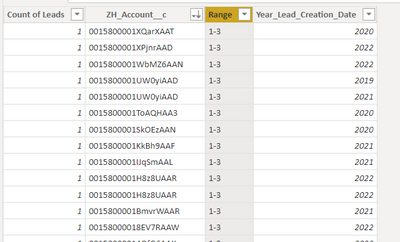
Range = SWITCH(TRUE(),'Leads Amount'[Count of Leads]<3,"1-3",'Leads Amount'[Count of Leads]<5,"3-5",'Leads Amount'[Count of Leads]<10,"5-10")
 
The result appears correctly in the final table:

Berl21_0-1666166759070.png


I am now trying to reproduce this with a change to the first step (filter for the previous year). But for some reason that I don't understand, I get this error message about an aggregation issue 😞

Helpful resources

Announcements
Power BI DataViz World Championships

Power BI Dataviz World Championships

The Power BI Data Visualization World Championships is back! Get ahead of the game and start preparing now!

December 2025 Power BI Update Carousel

Power BI Monthly Update - December 2025

Check out the December 2025 Power BI Holiday Recap!

FabCon Atlanta 2026 carousel

FabCon Atlanta 2026

Join us at FabCon Atlanta, March 16-20, for the ultimate Fabric, Power BI, AI and SQL community-led event. Save $200 with code FABCOMM.