Join us at FabCon Atlanta from March 16 - 20, 2026, for the ultimate Fabric, Power BI, AI and SQL community-led event. Save $200 with code FABCOMM.
Register now!The Power BI Data Visualization World Championships is back! Get ahead of the game and start preparing now! Learn more
Hello,
I'm new on dax, and need some help.
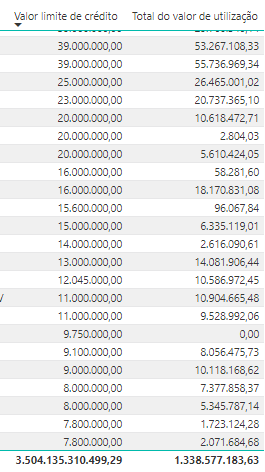
I wanna DIVIDE "total do valor de utilização"/"Valor limite de crédito" to know how much (%) represents, but i wanna do per client, so, for example: 53.267/39.000 = 136%
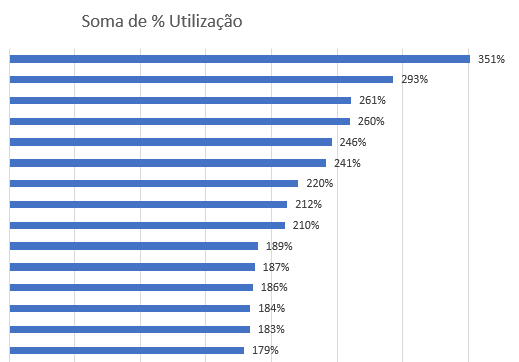
And after find out the % per client, I wanna make a ranking, in Excel it's like that:
It's possible?
Tks
Solved! Go to Solution.
Hi there,
Yes, you can do measure:
%total = DIVIDE ( sum('Table'[Total do valor de utilizaçao]) ; sum('Table'[Valor limite de crédito]) )and you drag this measure to one graphic as value, and then you put the "Client" in the same graphic as X or Y axe.
Hope this would be helpful.
Hi there,
Yes, you can do measure:
%total = DIVIDE ( sum('Table'[Total do valor de utilizaçao]) ; sum('Table'[Valor limite de crédito]) )and you drag this measure to one graphic as value, and then you put the "Client" in the same graphic as X or Y axe.
Hope this would be helpful.
That work!!! Tks so much (:
Hi there,
Yes, you can do the same in Power BI, just drag the values into:
for exemple =>
Have a nice day,
Chen
Tks, I will try this one, but first i have to do the measure, do you have any idea about what measure can i use to I DIVIDE "total do valor de utilização"/"Valor limite de crédito" to know how much (%) represents, and i wanna do per client, so, for example: 53.267/39.000 = 136%
The Power BI Data Visualization World Championships is back! Get ahead of the game and start preparing now!
Check out the November 2025 Power BI update to learn about new features.
| User | Count |
|---|---|
| 20 | |
| 10 | |
| 9 | |
| 4 | |
| 4 |
| User | Count |
|---|---|
| 32 | |
| 31 | |
| 18 | |
| 12 | |
| 11 |