Join us at FabCon Atlanta from March 16 - 20, 2026, for the ultimate Fabric, Power BI, AI and SQL community-led event. Save $200 with code FABCOMM.
Register now!The Power BI Data Visualization World Championships is back! Get ahead of the game and start preparing now! Learn more
I am attempting to create a dax measure that will calculate the total commission amount based on a filter of "eligible for payout" and the # Sales between two numbers. So if Validation 1 Column = "Eligible for Payout" and the # Sales Column is between 0-6 then I want to take the # Sales * the $ amount per sale.
Example: If Validation 1 Column = "Eligible for Payout" and the # Sales Column = 16 then I want to take 16 * $14 to get $224.
Another Example: If Validation 1 Column = "Eligible for Payout" and the # Sales Column = 5 then I want to take 5 * $7 to get $35.
Want I want to see in a Power BI Table is this:
| Validation 1 | # Sales | Commission Amount |
| Eligible for Payout | 16 | $224 |
| Eligible for Payout | 15 | $210 |
| Eligible for Payout | 15 | $210 |
| Eligible for Payout | 9 | $81 |
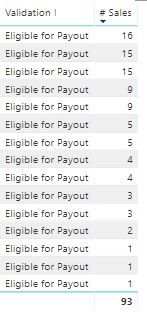
What I currently have in a Power BI Table is this:
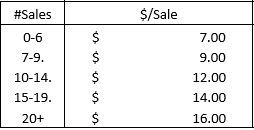
The Commission Tier is this:
So, probably something like:
Measure =
VAR __sales = MAX([# Sales])
VAR __commission =
SWITCH(TRUE(),
__sales<=6,LOOKUPVALUE('Commissions'[$/Sale],'Commissions'[#Sales],"0-6"),
__sales<=9,LOOKUPVALUE('Commissions'[$/Sale],'Commissions'[#Sales],"7-9"),
__sales<=14,LOOKUPVALUE('Commissions'[$/Sale],'Commissions'[#Sales],"10-14"),
__sales<=19,LOOKUPVALUE('Commissions'[$/Sale],'Commissions'[#Sales],"15-19"),
LOOKUPVALUE('Commissions'[$/Sale],'Commissions'[#Sales],"20+")
)
VAR __eligible = MAX([Validation 1])
RETURN
IF([Validation 1]<>"Eligible for Payout",0,__sales * __commission)
Thanks Greg,
I am receiving an error message on the If statement for [Validation 1] column. I forgot to mention the commission values are in a separate table titled "FL Commission Rates" and the query table holding the data is in a table titled "FL Agents Commission". There's no unique identifier to create a relationship between these two tables. Any suggestions on how to fix the error message?
The Power BI Data Visualization World Championships is back! Get ahead of the game and start preparing now!
Check out the November 2025 Power BI update to learn about new features.
| User | Count |
|---|---|
| 20 | |
| 11 | |
| 10 | |
| 4 | |
| 4 |
| User | Count |
|---|---|
| 34 | |
| 31 | |
| 19 | |
| 12 | |
| 11 |