Join us at FabCon Atlanta from March 16 - 20, 2026, for the ultimate Fabric, Power BI, AI and SQL community-led event. Save $200 with code FABCOMM.
Register now!Get Fabric Certified for FREE during Fabric Data Days. Don't miss your chance! Request now
Hello,
I'm new on dax, and need some help.
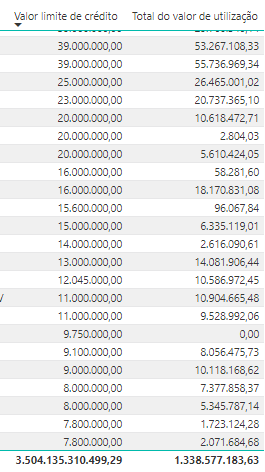
I wanna DIVIDE "total do valor de utilização"/"Valor limite de crédito" to know how much (%) represents, but i wanna do per client, so, for example: 53.267/39.000 = 136%
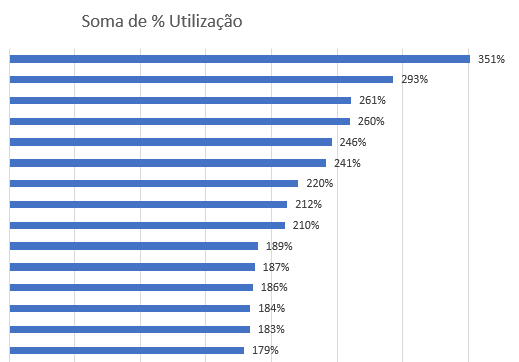
And after find out the % per client, I wanna make a ranking, in Excel it's like that:
It's possible?
Tks
Solved! Go to Solution.
Hi there,
Yes, you can do measure:
%total = DIVIDE ( sum('Table'[Total do valor de utilizaçao]) ; sum('Table'[Valor limite de crédito]) )and you drag this measure to one graphic as value, and then you put the "Client" in the same graphic as X or Y axe.
Hope this would be helpful.
Hi there,
Yes, you can do measure:
%total = DIVIDE ( sum('Table'[Total do valor de utilizaçao]) ; sum('Table'[Valor limite de crédito]) )and you drag this measure to one graphic as value, and then you put the "Client" in the same graphic as X or Y axe.
Hope this would be helpful.
That work!!! Tks so much (:
Hi there,
Yes, you can do the same in Power BI, just drag the values into:
for exemple =>
Have a nice day,
Chen
Tks, I will try this one, but first i have to do the measure, do you have any idea about what measure can i use to I DIVIDE "total do valor de utilização"/"Valor limite de crédito" to know how much (%) represents, and i wanna do per client, so, for example: 53.267/39.000 = 136%
Check out the November 2025 Power BI update to learn about new features.
Advance your Data & AI career with 50 days of live learning, contests, hands-on challenges, study groups & certifications and more!
| User | Count |
|---|---|
| 10 | |
| 10 | |
| 8 | |
| 6 | |
| 6 |
| User | Count |
|---|---|
| 25 | |
| 21 | |
| 19 | |
| 16 | |
| 10 |