cancel
Showing results for 
Search instead for 
Did you mean: 

Vote for your favorite vizzies from the Power BI Dataviz World Championship submissions. Vote now!

Reply
Trooz
Helper I
Helper I

Divide function

Hi friends,


I'm sorry to make this question, but I was trying to simulate an assignment and I found that they used DAX "DIVIDE" to create this table and to make it also appear in the "Data model view" , despite that as far as I know "Measures" appear only in the "Report view".


modelview.png


But when I try to do the same step by clicking "New measure" and selecting "Divide function" it doesn't suggest the columns that I should divide or divide by. I changed the column format to "Whole number" but I still unable to select the coulmns to complete the measure. 


Many thanks to you all. 🙂

1 ACCEPTED SOLUTION
harshnathani
Community Champion
Community Champion

Hi @Trooz ,


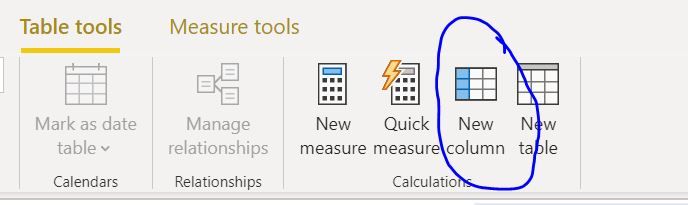
Incase you want to create a calculated column, you will need to click on the calculated column and not a measure.


123.JPG


Try creating a column and you can perform the Divide function.


Regards,

Harsh Nathani

View solution in original post

6 REPLIES 6
Greg_Deckler
Community Champion
Community Champion

Any time you reference a column in a measure, you must use an aggregation like MIN, MAX, SUM, AVERAGE, etc.

The function you are using has nothing to do with it, any function will exhibit the same behavior in a measure calculation.


Follow on LinkedIn
@ me in replies or I'll lose your thread!!!
Instead of a Kudo, please vote for this idea
Become an expert!: Enterprise DNA
External Tools: MSHGQM
YouTube Channel!: Microsoft Hates Greg
Latest book!:
DAX For Humans

DAX is easy, CALCULATE makes DAX hard...

Thanks @Greg_Deckler 🙂

you know those are my first days with Power BI so I still need to learn 🙂

Here to help flatten the learning curve! 🙂


Follow on LinkedIn
@ me in replies or I'll lose your thread!!!
Instead of a Kudo, please vote for this idea
Become an expert!: Enterprise DNA
External Tools: MSHGQM
YouTube Channel!: Microsoft Hates Greg
Latest book!:
DAX For Humans

DAX is easy, CALCULATE makes DAX hard...
harshnathani
Community Champion
Community Champion

Hi @Trooz ,


Incase you want to create a calculated column, you will need to click on the calculated column and not a measure.


123.JPG


Try creating a column and you can perform the Divide function.


Regards,

Harsh Nathani

Thanks @harshnathani , I was a quite confused between both things, now it's very clear 🤗

Helpful resources

Announcements
Power BI DataViz World Championships

Power BI Dataviz World Championships

Vote for your favorite vizzies from the Power BI World Championship submissions!

Sticker Challenge 2026 Carousel

Join our Community Sticker Challenge 2026

If you love stickers, then you will definitely want to check out our Community Sticker Challenge!

January Power BI Update Carousel

Power BI Monthly Update - January 2026

Check out the January 2026 Power BI update to learn about new features.

FabCon Atlanta 2026 carousel

FabCon Atlanta 2026

Join us at FabCon Atlanta, March 16-20, for the ultimate Fabric, Power BI, AI and SQL community-led event. Save $200 with code FABCOMM.