cancel
Showing results for 
Search instead for 
Did you mean: 

The Power BI Data Visualization World Championships is back! Get ahead of the game and start preparing now! Learn more

Reply
BigBadBob
Helper I
Helper I

Dax Measure

Hi,


I know im being stupid but this is driving me crazy. 


Based on the below data i would like to retrieve all lines where one of the lines has "Flag" = 1. I have included what the results should look like below.


Example Data


IDFlagCityDateAmount
10Timbuktu15/12/2019499
10Timbuktu15/12/2019162
10Timbuktu15/12/2019306
20Dubai15/12/2019107
20Dubai15/12/2019370
21Vatican City20/12/2019358
80Dubai15/12/201946
80Dubai15/12/201945
80Dubai15/12/2019144
80Dubai15/12/2019914
81Dubai15/12/2019817
80Dubai15/12/2019737


Required Result


IDFlagCityDateAmount
20Dubai15/12/2019107
20Dubai15/12/2019370
21Vatican City20/12/2019358
80Dubai15/12/201946
80Dubai15/12/201945
80Dubai15/12/2019144
80Dubai15/12/2019914
81Dubai15/12/2019817
80Dubai15/12/2019737


Big thanks in Advance!

2 ACCEPTED SOLUTIONS
AlB
Community Champion
Community Champion

Hi @BigBadBob 

Create a calculated column that will say whether the row is to be shown:

ShowLine = 
VAR res_ = CALCULATE(SUM(Table1[Flag]);ALLEXCEPT(Table1;Table1[ID]))
RETURN
IF ( res_ > 0; "YES"; "NO")

Then place all the fields you want to show in a  Table visual and filter for ShowLine = "YES"

It can also be done with a measure for the filtering, instead of a calculated column

Please mark the question solved when done and consider giving kudos if posts are helpful.

 Cheers 


SU18_powerbi_badge


View solution in original post

Hi @BigBadBob ,


Please share sample data for both the tables and the relationship between them.


Regards,

Harsh Nathani

View solution in original post

5 REPLIES 5
harshnathani
Community Champion
Community Champion

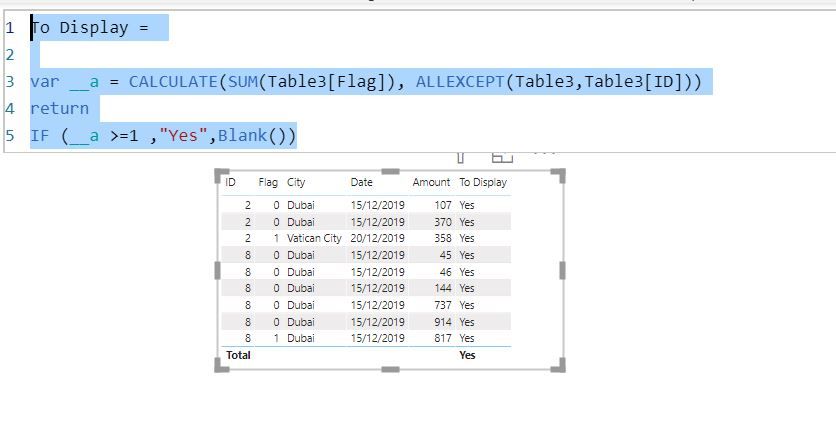
Hi @BigBadBob ,


To Display =

var __a = CALCULATE(SUM(Table3[Flag]), ALLEXCEPT(Table3,Table3[ID]))
return
IF (__a >=1 ,"Yes",Blank())
 
 
123.JPG
 
Regards,
Harsh Nathani
 
Did I answer your question? Mark my post as a solution! Appreciate with a Kudos!!
AlB
Community Champion
Community Champion

Hi @BigBadBob 

Create a calculated column that will say whether the row is to be shown:

ShowLine = 
VAR res_ = CALCULATE(SUM(Table1[Flag]);ALLEXCEPT(Table1;Table1[ID]))
RETURN
IF ( res_ > 0; "YES"; "NO")

Then place all the fields you want to show in a  Table visual and filter for ShowLine = "YES"

It can also be done with a measure for the filtering, instead of a calculated column

Please mark the question solved when done and consider giving kudos if posts are helpful.

 Cheers 


SU18_powerbi_badge


Hi - Massive thanks. The flag number is in another table. I tried using the below as a measure and it has not filtered it correctly. Sorry for not mentioning the second table in the original post


Includes Cancelled =
Var res_=
CALCULATE(SUM(Policy[flag Number]),
ALLEXCEPT(Transactions,Transactions[User ID]))

RETURN
IF(res_>=1,"Y","N")

Hi @BigBadBob ,


Please share sample data for both the tables and the relationship between them.


Regards,

Harsh Nathani

Hi,


I constructed a basic model using the criteria we discussed on two tables and it worked. I cant see why it does not work in my first model but i am unable to share it. Thanks in advance and Kudos coming your way 😉

Helpful resources

Announcements
Power BI DataViz World Championships

Power BI Dataviz World Championships

The Power BI Data Visualization World Championships is back! Get ahead of the game and start preparing now!

December 2025 Power BI Update Carousel

Power BI Monthly Update - December 2025

Check out the December 2025 Power BI Holiday Recap!

FabCon Atlanta 2026 carousel

FabCon Atlanta 2026

Join us at FabCon Atlanta, March 16-20, for the ultimate Fabric, Power BI, AI and SQL community-led event. Save $200 with code FABCOMM.