Don't miss your chance to take the Fabric Data Engineer (DP-600) exam for FREE! Find out how by attending the DP-600 session on April 23rd (pacific time), live or on-demand.
Learn moreNext up in the FabCon + SQLCon recap series: The roadmap for Microsoft SQL and Maximizing Developer experiences in Fabric. All sessions are available on-demand after the live show. Register now
Hi PBI Community,
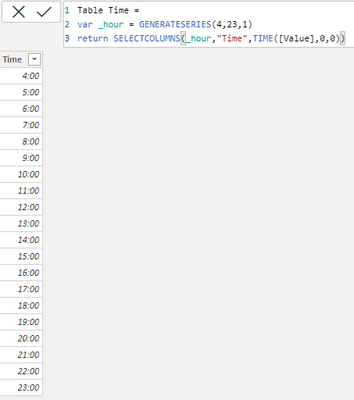
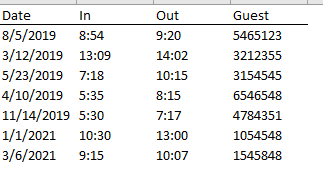
I'm trying to calculate hourly % utilization with a sample of the following data points. I want to display a matrix visual that shows by day and hour, the percentage of rooms occupied (similar to the last image). I found this DAX on this site but couldn't get it to calculate correctly. I also need to ensure that the appropriate utilization is calculated for the hours inbetween "In" and "Out." For instance, if 'In' is 8am and 'Out' is 10am, I need to make sure that the DAX accounts for the 9am hour.
Sorry -- new to DAX and looking to learn from the community.
_______________________
Measure Utilization =
var _occupied =
CALCULATE(COUNT('Source'[Guest]),
FILTER(ALLSELECTED('Source'),
'Source'[In]<=MAX('Table Time'[Time])&&'Source'[Out]>=MAX('Table Time'[Time])&&'Source'[Date]=MAX('Table Calendar'[Date])))
var _utilization =
DIVIDE(_occupied,20) // for 20 rooms
return
IF(_utilization = BLANK(),0,_utilization)
@seanguerrero , change var _occupied like this and try
var _occupied =
Sumx( addcolumns( summarize( 'Source', 'Source'[Guest], source[Date] ) , "_1", calculate(COUNT('Source'[Guest]),
FILTER(ALLSELECTED('Source'),
'Source'[In]<=MAX('Table Time'[Time])&&'Source'[Out]>=MAX('Table Time'[Time])&&'Source'[Date]=MAX('Table Calendar'[Date])))), [_1])
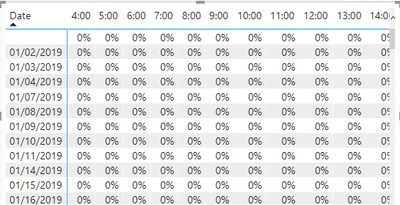
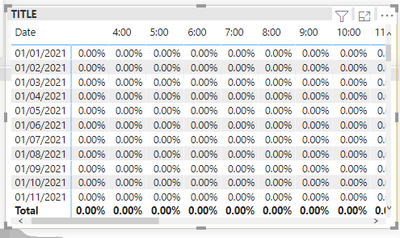
Thanks for the reply @amitchandak. I changed var _occupied per your recommendation. After charting Source[Date] and Table Time[Time], I'm getting zeros. Any help would be greatly appreciated! Thanks again!
If you have recently started exploring Fabric, we'd love to hear how it's going. Your feedback can help with product improvements.
A new Power BI DataViz World Championship is coming this June! Don't miss out on submitting your entry.
Experience the highlights from FabCon & SQLCon, available live and on-demand starting April 14th.
| User | Count |
|---|---|
| 6 | |
| 6 | |
| 3 | |
| 2 | |
| 2 |
| User | Count |
|---|---|
| 22 | |
| 10 | |
| 10 | |
| 7 | |
| 5 |