FabCon is coming to Atlanta
Join us at FabCon Atlanta from March 16 - 20, 2026, for the ultimate Fabric, Power BI, AI and SQL community-led event. Save $200 with code FABCOMM.
Register now!- Power BI forums
- Get Help with Power BI
- Desktop
- Service
- Report Server
- Power Query
- Mobile Apps
- Developer
- DAX Commands and Tips
- Custom Visuals Development Discussion
- Health and Life Sciences
- Power BI Spanish forums
- Translated Spanish Desktop
- Training and Consulting
- Instructor Led Training
- Dashboard in a Day for Women, by Women
- Galleries
- Data Stories Gallery
- Themes Gallery
- Contests Gallery
- QuickViz Gallery
- Quick Measures Gallery
- Visual Calculations Gallery
- Notebook Gallery
- Translytical Task Flow Gallery
- TMDL Gallery
- R Script Showcase
- Webinars and Video Gallery
- Ideas
- Custom Visuals Ideas (read-only)
- Issues
- Issues
- Events
- Upcoming Events
The Power BI Data Visualization World Championships is back! Get ahead of the game and start preparing now! Learn more
- Power BI forums
- Forums
- Get Help with Power BI
- DAX Commands and Tips
- DAX formula that parses whether a date is in the c...
- Subscribe to RSS Feed
- Mark Topic as New
- Mark Topic as Read
- Float this Topic for Current User
- Bookmark
- Subscribe
- Printer Friendly Page

- Mark as New
- Bookmark
- Subscribe
- Mute
- Subscribe to RSS Feed
- Permalink
- Report Inappropriate Content
DAX formula that parses whether a date is in the current month, before the month, or after the curre
Good morning guys, I need help in the following sense:
If the date is in the current month, it will show a yellow light, if the date is before the month of the current month, it will show a red light and if the date is after the current month, it will show an orange light.
I thank you all!
Solved! Go to Solution.
- Mark as New
- Bookmark
- Subscribe
- Mute
- Subscribe to RSS Feed
- Permalink
- Report Inappropriate Content
@osvaldocordeiro , no problem. Do you know you can edit your post? Click on the three vertical dots at the top-right of the post and select Edit Reply
- Mark as New
- Bookmark
- Subscribe
- Mute
- Subscribe to RSS Feed
- Permalink
- Report Inappropriate Content
Good morning Ajendra,
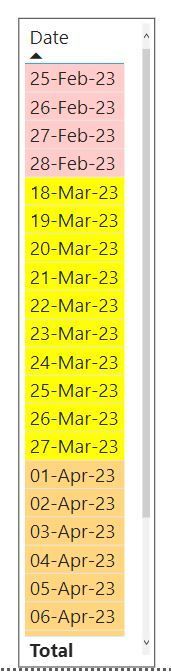
In addition to your help, we managed to solve the challenge. Thanks a lot for the help.
See how it turned out:
Indicator = VAR DATA_X = DATE(YEAR(TODAY()), MONTH(TODAY()), "01") RETURN IF('Portfolio Planning 2023'[Planned Start Period ].[MonthNo] == MONTH(TODAY()) && YEAR(TODAY()) == 'Portfolio Planning 2023'[Planned Start Period ].[Year], 0, IF('Portfolio Planning 2023'[Planned Start Period ]< DATA_X, -1,1))
- Mark as New
- Bookmark
- Subscribe
- Mute
- Subscribe to RSS Feed
- Permalink
- Report Inappropriate Content
Good morning EylesIT,
In addition to your help, we managed to solve the challenge. Thanks a lot for the help.
See how it turned out:
Indicator = VAR DATA_X = DATE(YEAR(TODAY()), MONTH(TODAY()), "01") RETURN IF('Portfolio Planning 2023'[Planned Start Period ].[MonthNo] == MONTH(TODAY()) && YEAR(TODAY()) == 'Portfolio Planning 2023'[Planned Start Period ].[Year], 0, IF('Portfolio Planning 2023'[Planned Start Period ]< DATA_X, -1,1))


- Mark as New
- Bookmark
- Subscribe
- Mute
- Subscribe to RSS Feed
- Permalink
- Report Inappropriate Content
- Mark as New
- Bookmark
- Subscribe
- Mute
- Subscribe to RSS Feed
- Permalink
- Report Inappropriate Content
Good morning Ajendra, first I want to thank you for your help. Thank you very much!
I am in need of a calculated column, as the measure did not work in my table. Then, I changed from measure to calculated column, but the result is not working. Look:
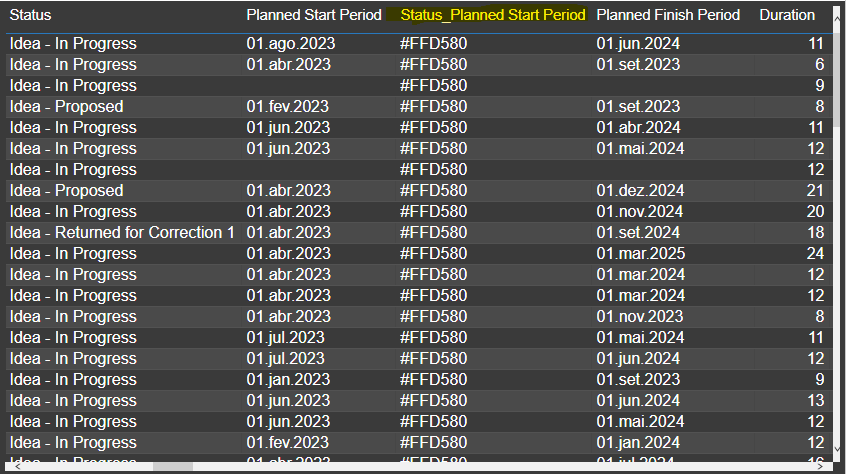
Thank you in advance if you can help me complete this challenge!
- Mark as New
- Bookmark
- Subscribe
- Mute
- Subscribe to RSS Feed
- Permalink
- Report Inappropriate Content
Good morning Ajendra,
In addition to your help, we managed to solve the challenge. Thanks a lot for the help.
See how it turned out:
Indicator = VAR DATA_X = DATE(YEAR(TODAY()), MONTH(TODAY()), "01") RETURN IF('Portfolio Planning 2023'[Planned Start Period ].[MonthNo] == MONTH(TODAY()) && YEAR(TODAY()) == 'Portfolio Planning 2023'[Planned Start Period ].[Year], 0, IF('Portfolio Planning 2023'[Planned Start Period ]< DATA_X, -1,1))

- Mark as New
- Bookmark
- Subscribe
- Mute
- Subscribe to RSS Feed
- Permalink
- Report Inappropriate Content
@osvaldocordeiro , this is one way. Create a DAX measure
KPIColour =
    SWITCH(TRUE()
        ,DATEDIFF(SELECTEDVALUE('Period'[date_from]), NOW(), MONTH) = 0, "Current month - Yellow"
        ,DATEDIFF(SELECTEDVALUE('Period'[date_from]), NOW(), MONTH) >= 0, "Before current month - Red"
        ,DATEDIFF(SELECTEDVALUE('Period'[date_from]), NOW(), MONTH) <= 0, "After current month - Orange"
    )
This uses teh date field [date_from] in my time table called 'period'. When I create a visual and place the fields [date_from] and the measure KPIColour, this is the result:
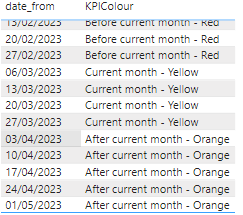
Hope this helps.
- Mark as New
- Bookmark
- Subscribe
- Mute
- Subscribe to RSS Feed
- Permalink
- Report Inappropriate Content
Good morning EylesIT, first I want to thank you for your help. Thank you very much!
I am in need of a calculated column, as the measure did not work in my table. Then, I changed from measure to calculated column, but the result is not working. Look:
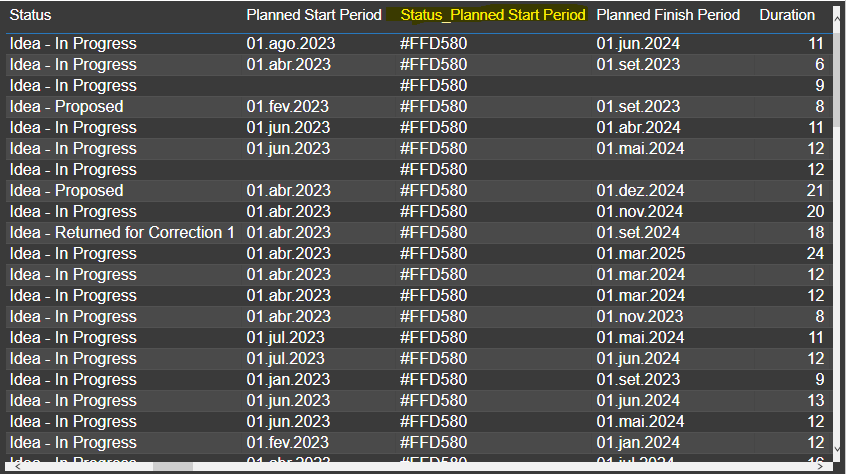
Thank you in advance if you can help me complete this challenge!
- Mark as New
- Bookmark
- Subscribe
- Mute
- Subscribe to RSS Feed
- Permalink
- Report Inappropriate Content
Sorry, EylesIT for not putting your name on it.
- Mark as New
- Bookmark
- Subscribe
- Mute
- Subscribe to RSS Feed
- Permalink
- Report Inappropriate Content
@osvaldocordeiro , no problem. Do you know you can edit your post? Click on the three vertical dots at the top-right of the post and select Edit Reply
Helpful resources

Power BI Dataviz World Championships
The Power BI Data Visualization World Championships is back! Get ahead of the game and start preparing now!

Power BI Monthly Update - November 2025
Check out the November 2025 Power BI update to learn about new features.

FabCon Atlanta 2026
Join us at FabCon Atlanta, March 16-20, for the ultimate Fabric, Power BI, AI and SQL community-led event. Save $200 with code FABCOMM.

| User | Count |
|---|---|
| 20 | |
| 10 | |
| 9 | |
| 4 | |
| 4 |


| User | Count |
|---|---|
| 34 | |
| 31 | |
| 20 | |
| 12 | |
| 11 |


