FabCon is coming to Atlanta
Join us at FabCon Atlanta from March 16 - 20, 2026, for the ultimate Fabric, Power BI, AI and SQL community-led event. Save $200 with code FABCOMM.
Register now!- Power BI forums
- Get Help with Power BI
- Desktop
- Service
- Report Server
- Power Query
- Mobile Apps
- Developer
- DAX Commands and Tips
- Custom Visuals Development Discussion
- Health and Life Sciences
- Power BI Spanish forums
- Translated Spanish Desktop
- Training and Consulting
- Instructor Led Training
- Dashboard in a Day for Women, by Women
- Galleries
- Data Stories Gallery
- Themes Gallery
- Contests Gallery
- QuickViz Gallery
- Quick Measures Gallery
- Visual Calculations Gallery
- Notebook Gallery
- Translytical Task Flow Gallery
- TMDL Gallery
- R Script Showcase
- Webinars and Video Gallery
- Ideas
- Custom Visuals Ideas (read-only)
- Issues
- Issues
- Events
- Upcoming Events
The Power BI Data Visualization World Championships is back! Get ahead of the game and start preparing now! Learn more
- Power BI forums
- Forums
- Get Help with Power BI
- DAX Commands and Tips
- DAX: How to do a speciall DISTINCT COUNT on ID if ...
- Subscribe to RSS Feed
- Mark Topic as New
- Mark Topic as Read
- Float this Topic for Current User
- Bookmark
- Subscribe
- Printer Friendly Page


- Mark as New
- Bookmark
- Subscribe
- Mute
- Subscribe to RSS Feed
- Permalink
- Report Inappropriate Content
DAX: How to do a speciall DISTINCT COUNT on ID if it
Hi all,
I have this tables:
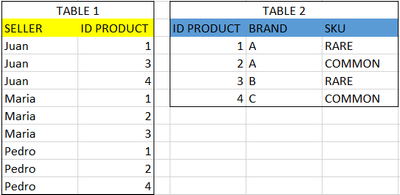
I am trying to count all the ID that had sell at least one product in each of the following categories:
-Sell a product of Brand A & it is rare
-Sell a product of Brand B
-Sell a product of Brand C
In this case, it would be only one person; Juan.
Any suggestions which function I should use?
Solved! Go to Solution.

- Mark as New
- Bookmark
- Subscribe
- Mute
- Subscribe to RSS Feed
- Permalink
- Report Inappropriate Content
// Connect T2 to T1 on [ID Product]
// with one-way filtering from T2 to
// T1.

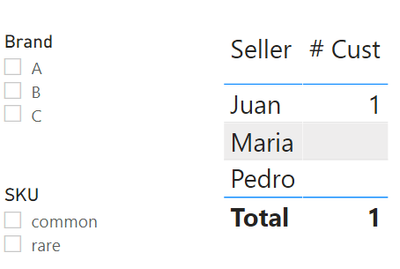
[# Cust] =
COUNTROWS(
    FILTER(
        DISTINCT( T1[Seller] ),
        var HasType1Products =
            CALCULATE(
                NOT ISEMPTY( T2 ),
                KEEPFILTERS(
                    T2[Brand] = "A"
                    &&
                    T2[SKU] = "Rare"
                ),
                CROSSFILTER(
                    T2[ProdID],
                    T1[ProdID],
                    BOTH
                )
            )
         var HasType2Products =
            CALCULATE(
                NOT ISEMPTY( T2 ),
                KEEPFILTERS(
                    T2[Brand] = "B"
                ),
                CROSSFILTER(
                    T2[ProdID],
                    T1[ProdID],
                    BOTH
                )
            )
         var HasType3Products =
            CALCULATE(
                NOT ISEMPTY( T2 ),
                KEEPFILTERS(
                    T2[Brand] = "C"
                ),
                CROSSFILTER(
                    T2[ProdID],
                    T1[ProdID],
                    BOTH
                )
            )
         var HasAll3Types = TRUE()
            && HasType1Products
            && HasType2Products
            && HasType3Products
         return
            HasAll3Types
    )
 )
- Mark as New
- Bookmark
- Subscribe
- Mute
- Subscribe to RSS Feed
- Permalink
- Report Inappropriate Content
Hi @AlB @Anonymous !
Both solutions works perfectly!
Thank you very much, it was my first time asking for help, and you made my day!


- Mark as New
- Bookmark
- Subscribe
- Mute
- Subscribe to RSS Feed
- Permalink
- Report Inappropriate Content
This doesn't need a relationship between the tables:
Measure =
VAR auxT_ =
    FILTER (
        Table2,
        ( Table2[Brand] = "A" && Table2[SKU] = "RARE" ) || Table2[Brand] IN { "B", "C" }
    )
RETURN
    COUNTROWS (
        FILTER (
            DISTINCT ( Table1[Seller] ),
            COUNTROWS (
                INTERSECT (
                    { "A", "B", "C" },
                    CALCULATETABLE (
                        DISTINCT ( Table2[Brand] ),
                        TREATAS ( CALCULATETABLE ( DISTINCT ( Table1[IDProduct] ) ), Table2[IDProduct] ), auxT_)
                )
            ) = 3
        )
    )
|
|
Please accept the solution when done and consider giving a thumbs up if posts are helpful. Contact me privately for support with any larger-scale BI needs, tutoring, etc. |

- Mark as New
- Bookmark
- Subscribe
- Mute
- Subscribe to RSS Feed
- Permalink
- Report Inappropriate Content
// Connect T2 to T1 on [ID Product]
// with one-way filtering from T2 to
// T1.

[# Cust] =
COUNTROWS(
    FILTER(
        DISTINCT( T1[Seller] ),
        var HasType1Products =
            CALCULATE(
                NOT ISEMPTY( T2 ),
                KEEPFILTERS(
                    T2[Brand] = "A"
                    &&
                    T2[SKU] = "Rare"
                ),
                CROSSFILTER(
                    T2[ProdID],
                    T1[ProdID],
                    BOTH
                )
            )
         var HasType2Products =
            CALCULATE(
                NOT ISEMPTY( T2 ),
                KEEPFILTERS(
                    T2[Brand] = "B"
                ),
                CROSSFILTER(
                    T2[ProdID],
                    T1[ProdID],
                    BOTH
                )
            )
         var HasType3Products =
            CALCULATE(
                NOT ISEMPTY( T2 ),
                KEEPFILTERS(
                    T2[Brand] = "C"
                ),
                CROSSFILTER(
                    T2[ProdID],
                    T1[ProdID],
                    BOTH
                )
            )
         var HasAll3Types = TRUE()
            && HasType1Products
            && HasType2Products
            && HasType3Products
         return
            HasAll3Types
    )
 )
- Mark as New
- Bookmark
- Subscribe
- Mute
- Subscribe to RSS Feed
- Permalink
- Report Inappropriate Content
Hi @Anonymous & @AlB
Both options doesn't work for me 😞
Maybe my question was confusing, but I need to count a seller if they sold at least on product in EACH category:
-Sell a product of Brand A & it is rare
-Sell a product of Brand B
-Sell a product of Brand C
Your solutions works to count if they sold at least one of the list, no matters what they sold in the others categorys.
In my example:
Juan sold a product 1 (A - Rare), product 3 (B) and product 4 (C), so i want to count him.
Maria sold a product 1 (A - Rare), product 2 (A - Common) and product 3 (B). She didn't sell a product brand C, so I dont want to count her.
In the same way, Pedro sold Product 1 (A -Rare), product 2 (A - Common) and product 4 (C - Common). He didn't sell a product brand B, so I don'w want to count him either.
Thank you all for your help, I really apreciatte it 🙂
I keep looking for a solution!
- Mark as New
- Bookmark
- Subscribe
- Mute
- Subscribe to RSS Feed
- Permalink
- Report Inappropriate Content
[# Cust] =
var ProdOfInterest =
    SELECTCOLUMNS(
        FILTER(
            ALL( T2 ),
            (T2[Brand], T2[SKU]) IN
            UNION(
                {("A", "Rare")},
                CROSSJOIN(
                    {"B", "C"},
                    ALL( T2[SKU] )
                )
            )
        )
        "@ProdID",
            T2[ID Product]
    )
var Result =
    CALCULATE(
        DISTINCTCOUNT( T1[Seller] ),
        KEEPFILTERS(
            TREATAS(
                ProdOfInterest,
                T1[ID Product]
            )
        )
    )
return
    Result
This code respects all filters put on the T1 (Table 1) table.
- Mark as New
- Bookmark
- Subscribe
- Mute
- Subscribe to RSS Feed
- Permalink
- Report Inappropriate Content
Hi @gustalem
Place this measure in a card visual
Measure =
VAR auxT_ =
    CALCULATETABLE (
        DISTINCT ( Table2[Id product] ),
        FILTER (
            Table2,
            ( Table2[Brand] = "A" && Table2[Brand] = "RARE" ) || Table2[Brand] IN { "B", "C" }
        )
    )
RETURN
    CALCULATE (
        DISTINCTCOUNT ( Table1[Seller] ),
        TREATAS ( auxT_, Table1[Id product] )
    )
|
|
Please accept the solution when done and consider giving a thumbs up if posts are helpful. Contact me privately for support with any larger-scale BI needs, tutoring, etc. |
Helpful resources

Power BI Dataviz World Championships
The Power BI Data Visualization World Championships is back! Get ahead of the game and start preparing now!

Power BI Monthly Update - December 2025
Check out the December 2025 Power BI Holiday Recap!

FabCon Atlanta 2026
Join us at FabCon Atlanta, March 16-20, for the ultimate Fabric, Power BI, AI and SQL community-led event. Save $200 with code FABCOMM.

| User | Count |
|---|---|
| 14 | |
| 7 | |
| 4 | |
| 4 | |
| 3 |


| User | Count |
|---|---|
| 23 | |
| 10 | |
| 10 | |
| 6 | |
| 5 |


