cancel
Showing results for 
Search instead for 
Did you mean: 

The Power BI Data Visualization World Championships is back! Get ahead of the game and start preparing now! Learn more

Reply
sandy_a
Frequent Visitor

Tabular turn row records into category columns grouped by date

I'm fairly new to Tabular, DAX and Power BI although I have a history with SSAS and SSRS.  


I was hoping someone could point me in the right direction of how to achieve the following with a Linked Tabular model (i.e. I can't apply the groupings in the Power BI report)


I have a data table in the following record format:

sandy_a_0-1621037389292.png


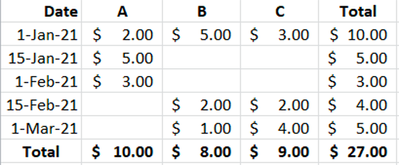
Which I'm trying to display in Power BI in the following group format:

sandy_a_1-1621037428403.png


This is where I've been able to get to by creating a 'Total' measure with DAX Calculate(Sum(Table[Amount]), Filter(Table, Table[Type] = "A")). 

sandy_a_2-1621037623677.png


Do I need to create Measures or a Calculated Group in my Tabular model (or something else)?  


Thanks in advance for any help you can give me.


1 ACCEPTED SOLUTION
sandy_a
Frequent Visitor

Solved - just needed to use a Matrix visual in Power BI

View solution in original post

1 REPLY 1
sandy_a
Frequent Visitor

Solved - just needed to use a Matrix visual in Power BI

Helpful resources

Announcements
November Power BI Update Carousel

Power BI Monthly Update - November 2025

Check out the November 2025 Power BI update to learn about new features.

Fabric Data Days Carousel

Fabric Data Days

Advance your Data & AI career with 50 days of live learning, contests, hands-on challenges, study groups & certifications and more!

FabCon Atlanta 2026 carousel

FabCon Atlanta 2026

Join us at FabCon Atlanta, March 16-20, for the ultimate Fabric, Power BI, AI and SQL community-led event. Save $200 with code FABCOMM.