cancel
Showing results for 
Search instead for 
Did you mean: 

We've captured the moments from FabCon & SQLCon that everyone is talking about, and we are bringing them to the community, live and on-demand. Starts on April 14th. Register now

Reply
mlozano
Helper III
Helper III

DAX CALCULATE ERROR

Hello, I have the following problem.


I have a measure built in DAX called Share % SKU ACT Volume, it is the percentage participation that each SKU has in the total ACT Volume, with that measure I have no problem.


Now I need to build a SUMIF that calculates the Share % SKU ACT Volume grouped by category for which I am using CALCULATE. So far I managed to build a code that brings me the correct result but when I apply the region filter or any filter, the result is static.


my code is as follows:


SUM of SKU ACT Volume Share % by Category Static = CALCULATE(Worksheet[SKU ACT Volume % Share], ALLEXCEPT(Worksheet, Worksheet[Month], Worksheet[Category]))


I understand that the result is static because I am using ALLEXCEPT, so he tried to set my CALCULATE in such a way that my result changes and is correct according to the applied filters. 


So I come up with the following code:


SUM of Share % SKU ACT Volume by category = CALCULATE(Worksheet[Share % SKU ACT Volume], ALLSELECTED(Worksheet), VALUES(Worksheet[Month]), VALUES(Worksheet[Category]))


The result I get is incorrect, my intention is to get to the result of the measure SUM of SKU ACT Volume Share % by Category Static but that the result changes according to the applied filters.


How can I achieve it?


Share PBI File PBI FILE 

1 ACCEPTED SOLUTION
mlozano
Helper III
Helper III

I solved it like this:


VAR Numerator = CALCULATE(SUM(Worksheet[ACT Volume]), ALLSELECTED(Worksheet), VALUES(Worksheet[Month]),VALUES(Worksheet[Category]))

VAR Denominator = CALCULATE(SUM(Worksheet[ACT Volume]), ALLSELECTED(Worksheet))

RETURN

DIVIDE(Numerator, Denominator)


View solution in original post

5 REPLIES 5
mlozano
Helper III
Helper III

I solved it like this:


VAR Numerator = CALCULATE(SUM(Worksheet[ACT Volume]), ALLSELECTED(Worksheet), VALUES(Worksheet[Month]),VALUES(Worksheet[Category]))

VAR Denominator = CALCULATE(SUM(Worksheet[ACT Volume]), ALLSELECTED(Worksheet))

RETURN

DIVIDE(Numerator, Denominator)


vapid128
Solution Specialist
Solution Specialist

you can't calculate a colnum, it need to be a measure, like sum the colnum or ave the colnum


SUM of SKU ACT Volume Share % by Category Static = CALCULATE(Sum(Worksheet[SKU ACT Volume % Share]), ALLEXCEPT(Worksheet, Worksheet[Month], Worksheet[Category]))


A calculated column would contain static values ​​and I need my result to change as I apply filters on the report.


To add the measure I must create another measure with a SUMX to force the context of the row but before doing so I must obtain the correct values ​​from my calculate

vapid128
Solution Specialist
Solution Specialist

OKOK

I download you file.

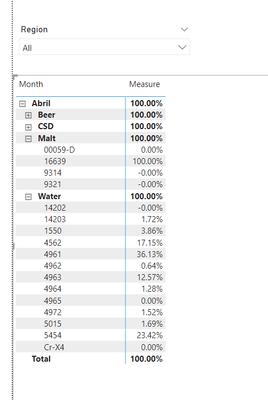
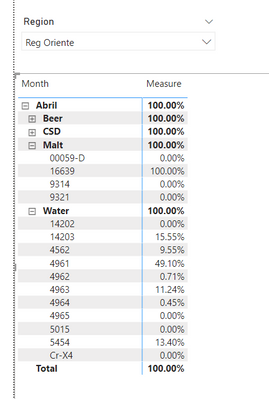
So... you want calculate ACT Volume Share % for each SKU ID base on colnum Month and colnum Category. And sum all those number become 100%


like this

vapid128_1-1655341203517.pngvapid128_2-1655341225066.png


Measure = AVERAGEX(
    VALUES(Worksheet[index]),
    CALCULATE(
        DIVIDE(
            SUM([ACT Volume]),
            CALCULATE(
                SUM([ACT Volume]),
                REMOVEFILTERS(Worksheet[SKU ID])
            )
        )
    )
)
index = [Month]&[Category]

Thanks for your answer. It is not what I need, the participation percentage is already calculated, which is the Share % SKU ACT Volume measure, now what I have to do is, that measure, which is my participation percentage, include it in a calculate that groups it by month and category .


So if you can see with the following code:

SUM of Share % SKU ACT Volume by category Static = CALCULATE(Worksheet[Share % SKU ACT Volume], ALLEXCEPT(Worksheet, Worksheet[Month], Worksheet[Category]))


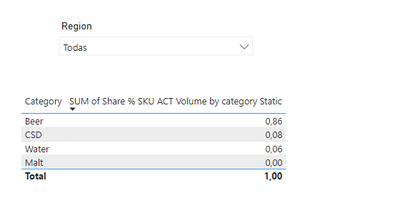
Result


Without filters

mlozano_0-1655343169023.png

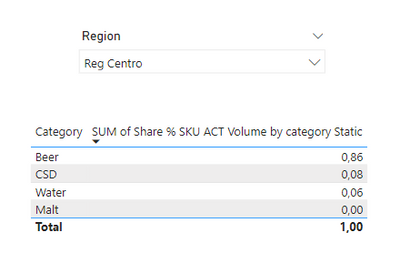
It has the result that I expect, what happens is that this result is not dynamic since I apply the region filter and it is the same all the time, what I need is to get that result and that it fits to the granularity defined by the filters.


With filters

mlozano_1-1655343224943.png


The expected result would be the distribution of 100% that represents the total of my participation among my four categories and that this be dynamic every time I change the region filter.

Helpful resources

Announcements
New to Fabric survey Carousel

New to Fabric Survey

If you have recently started exploring Fabric, we'd love to hear how it's going. Your feedback can help with product improvements.

Power BI DataViz World Championships carousel

Power BI DataViz World Championships - June 2026

A new Power BI DataViz World Championship is coming this June! Don't miss out on submitting your entry.

Join our Fabric User Panel

Join our Fabric User Panel

Share feedback directly with Fabric product managers, participate in targeted research studies and influence the Fabric roadmap.

March Power BI Update Carousel

Power BI Community Update - March 2026

Check out the March 2026 Power BI update to learn about new features.