Join us at FabCon Atlanta from March 16 - 20, 2026, for the ultimate Fabric, Power BI, AI and SQL community-led event. Save $200 with code FABCOMM.
Register now!Get Fabric Certified for FREE during Fabric Data Days. Don't miss your chance! Request now
I have a table of all sales orders, including product group, order reference, order qty, customer, plus various other attributes.
I want to be able to create a report that summarises the order qty by customer and display the top 20 customers
I then want to apply a filter to change the product group
However i cannot seem to write the correct formula for establishing the rank.
Thanks
Hi, i am new in this community and still trying hard to navigate around.
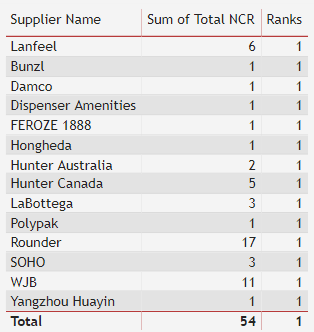
i am trying to rank my supplier performance using the following DAX but the result still showing rank = 1.
Ranks = RANKX(ALL('NCR report'[Total NCR]), SUMX('NCR report', 'NCR report'[Total NCR]),,ASC)
please help..
HI @Anonymous ,
You can create a RANKX Measure
Ranks = RANKX(ALL('NCR report'[Supplier]), [Total NCR],,ASC)
Regards,
Harsh Nathani
Hello,
Are you sure you need a measure to get the desired result?
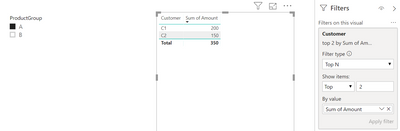
It is possible to display a dynamic TOPN in a visual that is influenced by slicers;
Check out the November 2025 Power BI update to learn about new features.
Advance your Data & AI career with 50 days of live learning, contests, hands-on challenges, study groups & certifications and more!
| User | Count |
|---|---|
| 11 | |
| 9 | |
| 9 | |
| 6 | |
| 5 |
| User | Count |
|---|---|
| 27 | |
| 22 | |
| 19 | |
| 17 | |
| 11 |