Join us at FabCon Atlanta from March 16 - 20, 2026, for the ultimate Fabric, Power BI, AI and SQL community-led event. Save $200 with code FABCOMM.
Register now!Vote for your favorite vizzies from the Power BI Dataviz World Championship submissions. Vote now!
I have a table of all sales orders, including product group, order reference, order qty, customer, plus various other attributes.
I want to be able to create a report that summarises the order qty by customer and display the top 20 customers
I then want to apply a filter to change the product group
However i cannot seem to write the correct formula for establishing the rank.
Thanks
Hi, i am new in this community and still trying hard to navigate around.
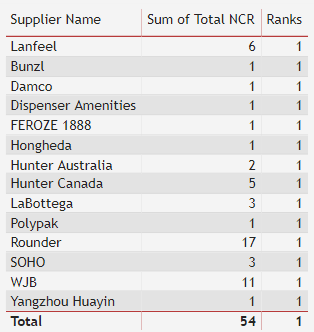
i am trying to rank my supplier performance using the following DAX but the result still showing rank = 1.
Ranks = RANKX(ALL('NCR report'[Total NCR]), SUMX('NCR report', 'NCR report'[Total NCR]),,ASC)
please help..
HI @Anonymous ,
You can create a RANKX Measure
Ranks = RANKX(ALL('NCR report'[Supplier]), [Total NCR],,ASC)
Regards,
Harsh Nathani
Hello,
Are you sure you need a measure to get the desired result?
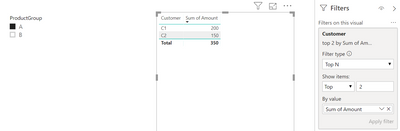
It is possible to display a dynamic TOPN in a visual that is influenced by slicers;
Vote for your favorite vizzies from the Power BI World Championship submissions!
If you love stickers, then you will definitely want to check out our Community Sticker Challenge!
Check out the January 2026 Power BI update to learn about new features.
| User | Count |
|---|---|
| 7 | |
| 5 | |
| 3 | |
| 3 | |
| 3 |
| User | Count |
|---|---|
| 17 | |
| 13 | |
| 9 | |
| 5 | |
| 4 |