cancel
Showing results for 
Search instead for 
Did you mean: 

The Power BI Data Visualization World Championships is back! Get ahead of the game and start preparing now! Learn more

Reply
MNGoodyear
Frequent Visitor

Creating Ranks

I have a table of all sales orders, including product group, order reference, order qty, customer, plus various other attributes.


I want to be able to create a report that summarises the order qty by customer and display the top 20 customers


I then want to apply a filter to change the product group


However i cannot seem to write the correct formula for establishing the rank.


Thanks

3 REPLIES 3
Anonymous
Not applicable

Hi, i am new in this community and still trying hard to navigate around.


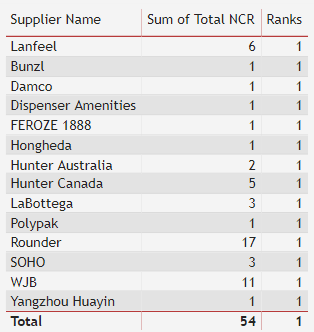
i am trying to rank my supplier performance using the following DAX but the result still showing rank = 1.

Ranks = RANKX(ALL('NCR report'[Total NCR]), SUMX('NCR report', 'NCR report'[Total NCR]),,ASC)

please help..


RANKX.png


HI @Anonymous ,


You can create a RANKX Measure


Ranks = RANKX(ALL('NCR report'[Supplier]), [Total NCR],,ASC)


Regards,

Harsh Nathani


avanderschilden
Resolver I
Resolver I

Hello,


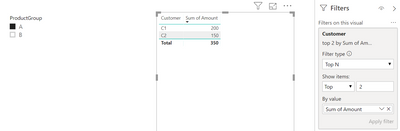
Are you sure you need a measure to get the desired result?

It is possible to display a dynamic TOPN in a visual that is influenced by slicers;


Capture.PNG

Helpful resources

Announcements
Power BI DataViz World Championships

Power BI Dataviz World Championships

The Power BI Data Visualization World Championships is back! Get ahead of the game and start preparing now!

December 2025 Power BI Update Carousel

Power BI Monthly Update - December 2025

Check out the December 2025 Power BI Holiday Recap!

FabCon Atlanta 2026 carousel

FabCon Atlanta 2026

Join us at FabCon Atlanta, March 16-20, for the ultimate Fabric, Power BI, AI and SQL community-led event. Save $200 with code FABCOMM.