We've captured the moments from FabCon & SQLCon that everyone is talking about, and we are bringing them to the community, live and on-demand. Starts on April 14th. Register now
I have a table of all sales orders, including product group, order reference, order qty, customer, plus various other attributes.
I want to be able to create a report that summarises the order qty by customer and display the top 20 customers
I then want to apply a filter to change the product group
However i cannot seem to write the correct formula for establishing the rank.
Thanks
Hi, i am new in this community and still trying hard to navigate around.
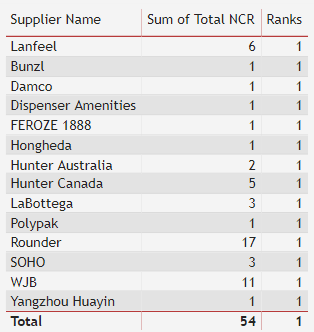
i am trying to rank my supplier performance using the following DAX but the result still showing rank = 1.
Ranks = RANKX(ALL('NCR report'[Total NCR]), SUMX('NCR report', 'NCR report'[Total NCR]),,ASC)
please help..
HI @Anonymous ,
You can create a RANKX Measure
Ranks = RANKX(ALL('NCR report'[Supplier]), [Total NCR],,ASC)
Regards,
Harsh Nathani
Hello,
Are you sure you need a measure to get the desired result?
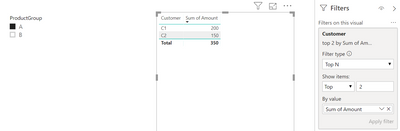
It is possible to display a dynamic TOPN in a visual that is influenced by slicers;
If you have recently started exploring Fabric, we'd love to hear how it's going. Your feedback can help with product improvements.
A new Power BI DataViz World Championship is coming this June! Don't miss out on submitting your entry.
| User | Count |
|---|---|
| 22 | |
| 13 | |
| 10 | |
| 6 | |
| 5 |