cancel
Showing results for 
Search instead for 
Did you mean: 

The Power BI Data Visualization World Championships is back! Get ahead of the game and start preparing now! Learn more

Reply
MekdigG
Frequent Visitor

Create a single column based on multiple columns and conditions

Hi,


I need to create a column (a Status) to show list of clients who has completed or not completed a quiz.

I have a sample table below. I want to say if a client has passed all the quizzes then "complete" if not "not complete"

there is "not applicable" value(option) in any of the columns but it shouldn't affect the output; it can be Pass or not applicable and they can be counted as completed. 


Please help 🙂


Quiz   1Quiz   2Quiz    3Status
FailPassPassNot Completed
PassFailPassNot Completed
PassPassPassCompleted
N/APassPassCompleted
PassN/APassCompleted
FailFailN/ANot Completed


1 ACCEPTED SOLUTION
AUaero
Responsive Resident
Responsive Resident

I'm assuming your quiz data has a client ID field.  If so, try this:

# Quiz Status = 
VAR Quiz1Result = MAX(QuizData[Quiz1])
VAR Quiz2Result = MAX(QuizData[Quiz2])
VAR Quiz3Result = MAX(QuizData[Quiz3])

VAR Quiz1Status = 
SWITCH(
    TRUE(),
    Quiz1Result IN {"N/A", "Pass"}, 1,
    0
)

VAR Quiz2Status = 
SWITCH(
    TRUE(),
    Quiz2Result IN {"N/A", "Pass"}, 1,
    0
)

VAR Quiz3Status = 
SWITCH(
    TRUE(),
    Quiz3Result IN {"N/A", "Pass"}, 1,
    0
)

RETURN
SWITCH(
    TRUE(),
    Quiz1Status + Quiz2Status + Quiz3Status = 3, "Complete",
    "Not Complete"
)

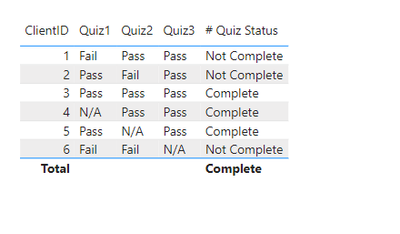
which will give you the following result:

AUaero_0-1659050544170.png


Please accept this as a solution if it solves your problem.

View solution in original post

4 REPLIES 4
AUaero
Responsive Resident
Responsive Resident

I'm assuming your quiz data has a client ID field.  If so, try this:

# Quiz Status = 
VAR Quiz1Result = MAX(QuizData[Quiz1])
VAR Quiz2Result = MAX(QuizData[Quiz2])
VAR Quiz3Result = MAX(QuizData[Quiz3])

VAR Quiz1Status = 
SWITCH(
    TRUE(),
    Quiz1Result IN {"N/A", "Pass"}, 1,
    0
)

VAR Quiz2Status = 
SWITCH(
    TRUE(),
    Quiz2Result IN {"N/A", "Pass"}, 1,
    0
)

VAR Quiz3Status = 
SWITCH(
    TRUE(),
    Quiz3Result IN {"N/A", "Pass"}, 1,
    0
)

RETURN
SWITCH(
    TRUE(),
    Quiz1Status + Quiz2Status + Quiz3Status = 3, "Complete",
    "Not Complete"
)

which will give you the following result:

AUaero_0-1659050544170.png


Please accept this as a solution if it solves your problem.

Thank you, i tried it and it gave me a new column with all results "complete", i checked to make sure the formula is correct but it is still giving me all all complete status only.

AUaero
Responsive Resident
Responsive Resident

Did you create this as a measure or a calculated column?  The code above will work as a measure.  To use it for a calculated column, ditch the MAX function on the QuizXResult variables.

Yes, it was created it as a column and now its working after i changed it to a meausre; thank you so much! I have accepted your solution.

Helpful resources

Announcements
Power BI DataViz World Championships

Power BI Dataviz World Championships

The Power BI Data Visualization World Championships is back! Get ahead of the game and start preparing now!

November Power BI Update Carousel

Power BI Monthly Update - November 2025

Check out the November 2025 Power BI update to learn about new features.

FabCon Atlanta 2026 carousel

FabCon Atlanta 2026

Join us at FabCon Atlanta, March 16-20, for the ultimate Fabric, Power BI, AI and SQL community-led event. Save $200 with code FABCOMM.