Join us at FabCon Atlanta from March 16 - 20, 2026, for the ultimate Fabric, Power BI, AI and SQL community-led event. Save $200 with code FABCOMM.
Register now!The Power BI Data Visualization World Championships is back! Get ahead of the game and start preparing now! Learn more
Hi all,
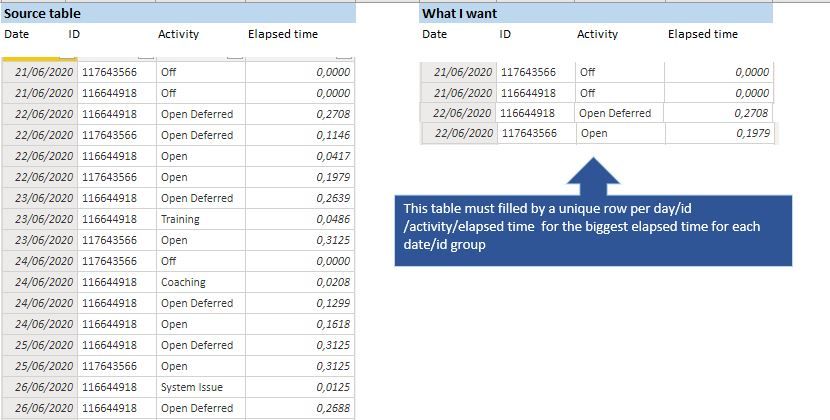
I've the table on the left and I want to obtain the table on the right.
Already use the SUMARIZEDCOLUMN and works fine if I don´t include the Activity field, but in that case, I only get the maximum Elapsed time but I do not know what was the Activity responsible for that.
@Anonymous , use this in place of activity
lastnonblankvalue(table[elapsed time],max(table[Activity]))
and for elapsed time do not use aggregation (do not summarize)
@amitchandak
If I use something like:
New Table = SUMMARIZECOLUMNS (
'Date'[Date],
'Schedules[Client ID],
FIRSTNONBLANKVALUE( Schedules [Activity], MAX ( Schedules [Time in Acivity] ) ) )
I get an error saying: The SUMMARIZATIONCOLUMNS function expects a table expression for argument '3', but a string or numeric expression was used.
The Power BI Data Visualization World Championships is back! Get ahead of the game and start preparing now!
Check out the November 2025 Power BI update to learn about new features.
| User | Count |
|---|---|
| 20 | |
| 10 | |
| 9 | |
| 4 | |
| 4 |
| User | Count |
|---|---|
| 33 | |
| 31 | |
| 19 | |
| 12 | |
| 11 |