Advance your Data & AI career with 50 days of live learning, dataviz contests, hands-on challenges, study groups & certifications and more!
Get registeredGet Fabric Certified for FREE during Fabric Data Days. Don't miss your chance! Request now
Hi all,
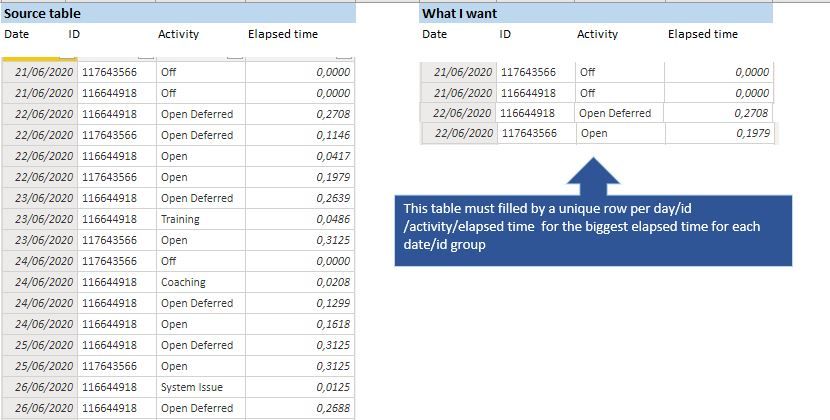
I've the table on the left and I want to obtain the table on the right.
Already use the SUMARIZEDCOLUMN and works fine if I don´t include the Activity field, but in that case, I only get the maximum Elapsed time but I do not know what was the Activity responsible for that.
@Anonymous , use this in place of activity
lastnonblankvalue(table[elapsed time],max(table[Activity]))
and for elapsed time do not use aggregation (do not summarize)
@amitchandak
If I use something like:
New Table = SUMMARIZECOLUMNS (
'Date'[Date],
'Schedules[Client ID],
FIRSTNONBLANKVALUE( Schedules [Activity], MAX ( Schedules [Time in Acivity] ) ) )
I get an error saying: The SUMMARIZATIONCOLUMNS function expects a table expression for argument '3', but a string or numeric expression was used.
Advance your Data & AI career with 50 days of live learning, contests, hands-on challenges, study groups & certifications and more!
Check out the October 2025 Power BI update to learn about new features.
| User | Count |
|---|---|
| 8 | |
| 8 | |
| 6 | |
| 5 | |
| 4 |
| User | Count |
|---|---|
| 25 | |
| 10 | |
| 8 | |
| 8 | |
| 8 |