This time we’re going bigger than ever. Fabric, Power BI, SQL, AI and more. We're covering it all. You won't want to miss it.
Learn moreLevel up your Power BI skills this month - build one visual each week and tell better stories with data! Get started
Hi all,
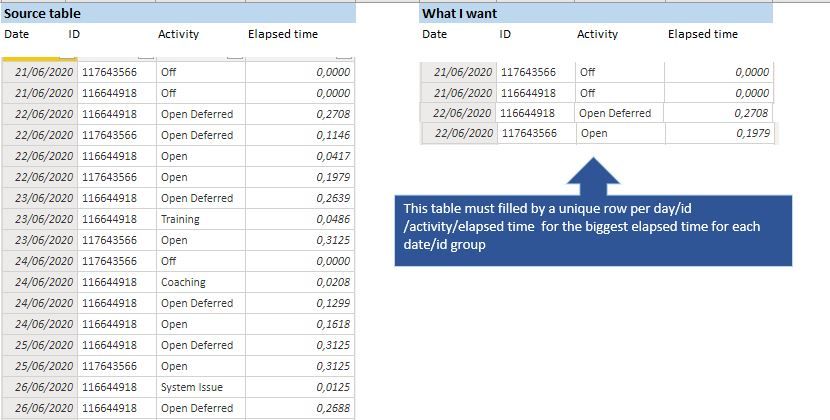
I've the table on the left and I want to obtain the table on the right.
Already use the SUMARIZEDCOLUMN and works fine if I don´t include the Activity field, but in that case, I only get the maximum Elapsed time but I do not know what was the Activity responsible for that.
@Anonymous , use this in place of activity
lastnonblankvalue(table[elapsed time],max(table[Activity]))
and for elapsed time do not use aggregation (do not summarize)
@amitchandak
If I use something like:
New Table = SUMMARIZECOLUMNS (
'Date'[Date],
'Schedules[Client ID],
FIRSTNONBLANKVALUE( Schedules [Activity], MAX ( Schedules [Time in Acivity] ) ) )
I get an error saying: The SUMMARIZATIONCOLUMNS function expects a table expression for argument '3', but a string or numeric expression was used.
Check out the April 2026 Power BI update to learn about new features.
Sign up to receive a private message when registration opens and key events begin.
If you have recently started exploring Fabric, we'd love to hear how it's going. Your feedback can help with product improvements.
| User | Count |
|---|---|
| 5 | |
| 4 | |
| 3 | |
| 3 | |
| 3 |