cancel
Showing results for 
Search instead for 
Did you mean: 

Next up in the FabCon + SQLCon recap series: The roadmap for Microsoft SQL and Maximizing Developer experiences in Fabric. All sessions are available on-demand after the live show. Register now

Reply
MrFahrenheit
Helper I
Helper I

Count Rows Based On Previous Row's value.

I have one column and it has 0s and 1s in it. I ONLY want to count the 0s which are followed by a 1 in the next row. For example, 0,1,0,1,0,1 would count 3 x 0s. Another example, 0,0,0,0,1 would only count one 0 because only one 0 is followed by a 1.


1

0

0

1


= 1 x 0 (only one 0 is followed by a 1


0

1

0

1

1

0

0

= 2 x 0


If anyone knows how to do this, please let me know. I checked into all the "Count" expressions but couldn't figure it out. 


1 ACCEPTED SOLUTION
Fowmy
Super User
Super User

@MrFahrenheit 

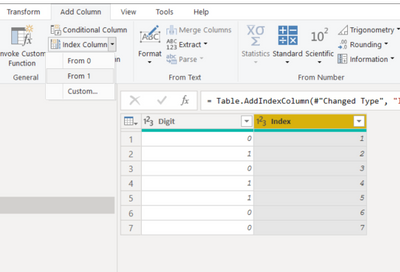
First, add an index column to your table in Power Query:

Fowmy_0-1660676038201.png


Then create the following measure to calculate the count:

Zero Count = 
    SUMX(
        Table4,
        VAR __CURRENTINDEX = Table4[Index]
        VAR __NEXTINDEX = __CURRENTINDEX + 1
        VAR __CURRENTDIGIT = Table4[Digit]        
        VAR __NEXTDIGIST = CALCULATE( MAX(Table4[Digit]) , Table4[Index] = __NEXTINDEX , REMOVEFILTERS(Table4))
        RETURN
        INT(__CURRENTDIGIT=0 && __NEXTDIGIST = 1)
    )


Did I answer your question? Mark my post as a solution! and hit thumbs up


Subscribe and learn Power BI from these videos

Website LinkedIn PBI User Group

View solution in original post

2 REPLIES 2
Fowmy
Super User
Super User

@MrFahrenheit 

First, add an index column to your table in Power Query:

Fowmy_0-1660676038201.png


Then create the following measure to calculate the count:

Zero Count = 
    SUMX(
        Table4,
        VAR __CURRENTINDEX = Table4[Index]
        VAR __NEXTINDEX = __CURRENTINDEX + 1
        VAR __CURRENTDIGIT = Table4[Digit]        
        VAR __NEXTDIGIST = CALCULATE( MAX(Table4[Digit]) , Table4[Index] = __NEXTINDEX , REMOVEFILTERS(Table4))
        RETURN
        INT(__CURRENTDIGIT=0 && __NEXTDIGIST = 1)
    )


Did I answer your question? Mark my post as a solution! and hit thumbs up


Subscribe and learn Power BI from these videos

Website LinkedIn PBI User Group

Thank you for your solution! I tested your suggestion by creating a smaller spreadsheet with only 50 items and manually counted how many "zeros" were followed in the next row by numbers greater than "zero". When I applied your measure/index idea, it came out to the right number!! I modified your code slightly to use "> 0" instead of "+ 1" in this part of the code (see example below) to count all "zeros" followed by any number greater than "zero": 

INT(__CURRENTDIGIT=0 && __NEXTDIGIST = 1)


Helpful resources

Announcements
New to Fabric survey Carousel

New to Fabric Survey

If you have recently started exploring Fabric, we'd love to hear how it's going. Your feedback can help with product improvements.

Power BI DataViz World Championships carousel

Power BI DataViz World Championships - June 2026

A new Power BI DataViz World Championship is coming this June! Don't miss out on submitting your entry.

Join our Fabric User Panel

Join our Fabric User Panel

Share feedback directly with Fabric product managers, participate in targeted research studies and influence the Fabric roadmap.

March Power BI Update Carousel

Power BI Community Update - March 2026

Check out the March 2026 Power BI update to learn about new features.