Don't miss your chance to take exam DP-600 or DP-700 on us!
Request nowLearn from the best! Meet the four finalists headed to the FINALS of the Power BI Dataviz World Championships! Register now
Hi,
Both Fact_GL and Dim_ExchangeRate comtains multiple MonthEndDate for a type of currency. I want to create a measure where the Rate from Dim_ExchangeRate will be picked up based on Period Selection. The rate will be used to divide the ending balances which is also based on Period Selection (Converted Amount). For example, when May-21 is selected, YTD May-21 numbers will be divided by the May-21 rate and when Jun-21 is selected, YTD Jun-21 numbers will be divided by the Jun-21 rate.
The Final Amount should also include if the Revalue Type in Fact is "Revalue", then take the Converted Amount else Base Amount.
I'm unable to create calculated column as the rate should not be stagnant so a measure is considered.
Data Model
Sample Data
| MonthEndDate | Currency | Trans Amount | Base Amount | CurrencyKey | Revalue Type |
| 5/31/2021 0:00 | USD | 10,000.00 | 10,000.00 | USD^202105 | Revalue |
| 5/31/2021 0:00 | USD | (120,000.00) | (120,000.00) | USD^202105 | Revalue |
| 5/31/2021 0:00 | AUD | (50,000.00) | (35,893.76) | AUD^202105 | Revalue |
| 5/31/2021 0:00 | AUD | (80,000.00) | (53,404.54) | AUD^202105 | Non-revalue |
| 5/31/2021 0:00 | NZD | (200,000.00) | (124,533.17) | NZD^202105 | Revalue |
| 6/30/2021 0:00 | AUD | (5,000.00) | (3,448.28) | AUD^202106 | Revalue |
| 6/30/2021 0:00 | NZD | (30,000.00) | (18,181.82) | NZD^202106 | Revalue |
| (475,000.00) | (345,461.56) |
Final Amount for each row in Fact based on period selection:
| May | May Rate | Jun | Jun Rate |
| 10,000.00 | 1.000 | 10,000.00 | 1.000 |
| (120,000.00) | 1.000 | (120,000.00) | 1.000 |
| (38,729.67) | 1.291 | (37,907.51) | 1.319 |
| (53,404.54) | (53,404.54) | ||
| (146,092.04) | 1.369 | (141,242.94) | 1.416 |
| (3,790.75) | 1.319 | ||
| (21,186.44) | 1.416 | ||
| (348,226.25) | (367,532.18) |
Dim_ExchangeRate
| Currency | MonthEndDate | Rate | CurrencyKey |
| AUD | 5/31/2021 0:00 | 1.291 | AUD^202105 |
| NZD | 5/31/2021 0:00 | 1.369 | NZD^202105 |
| USD | 5/31/2021 0:00 | 1 | USD^202105 |
| AUD | 6/30/2021 0:00 | 1.319 | AUD^202106 |
| NZD | 6/30/2021 0:00 | 1.416 | NZD^202106 |
| USD | 6/30/2021 0:00 | 1 | USD^202106 |
I appreciate any help. Thanks!
Hi @Greg_Deckler, thanks for your reply.
In your measure, "[CurrencyKey] = _CurrencyKey" might not be correct as it will fix the rate for each row in Fact table. What I require is if May-21 period is selected, I need YTD May-21 Trans Amount to be converted using May-21 rate and if Jun-21 period is selected, YTD May-21 + Jun-21 entries will be converted using Jun-21 rate.
@Joanne Maybe:
Measure =
VAR __MonthEndDate = MAX('Dim_Calendar'[MonthEndDate])
VAR __CurrencyKey = MAXX(FILTER('Fact_GL',[MonthEndDate]=__MonthEndDate),[CurrencyKey])
VAR __Rate = MAXX(FILTER('Dim_ExchangeRate',[CurrencyKey]=__CurrencyKey && [MonthEndDate]=__MonthEndDate),[Rate])
VAR __BaseAmount = MAX('Fact_GL'[Base Amount])
RETURN
__BaseAmount * __Rate
Hi @Greg_Deckler Link to PBIx: Link
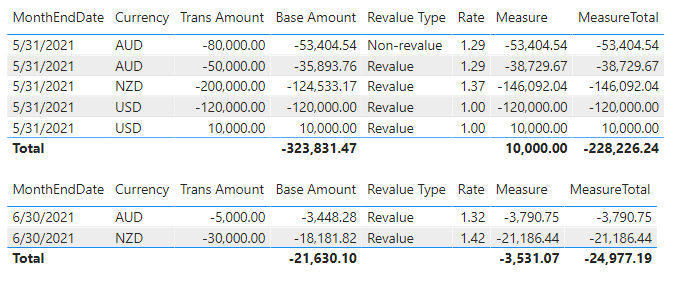
I have applied the suggested measure to my solution. Below are the results:
When May-21 & Jun-21 are selected in different table, the Trans Amount correctly converted using the rate of the selected month.
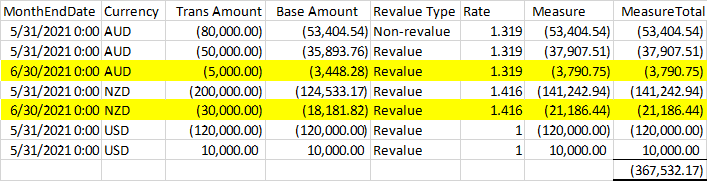
If Jun-21 is selected, the expected result is YTD Jun-21 balances will be converted using Jun-21 rate as below:
Can you also please help to take a look at the MeasureTotal which is not totalling the rows number?
Thank you in advance.
@Joanne Maybe:
Measure =
VAR __MonthEndDate = MAX('Dim_Calendar'[MonthEndDate])
VAR __CurrencyKey = MAX('Fact_GL'[CurrencyKey])
VAR __Rate = MAXX(FILTER('Dim_ExchangeRate',[CurrencyKey]=__CurrencyKey && [MonthEndDate]=__MonthEndDate),[Rate])
VAR __BaseAmount = MAX('Fact_GL'[Base Amount])
RETURN
__BaseAmount * __Rate
Share feedback directly with Fabric product managers, participate in targeted research studies and influence the Fabric roadmap.
Check out the February 2026 Power BI update to learn about new features.
| User | Count |
|---|---|
| 5 | |
| 4 | |
| 3 | |
| 3 | |
| 2 |