cancel
Showing results for 
Search instead for 
Did you mean: 

The Power BI Data Visualization World Championships is back! Get ahead of the game and start preparing now! Learn more

Reply
rbreneman
Helper II
Helper II

Combining Rows using DAX

Hi,


I have a table that contains census data, I've already added DAX columns to this table to return a true/false on whether this is the start date or end date of a stay.


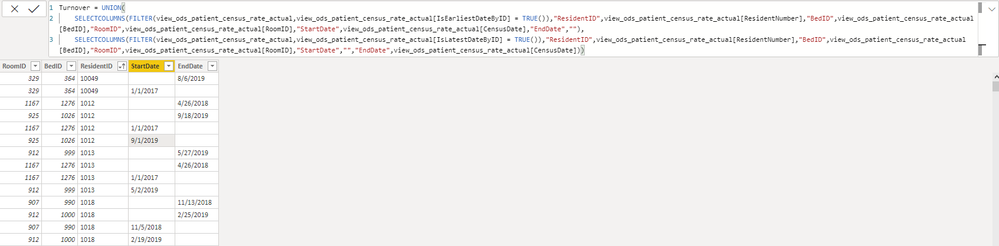
I'm using DAX to create a new table and with UNION I've pulled the start and end date rows in, but I need a way to combine these rows so that I end up with a single row containing RoomID, BedID, ResidentID, StartDate, and EndDate values. Screenshot below illustrates what I currently have. This needs to occur with DAX as the data in the other table is already using DAX to determine the start and end dates so the neccessary logic wouldn't available to me from query editor. Maybe UNION isn't the best way to approach this, if so, I'm open to anything that works!


Thanks so much!

Ryan


CombineRows.png

1 ACCEPTED SOLUTION
AlB
Community Champion
Community Champion

Hi @rbreneman 

I don't think you need the UNION. You could just do (Table1 is your base table "view_ods...")


NewTable =
ADDCOLUMNS (
    SUMMARIZE ( Table1, Table1[RoomID], Table1[BedID], Table1[ResidentID] ),
    "StartDate", CALCULATE ( MIN ( Table1[CensusDate] ) ),
    "EndDate", CALCULATE ( MAX ( Table1[CensusDate] ) )
)


where we are assuming the StartDate is the earliest on and the EndDate is the latest one. If you do need the check you use in your code:


NewTable =
ADDCOLUMNS (
    SUMMARIZE ( Table1, Table1[RoomID], Table1[BedID], Table1[ResidentID] ),
    "StartDate", CALCULATE ( DISTINCT ( Table1[CensusDate] ), Table1[IsEarliestByDate] = TRUE () ),
    "EndDate", CALCULATE ( DISTINCT ( Table1[CensusDate] ), Table1[IsLatestByDate] = TRUE () )
)


Please mark the question solved when done and consider giving kudos if posts are helpful.

Contact me privately for support with any larger-scale BI needs, tutoring, etc.

Cheers 


SU18_powerbi_badge

View solution in original post

2 REPLIES 2
AlB
Community Champion
Community Champion

Hi @rbreneman 

I don't think you need the UNION. You could just do (Table1 is your base table "view_ods...")


NewTable =
ADDCOLUMNS (
    SUMMARIZE ( Table1, Table1[RoomID], Table1[BedID], Table1[ResidentID] ),
    "StartDate", CALCULATE ( MIN ( Table1[CensusDate] ) ),
    "EndDate", CALCULATE ( MAX ( Table1[CensusDate] ) )
)


where we are assuming the StartDate is the earliest on and the EndDate is the latest one. If you do need the check you use in your code:


NewTable =
ADDCOLUMNS (
    SUMMARIZE ( Table1, Table1[RoomID], Table1[BedID], Table1[ResidentID] ),
    "StartDate", CALCULATE ( DISTINCT ( Table1[CensusDate] ), Table1[IsEarliestByDate] = TRUE () ),
    "EndDate", CALCULATE ( DISTINCT ( Table1[CensusDate] ), Table1[IsLatestByDate] = TRUE () )
)


Please mark the question solved when done and consider giving kudos if posts are helpful.

Contact me privately for support with any larger-scale BI needs, tutoring, etc.

Cheers 


SU18_powerbi_badge

@AlB Thank you so much for the quick reply!! This is perfect. I went with the 2nd example you provided as there is some logic happening on the other table beyond just the date. Thanks again!

Helpful resources

Announcements
Power BI DataViz World Championships

Power BI Dataviz World Championships

The Power BI Data Visualization World Championships is back! Get ahead of the game and start preparing now!

December 2025 Power BI Update Carousel

Power BI Monthly Update - December 2025

Check out the December 2025 Power BI Holiday Recap!

FabCon Atlanta 2026 carousel

FabCon Atlanta 2026

Join us at FabCon Atlanta, March 16-20, for the ultimate Fabric, Power BI, AI and SQL community-led event. Save $200 with code FABCOMM.