Don't miss your chance to take exam DP-600 or DP-700 on us!
Request nowLearn from the best! Meet the four finalists headed to the FINALS of the Power BI Dataviz World Championships! Register now
Hi,
I have a table that contains census data, I've already added DAX columns to this table to return a true/false on whether this is the start date or end date of a stay.
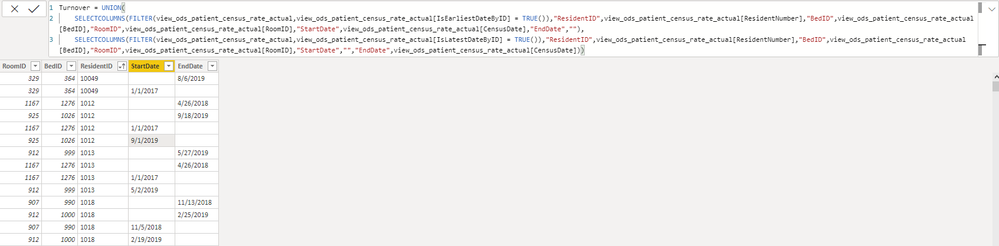
I'm using DAX to create a new table and with UNION I've pulled the start and end date rows in, but I need a way to combine these rows so that I end up with a single row containing RoomID, BedID, ResidentID, StartDate, and EndDate values. Screenshot below illustrates what I currently have. This needs to occur with DAX as the data in the other table is already using DAX to determine the start and end dates so the neccessary logic wouldn't available to me from query editor. Maybe UNION isn't the best way to approach this, if so, I'm open to anything that works!
Thanks so much!
Ryan
Solved! Go to Solution.
Hi @rbreneman
I don't think you need the UNION. You could just do (Table1 is your base table "view_ods...")
NewTable =
ADDCOLUMNS (
SUMMARIZE ( Table1, Table1[RoomID], Table1[BedID], Table1[ResidentID] ),
"StartDate", CALCULATE ( MIN ( Table1[CensusDate] ) ),
"EndDate", CALCULATE ( MAX ( Table1[CensusDate] ) )
)
where we are assuming the StartDate is the earliest on and the EndDate is the latest one. If you do need the check you use in your code:
NewTable =
ADDCOLUMNS (
SUMMARIZE ( Table1, Table1[RoomID], Table1[BedID], Table1[ResidentID] ),
"StartDate", CALCULATE ( DISTINCT ( Table1[CensusDate] ), Table1[IsEarliestByDate] = TRUE () ),
"EndDate", CALCULATE ( DISTINCT ( Table1[CensusDate] ), Table1[IsLatestByDate] = TRUE () )
)
Please mark the question solved when done and consider giving kudos if posts are helpful.
Contact me privately for support with any larger-scale BI needs, tutoring, etc.
Cheers
Hi @rbreneman
I don't think you need the UNION. You could just do (Table1 is your base table "view_ods...")
NewTable =
ADDCOLUMNS (
SUMMARIZE ( Table1, Table1[RoomID], Table1[BedID], Table1[ResidentID] ),
"StartDate", CALCULATE ( MIN ( Table1[CensusDate] ) ),
"EndDate", CALCULATE ( MAX ( Table1[CensusDate] ) )
)
where we are assuming the StartDate is the earliest on and the EndDate is the latest one. If you do need the check you use in your code:
NewTable =
ADDCOLUMNS (
SUMMARIZE ( Table1, Table1[RoomID], Table1[BedID], Table1[ResidentID] ),
"StartDate", CALCULATE ( DISTINCT ( Table1[CensusDate] ), Table1[IsEarliestByDate] = TRUE () ),
"EndDate", CALCULATE ( DISTINCT ( Table1[CensusDate] ), Table1[IsLatestByDate] = TRUE () )
)
Please mark the question solved when done and consider giving kudos if posts are helpful.
Contact me privately for support with any larger-scale BI needs, tutoring, etc.
Cheers
@AlB Thank you so much for the quick reply!! This is perfect. I went with the 2nd example you provided as there is some logic happening on the other table beyond just the date. Thanks again!
Share feedback directly with Fabric product managers, participate in targeted research studies and influence the Fabric roadmap.
Check out the February 2026 Power BI update to learn about new features.
| User | Count |
|---|---|
| 6 | |
| 4 | |
| 3 | |
| 3 | |
| 2 |